
24/7 Customer Support

Free returns

Same-day & Next-day Delivery

Quality Guaranteed

Unlock Your Welcome Offers: FREE Delivery | Up to 80% OFF | Free 30-day JoyPlus trial
Download the APP
Modern devices like the latest Mac mini M4 and ultra-slim laptops are powerful, but their minimalist design often comes at the cost of connectivity. Juggling multiple adapters and cables to connect a monitor, external drives and other peripherals can quickly lead to a cluttered and inefficient workspace. A high-quality USB-C docking station solves this by consolidating all your connections into a single, powerful hub.
This guide is designed to help you navigate the technical specifications and find a device that truly enhances your productivity. We will explore the key features to look for and present our recommendations to help you build a streamlined, single-cable workstation.
When selecting a laptop docking station, it is easy to get lost in technical jargon. Here are a few practical points to consider to ensure you get a device that meets the demands of a professional or creative workflow.
For anyone working with video, graphic design or simply wanting a fluid desktop experience, the refresh rate of your video output is critical. A dock that supports 4K at 60Hz delivers twice the number of frames per second compared to older 30Hz models. This results in noticeably smoother cursor movement, video playback and animations, reducing eye strain and providing a more responsive feel. Always check that the HDMI or DisplayPort on a dock explicitly states 4K@60Hz capability.
Not all USB ports are created equal. Many hubs on the market use older USB 3.0 technology, which offers speeds of 5Gbps. For professionals transferring large files from SSDs or high-resolution cameras, a USB-C hub 10Gbps is a significant upgrade. Look for ports labelled USB 3.2 Gen 2 or "10Gbps". This higher bandwidth allows you to move gigabytes of data in seconds, not minutes, saving valuable time in your workflow.
A docking station's value lies in its ability to connect all your essential tools. Before purchasing, take stock of the devices you use daily. For photographers and videographers, a built-in docking station with an SD card reader is non-negotiable for fast media imports. If you frequently join online meetings or record audio, a 3.5mm audio jack is essential. A good 10-in-1 USB-C hub typically offers a versatile mix of ports to cover most professional needs.
As a Joybuy Product Recommendation Officer, my role is to highlight products that offer practical solutions and clear value. Based on the criteria above, here are our recommendations for streamlining your desk setup.
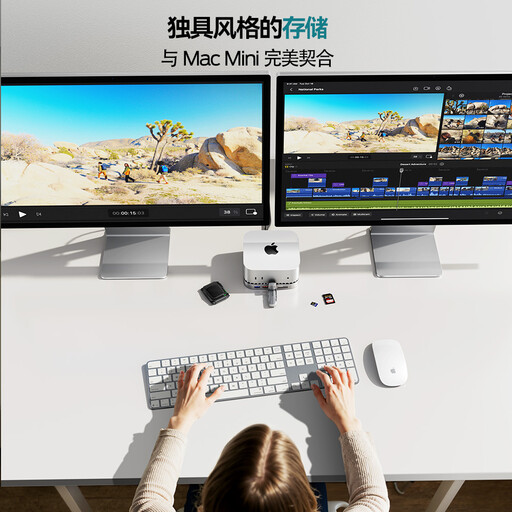
Why It Stands Out
The MOVESPEED DK5A1 is a robust and versatile hub designed for users who demand both speed and functionality. Its durable aluminium USB-C hub construction not only looks sleek on a modern desk but also aids in heat dissipation. It serves as an excellent Mac mini M4 dock or a central hub for any high-performance laptop.
The inclusion of both USB-C and USB-A ports operating at 10Gbps makes it a true USB 3.2 Gen 2 hub, capable of handling real-world SSD speeds approaching 1000MB/s. For creators, the combination of a smooth 4K 60Hz HDMI output and high-speed SD/TF card slots (up to 160MB/s) makes it a complete workstation solution.
Pros:
Who is it for? Content creators, tech professionals and minimalist desktop enthusiasts who need a single, reliable device to connect a high-resolution monitor, fast external storage and various peripherals without compromising on performance.
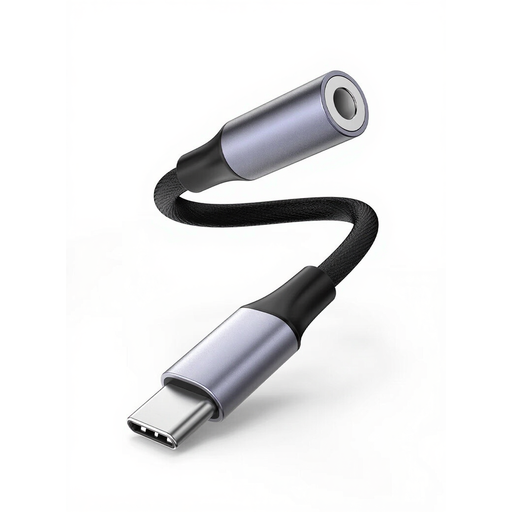
Why It Stands Out
While all-in-one docks like the MOVESPEED provide a convenient 3.5mm audio port, some users may require a dedicated solution for audio. The UGREEN USB-C to 3.5mm adapter is a specialist tool for this purpose. It incorporates a Digital-to-Analogue Converter (DAC) chip designed to deliver clear, noise-free sound conversion from your USB-C device to your favourite wired headphones.
Its compact and durable design makes it a portable accessory for those who prioritise audio quality for music, podcasts or calls, especially on devices that have eliminated the traditional headphone jack.
Pros:
Who is it for? Audiophiles, commuters and professionals who use high-quality wired headphones and need a reliable, high-fidelity audio connection for their USB-C phone, tablet or laptop.
Optimising your tech is one way to refine your setup. If the sleek silver finish of these devices inspires you, you might also appreciate the modern aesthetic in our other collections.
? Explore our collection of silver shorts to refresh your style.
No, they do not. For a USB-C port to output video, it must support "DisplayPort Alternate Mode" (often shortened to DP Alt Mode). Furthermore, to achieve 4K at 60Hz, the port and the connected dock must support a high-speed data standard like DisplayPort 1.4. Always check your device's specifications to confirm its video output capabilities.
Many, but not all, can. This feature is called "Power Delivery" (PD). If a docking station supports PD, it will have a dedicated USB-C port (often marked with a power symbol) that you connect your laptop's charger to. The dock then passes power through to your laptop while simultaneously handling data and video, enabling the true single-cable experience. Check for "PD" or "Power Delivery" and the maximum wattage (e.g., 100W) in the product specifications.
The terms are often used interchangeably, but there can be a difference. Generally, a "hub" is a smaller, more portable device focused on expanding the number of USB ports, perhaps with an added card reader or HDMI port. A "docking station" is typically a more substantial, stationary unit designed to be the heart of a desktop setup, offering a wider array of ports, higher power delivery and sometimes multiple video outputs. The MOVESPEED DK5A1 blurs this line, offering the comprehensive port selection of a docking station in a more compact form factor.