
24/7 Customer Support

Free returns

Same-day & Next-day Delivery

Quality Guaranteed
Download the APP
Categories
Modern laptops, from MacBooks to Windows ultrabooks, are celebrated for their sleek, minimalist designs. However, this often comes at the cost of connectivity, leaving users with a handful of USB-C ports and a tangle of adapters. If you find yourself constantly swapping cables to connect an external monitor, a keyboard or to transfer photos from an SD card, a USB-C docking station can be the single-cable solution that declutters your workspace and streamlines your workflow.
As a Joybuy Product Recommendation Officer, my role is to help you find practical solutions that fit your needs. This guide will walk you through the key features to consider when choosing a USB-C docking station and present a few carefully selected options for different types of users in the UK.
Navigating the market for a multiport adapter can be confusing. To simplify your decision, focus on these three practical considerations.
Before anything else, take stock of the devices you use daily. A simple USB C hub might suffice if you only need a couple of extra USB-A ports. However, a true laptop docking station offers a much wider array of connections.
Type-C hub with HDMI. Pay attention to the resolution and refresh rate it supports.USB C hub with SD card reader is essential for transferring files efficiently.Not all ports are created equal. The technical specifications directly impact your productivity.
10Gbps USB C hub will save you significant time.USB C hub 4K 60Hz provides a noticeably better visual experience.docking station with 100W PD is a game-changer for laptop users. It allows you to charge your laptop through the same USB-C cable that connects it to the dock, eliminating the need for your laptop's original power adapter and freeing up another port.Finally, ensure the docking station works with your primary device and fits your setup. Most docks are compatible with Windows, macOS and Linux, but it is always wise to check the product details. Some models are specifically designed to complement certain devices, such as a Mac mini dock that sits neatly underneath the computer, saving desk space and maintaining a clean aesthetic.
Here are a few recommendations that cater to different needs, from basic connectivity to high-performance professional use.
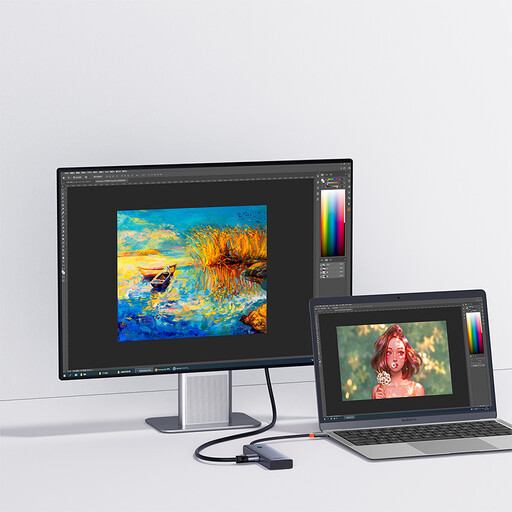
Why It Stands Out: The Baseus UltraJoy is an excellent entry point into the world of docking stations. It focuses on the essentials, providing the most commonly needed ports in a compact and portable aluminium alloy body. A unique feature is its screen-off button, which allows you to instantly turn off the connected display for privacy during presentations or calls.
Pros:
Who is it for? This hub is ideal for students, remote professionals and casual users who need to connect an external monitor and a few USB devices without the bulk of a larger station.
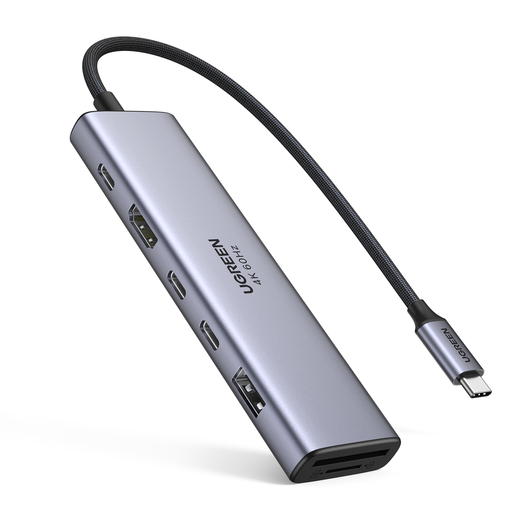
Why It Stands Out: This UGREEN model strikes a great balance between port variety and performance. It expands on the basics by including both USB-A and USB-C data ports, as well as SD and TF card readers, making it a versatile tool for a wider range of tasks.
Pros:
Who is it for? This is a solid choice for general office workers, photographers and anyone who needs a reliable multiport adapter that can handle data from memory cards and connect a mix of modern and older USB devices.
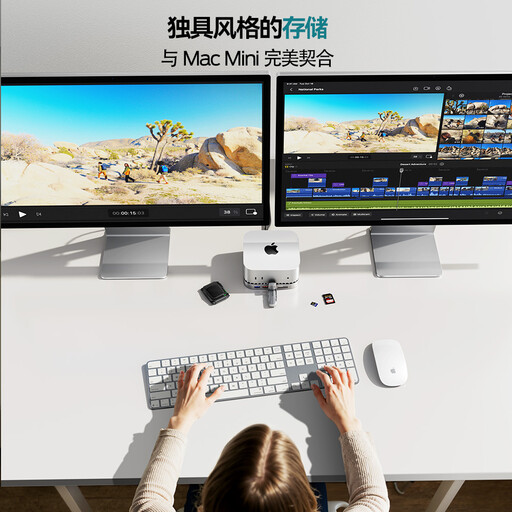
Why It Stands Out: The MOVESPEED DK5A1 is built for power users and creative professionals. It delivers top-tier performance with its 10Gbps data ports and smooth 4K@60Hz video output. Its form factor is also designed to serve as a Mac mini dock, fitting perfectly underneath the device to create an integrated, clutter-free workstation.
Pros:
Who is it for? This laptop docking station is aimed at video editors, graphic designers, programmers and Mac mini users who demand high speed, superior video quality and a wide range of ports to support a professional workflow.
While these selections cover many common use cases, your specific setup might require a different combination of ports or features. If you need more display outputs, an Ethernet port or other specialised connections, you can find more choices in our broader collection.
Explore our full range of PC components to find the perfect match for your desk.
1. What is the difference between a USB-C hub and a docking station? Generally, a USB C hub is a smaller, more portable device that is bus-powered (drawing power from the laptop). It offers a basic expansion of ports. A USB-C docking station is typically larger, may have its own external power supply and offers a more extensive range and number of ports, often with higher performance specifications like faster data speeds and support for multiple monitors.
2. Do USB-C docking stations work with all laptops? Most modern laptops with a USB-C port will work with a docking station, but full functionality depends on the port's capabilities. For video output, the laptop's USB-C port must support DisplayPort Alternate Mode (DP Alt Mode). For charging through the dock, it must support Power Delivery (PD). It is always best to check the specifications of your laptop to ensure compatibility.
3. Can a USB-C docking station affect my laptop's performance? A well-designed docking station should not negatively impact your laptop's performance. It simply acts as an external bridge for peripherals. However, ensure you are using a dock with sufficient Power Delivery to charge your laptop under load, especially for high-performance models, to avoid battery drain while connected. Using a dock with a dedicated Ethernet port can also provide a more stable and faster internet connection than Wi-Fi, which can be an improvement.