
24/7 Customer Support

Free returns

Same-day & Next-day Delivery

Quality Guaranteed

Unlock Your Welcome Offers: FREE Delivery | Up to 80% OFF | Free 30-day JoyPlus trial
Download the APP
Modern laptops, from MacBooks to Windows ultrabooks, are thinner and more powerful than ever. However, this sleek design often comes at the cost of connectivity, leaving you with just one or two USB-C ports. If you've ever found yourself needing to connect an external monitor, a mouse, a keyboard and charge your laptop all at once, you understand the frustration. A USB C hub, or multiport adapter, is the straightforward solution to this common problem, transforming a single port into a versatile workstation.
This guide is designed to help you navigate the options and find a device that fits your specific needs, whether you're working from home, in a creative studio or on the move. We'll outline key features to look for and present some of our top recommendations to expand your laptop's capabilities.
Selecting the right hub can feel overwhelming with all the technical specifications. Focusing on a few key areas will simplify your decision.
Consider what you need to connect daily. A USB C to HDMI port is essential for connecting to most monitors or TVs. If you require a stable, wired internet connection for video calls or large file downloads, look for a USB C hub with ethernet. For photographers and videographers, built-in SD and microSD card readers are a must. Most importantly, a USB C hub with power delivery (PD) allows you to charge your laptop through the hub itself, which is crucial if your device has limited charging ports.
Not all hubs are created equal. A simple, bus-powered USB hub for a laptop draws power directly from your computer and is perfect for connecting low-power devices like a mouse or flash drive. For more demanding setups, a USB C docking station or a hub with high-wattage Power Delivery is a better choice. These can support multiple high-resolution displays and charge your laptop simultaneously. Also, check the data transfer speeds—USB 3.2 ports offering 10Gbps are significantly faster for transferring large files than older USB 2.0 ports (480Mbps). If you plan on connecting two screens, ensure the hub is a dual monitor adapter and check its supported resolutions and refresh rates (e.g., 4K@60Hz).
Your lifestyle should influence your choice. If you are a frequent traveller or move between different work locations, a compact and lightweight hub with a durable metal casing is ideal. For a permanent desk setup, a larger hub with more ports and a longer cable might be more practical, helping to keep your workspace organised.
We've selected a few standout options that cater to different user needs, from basic expansion to a full-featured desktop setup.
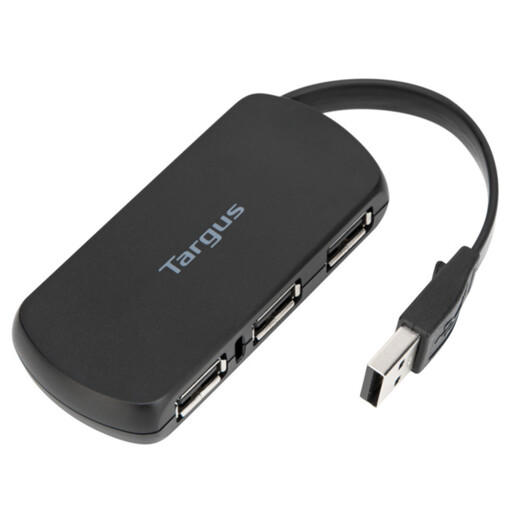
Why It Stands Out: The Targus hub is the definition of simplicity and reliability. It focuses on one task: turning a single USB port into four. Its plug-and-play design requires no drivers or external power, making it an incredibly straightforward solution for expanding basic connectivity.
Pros:
Who is it for? This hub is perfect for users who simply need to connect a few extra USB-A peripherals, such as a wired mouse, keyboard or a USB flash drive. It's an excellent, no-fuss choice for students and professionals who need basic port expansion on the go.

Why It Stands Out: This Baseus hub is a powerhouse designed for high-performance workflows. Its standout feature is the advanced dual HDMI support, with one port capable of driving a 4K display at a smooth 120Hz. Combined with 10Gbps data transfer speeds on both its USB-A and USB-C ports, it functions as a true desktop-class docking station.
Pros:
Who is it for? This is for the power user. Creative professionals, developers and gamers who demand the highest performance from their peripherals and displays will find this hub meets their needs. It’s an excellent choice for creating a high-spec, dual-monitor workstation with a MacBook Pro adapter or a high-end Windows laptop.
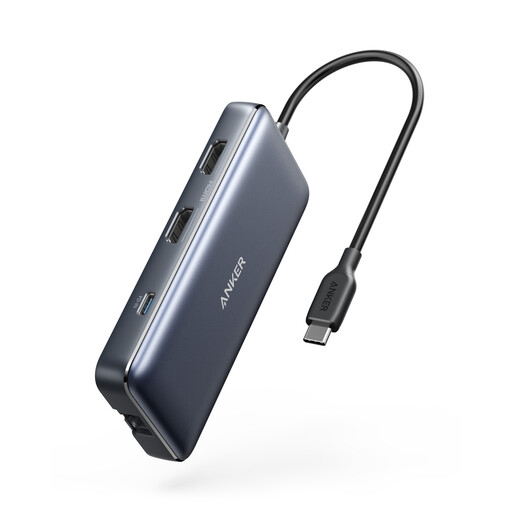
Why It Stands Out: The Anker USB C hub strikes an excellent balance between comprehensive features and a portable design. It provides a versatile selection of eight essential ports, including dual HDMI for multi-monitor setups, making it a fantastic all-rounder for modern professionals.
Pros:
Who is it for? This hub is ideal for remote workers, photographers and general professionals who need a reliable and versatile adapter. It provides the right mix of ports to turn a laptop into a capable workstation, whether at home or in the office.
These recommendations cover a range of common use cases, but your needs might be different. If you're looking for a hub with a specific port combination or a different form factor, there are many other models to consider.
Explore our full collection to find the perfect match for your setup: Browse All USB C Extension Solutions
1. Do I need a USB C hub with Power Delivery (PD)? If your laptop charges via USB-C and you want to use the hub while keeping your device powered, then yes, Power Delivery is essential. It allows a single port to handle data, video and charging simultaneously. Check your laptop's required wattage to ensure the hub's PD output is sufficient.
2. What is the difference between a USB C hub and a docking station? The terms are often used interchangeably, but there's a general distinction. A USB C hub is typically smaller, portable and powered by the laptop itself (bus-powered). A USB C docking station is usually larger, designed for a stationary desk, often has its own power supply and generally offers more ports and higher performance capabilities, such as driving multiple 4K monitors at high refresh rates.
3. Will a USB C hub work with both my MacBook and Windows laptop? Most modern USB C hubs are designed to be universally compatible with operating systems like macOS, Windows and ChromeOS. They are typically plug-and-play. However, for video output, your laptop's USB-C port must support DisplayPort Alternate Mode (DP Alt Mode). It's always a good practice to check the product specifications for compatibility with your specific device.