
24/7 Customer Support

Free returns

Same-day & Next-day Delivery

Quality Guaranteed

Unlock Your Welcome Offers: FREE Delivery | Up to 80% OFF | Free 30-day JoyPlus trial
Download the APP
As more of our devices—from the iPhone 15 to MacBooks and Windows laptops—adopt the USB-C standard, finding the right cable has become both essential and confusing. A low-quality USB-C to USB-C cable can lead to frustratingly slow charging, data transfer errors or a frayed connector after just a few months.
This guide is designed to help you navigate the options. We will break down the key features to look for and provide a few recommendations to help you find a reliable cable that meets the demands of your devices.
Before you add a cable to your basket, consider these three factors to ensure it’s the right fit for your needs.
Not all USB-C cables deliver power at the same rate. The key is to look at the wattage (W). A standard cable might offer up to 60W, which is ample for smartphones and tablets like the iPad Pro. However, for power-hungry laptops, you will need a cable that can handle more.
A 100W USB C cable, for example, is designed for high-performance laptops, ensuring you get the fastest possible charging speeds. Using a lower-wattage cable with a powerful laptop may result in slow charging or even battery drain while in use. Always check your device's power requirements and choose a PD charging cable that can meet or exceed them.
A cable is only as good as its construction. Many of us have experienced the frustration of a cable that splits or stops working. For a long-lasting and durable data cable, look for features like a braided nylon exterior. A braided USB C cable offers superior resistance to tangling, twisting and everyday wear and tear compared to standard plastic-coated cables. Reinforced connector joints also add significant strength where cables are most likely to fail.
Cable length can make a big difference to convenience. A shorter cable (around 1 metre) is often ideal for use at a desk, in the car or for carrying in a bag, as it reduces clutter. A longer cable (2 metres or more) provides more flexibility, allowing you to comfortably use your device while it charges from a wall socket across the room or by your bedside.
Here are our recommendations, selected to cover a range of common needs, from high-power laptop charging to everyday durability.
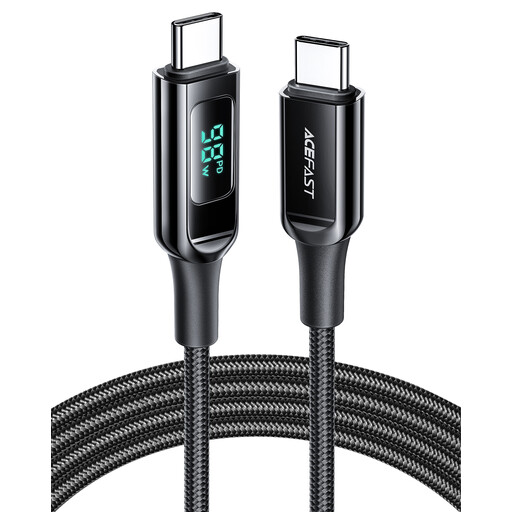
Why It Stands Out: This cable’s standout feature is the built-in digital display that shows the real-time charging wattage. It removes the guesswork, allowing you to see exactly how much power your device is drawing. Combined with its high power capacity, it’s a practical tool for tech-savvy users.
Pros:
Who is it for? This is an excellent MacBook charging cable for users with high-performance laptops who want to verify they are getting maximum charging speeds. It’s also great for anyone who appreciates having clear, technical feedback on their charging setup.
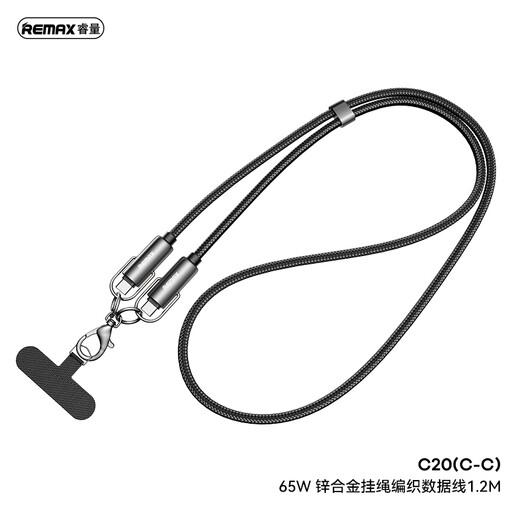
Why It Stands Out: The REMAX cable focuses on durability and practical design. Its tough braided nylon exterior and zinc alloy connectors are built to withstand daily handling, while the adjustable collar helps prevent strain and manage cable length. The built-in phone tether is a clever addition for those on the move.
Pros:
Who is it for? This is a great all-rounder for anyone needing a reliable and durable data cable for daily use. Its robust build makes it suitable for commuting, office and home life, serving well as an iPad Pro charger cable or for Android devices.
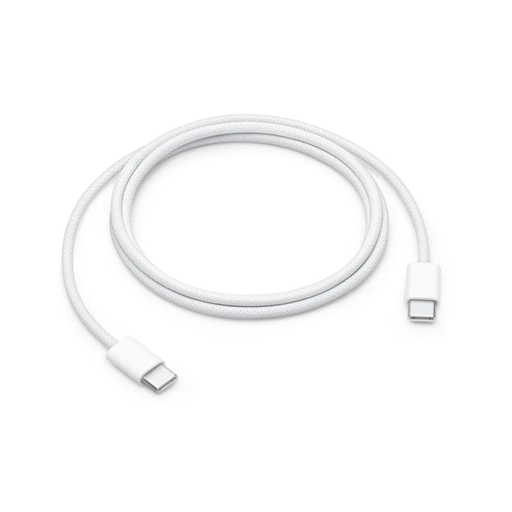
Why It Stands Out: For those invested in the Apple ecosystem, this official cable offers peace of mind and seamless compatibility. The new woven design is a significant improvement in durability over Apple's previous standard cables, offering better resistance to wear and tangling.
Pros:
Who is it for? This is the go-to choice for Apple users seeking a reliable iPhone 15 charging cable or a replacement for their iPad or MacBook. It’s perfect for those who prioritise first-party accessories and need a dependable cable for everyday charging and syncing.
If these recommendations don't quite match what you're looking for, don't worry. There is a wide variety of cables available with different lengths, power ratings and features.
Explore our complete range of Type 1 USB charging cable options to find the perfect one for your devices.
A 100W USB C cable is designed to carry more power than a 60W cable. While a 60W cable is sufficient for most smartphones, tablets and smaller laptops, a 100W cable is necessary to charge larger, high-performance laptops at their maximum speed. A 100W cable is backwards compatible, so it can safely charge a device that only requires 60W or less.
Generally, yes. The USB-C standard is designed to be universal. Any compliant Type C to Type C cable will charge and sync your iPhone 15 or MacBook. However, to achieve the fastest charging speeds, you must pair your device with a cable and power adapter that can supply the required wattage. For a MacBook Pro, a fast charging USB C cable rated for 65W or 100W is recommended.
Yes, in most cases. A braided USB C cable uses a woven fabric sheath, typically nylon, which provides an extra layer of protection against cuts, abrasions and sharp bends. This makes them more resistant to fraying and tangling than standard plastic-coated cables, contributing to a longer lifespan.