Desktop and NAS users moving large files
If you regularly move design, video, code or other project archives between a workstation and local storage, the speeds and number of wired connections are an early purchasing check.


Choose a router around the devices that exchange your project files: for frequent transfers between a desktop and local storage, start with enough Ethernet ports at speeds both devices can use. Prioritise Wi-Fi capacity when laptops work away from the router; if you plan to share a router-attached USB drive, check its folder permissions and keep a separate backup.
If you regularly move design, video, code or other project archives between a workstation and local storage, the speeds and number of wired connections are an early purchasing check.
If files are shared mainly from laptops around the home office, consider your devices’ Wi-Fi capabilities and where they will be used. A router’s rated wireless speed is not a file-transfer speed you can assume at every desk.
If a router-attached USB drive would be enough for occasional file exchanges, check that the specific router supports the sharing method, drive format and account permissions you need. ASUS support guidance, for example, describes Samba accounts and folder access controls.
For home-office project files, identify the connection you will use most: a wired desktop-to-storage path, laptops on Wi-Fi, a shared folder or the link to your broadband equipment.
| Concern | What to check | Who this matters to |
|---|---|---|
| Wired file transfers | Count the available 1GbE, 2.5GbE and 10GbE ports, including any used for WAN. Match the computers, storage, switch and cabling to the intended rate. | When large archives move between my desktop and NAS regularly, I want the wired path to keep up; around 36% of consumers put local transfer capacity first. |
| Wireless access | Check your laptops’ Wi-Fi capabilities and the router’s bands; consider placement or an access point if the office is far from the router. | If I work from a laptop away from the router while other devices are active, dependable wireless access matters most; roughly 29% of consumers prioritise wireless capacity. |
| Shared-folder control | Confirm file-sharing support, account and folder permissions, and the published security-update period for the exact model. | For confidential project folders, I need to control who can open them; approximately 21% of consumers make managed access their primary concern. |
| Broadband compatibility | Confirm your access type and ISP settings. For the Openreach FTTP arrangement described in its guidance, check the Ethernet connection from the ONT to the router’s WAN port. | Before replacing my broadband hub, I need the new router to connect to my existing service; around 14% of consumers put installation compatibility first. |
A fast wireless rating will not remove a slower wired connection between a workstation and NAS. ASUS UK lists 10G and 2.5G ports on the RT-BE88U, while NETGEAR UK lists four 1G LAN ports alongside faster connections on the RS700S.
Trace the full file path and check the port speed used by each fixed device before choosing a router.
Using faster wired ports may also require compatible network adapters, a switch or suitable cabling.
ASUS support guidance describes Samba accounts and folder permissions, but shared access does not itself provide file versioning or recovery if the drive fails.
Check the router’s documented sharing controls and keep an independent backup of important project files.
A separate backup destination may still be needed.
In the Openreach FTTP arrangement described by Openreach, the Optical Network Terminal connects to the router’s WAN port with a Cat5e or Cat6 Ethernet lead. Other access arrangements may need different equipment or settings.
Identify your broadband access type and confirm your ISP’s router requirements before ordering.
A router used for work files needs an update plan as well as appropriate folder permissions. The published minimum security-update period helps you assess how long support is promised.
Check the exact model’s support information and vulnerability-reporting contact, change its credentials during setup and apply available firmware updates.
The RT-BE88U is relevant when several fixed home-office devices need wired connections.
The Archer BE550 is a Wi-Fi 7 option for a home office planning several 2.5GbE wired connections.
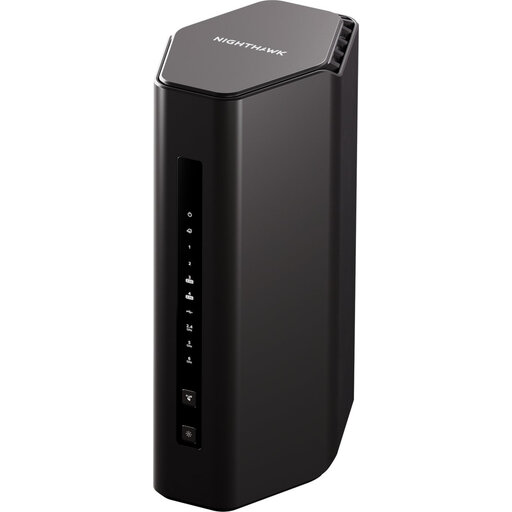
The Nighthawk RS700S is relevant to a wireless-first setup that also needs a faster wired connection.
This Wi-Fi 7 router is a choice to examine for a home office with wireless devices and a planned wired file-sharing setup. Check its port layout and sharing features against your equipment before deciding.
 No image available
Consider this model if your home-office devices need Wi-Fi 7 and you can confirm that its wired connections fit your workstation and storage setup.
Check the number and WAN/LAN roles of its Ethernet ports before connecting a NAS or replacing your broadband router. If you need a router-attached shared folder, also confirm USB file-sharing, drive-format and permission support for this model.
Not necessarily: start with the connection between the computer and storage holding the files, particularly if both stay at fixed desks. Wi-Fi 7 is more relevant when compatible wireless devices need access; ASUS UK and TP-Link UK list multi-gig Ethernet options on the RT-BE88U and Archer BE550 respectively.
For the Openreach FTTP arrangement described in its guidance, the router connects to the Optical Network Terminal through its WAN port using a Cat5e or Cat6 Ethernet lead. Confirm your ISP’s WAN settings and whether its supplied hub needs to remain in the setup before replacing it.
Yes, if the specific router supports the drive and file-sharing method you need. ASUS support instructions describe Samba accounts and folder permissions, but check the features of your chosen model and keep a separate backup of important files.
Check the exact router model’s published minimum security-update period and vulnerability-reporting contact, then plan to apply available firmware updates. For a shared folder, also check account and folder permissions rather than relying on the router’s Wi-Fi password alone.