Shared-office data enterers
If you repeatedly enter bird counts, dates or location codes near colleagues, a dedicated number pad and the sound of the keys are both worth assessing.


If you regularly enter bird counts and other numeric fields, start with a full-size keyboard that has a dedicated number pad, then assess its typing noise for the shared office. Multi-device switching and programmable keys matter more if you move between compatible computers; a compact layout makes sense when desk space and shortcuts outweigh the loss of the number pad. Check the UK layout, workplace connection rules and actual key sound before buying.
If you repeatedly enter bird counts, dates or location codes near colleagues, a dedicated number pad and the sound of the keys are both worth assessing.
If you move between compatible devices while checking maps, entering data and reviewing results, device switching and programmable shortcuts may be useful.
If desk space is limited, a 75% UK-ISO keyboard offers a smaller layout, but you need to be comfortable working without a dedicated number pad.
For bird-survey work in a shared office, decide how much numeric entry you do and how sensitive the room is to typing noise before weighing device switching against desk space.
| Concern | What to check | Who this matters to |
|---|---|---|
| Typing noise | Check that quietness claims cover the keyboard, not just a bundled mouse; listen to large keys and number-pad keys where possible. | I type beside colleagues and do not want repeated entries to interrupt their work. Around 36% of consumers put low-disruption typing first. |
| Numeric entry | Confirm a physical number pad and enough desk space to place the keyboard and mouse comfortably. | Entering counts and coded fields takes up much of my day, so I want dedicated number keys. Roughly 29% of consumers make number-pad access their primary concern. |
| Devices and shortcuts | Check connection types, compatible devices and whether workplace IT permits the required receiver, Bluetooth or configuration software. | I switch computers or repeat the same spreadsheet actions often enough to value quick switching and shortcuts. Around 21% of consumers prioritise that workflow. |
| Desk space | Check the exact UK-ISO variant, keyboard footprint and whether you can work without a dedicated number pad. | My desk is constrained, and remapped keys matter more to me than separate number keys. For about 14% of consumers, compact custom controls are the leading need. |
A 75% keyboard has no dedicated number pad. Logitech identifies a full number pad on the MK295, while Keychron describes its K3 Version 3 as a 75% layout.
If counts and codes dominate your work, check how you would enter them on a compact keyboard before giving up the number pad.
Manufacturers describe keyboard sound in different ways; those claims do not establish comparable sound levels at your desk.
Listen or test where feasible, paying particular attention to Space, Enter and Backspace as well as ordinary letter keys.
Wireless models can use Bluetooth, a USB receiver or both, and programmable functions may depend on compatible software.
Check available ports, permitted connections and software-installation rules with your workplace before choosing a model.
The Health and Safety Executive’s workstation guidance covers keyboard height and position alongside screen and mouse placement.
Keep the keyboard just below elbow height and central to the screen, and assess whether the mouse is positioned comfortably too.
The MK295 and MK470 are office-oriented keyboard-and-mouse combinations; MX Keys S addresses multi-device and shortcut needs.
The HP 975 is a full-size wireless option for analysts considering shortcuts and several device connections.
The K3 Version 3 offers a compact 75% mechanical layout, including UK-ISO variants, with wired and Bluetooth operation.
These keyboards offer different approaches to shared-office survey work, from full-size office designs to wireless mechanical options. Check each layout and connection method against your numeric-entry needs and workplace rules; a quiet-sounding product description is not a substitute for assessing key noise.
 No image available
Consider this full-size UK keyboard if you prefer an office-oriented layout for survey work. Check the physical number pad and key sound against your data-entry needs, and confirm that its wireless connection is permitted at work.
 No image available
The stated UK layout makes this a candidate if you want to assess a 96% design for numeric survey work. Confirm the fitted switch and actual typing sound before using it near colleagues, and check which connections your workplace allows.
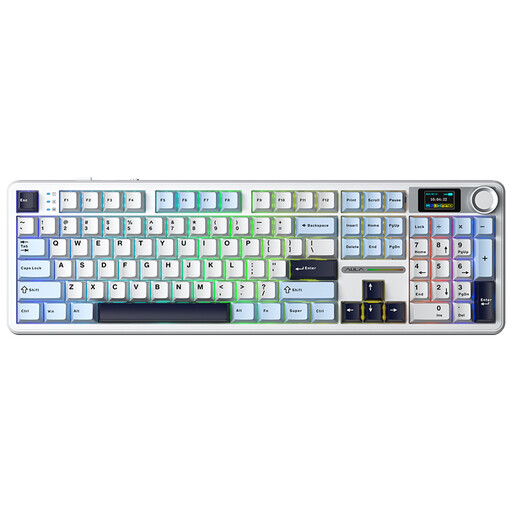 No image available
This variant is worth assessing if you want mechanical keys and the Bluetooth, 2.4G and USB-C connection options named in its title. Confirm its physical layout and number pad for repeated counts; its typing sound also needs checking for a shared office.
 No image available
This full-size keyboard-and-mouse set may suit an office desk if its stated US layout works for you. Verify that it has the number pad you need, assess the typing sound yourself and check permission to use its 2.4GHz receiver.
Keep the keyboard just below elbow height and central to the screen, following Health and Safety Executive guidance, so you do not need to twist your back. The guidance also places the mouse in line with the elbow.
A 75% keyboard can work if you are comfortable entering counts without a dedicated number pad. If numeric fields dominate your work, compare that trade-off with a full-size layout before choosing the smaller footprint.
Check the keyboard’s connection method against your computer and workplace IT rules before buying. Bluetooth, USB receivers and software-enabled shortcuts have different requirements; HP, for example, specifies Bluetooth and a USB-A receiver for the 975.
No quiet-typing claim establishes how a keyboard will sound at your desk. Key choice, typing force and the sounds of larger keys can affect the experience, so listen or test where possible rather than relying on the product description alone.