Choose a USB Bluetooth adapter if your Windows PC lacks Bluetooth and your controller supports Bluetooth pairing. Consider a controller-focused wireless adapter if its stated controller compatibility or configuration options matter to you; either way, check the exact controller revision, host system, USB port and driver requirements before buying.
Who is this for?
Windows players without Bluetooth
If your Windows PC lacks Bluetooth, a USB adapter can add it for a controller that supports Bluetooth pairing. Microsoft Support describes this use for USB Bluetooth adapters; check your controller’s connection options as well.
Players using different controller families
If you switch between controller families, an adapter with an explicit compatibility list may be easier to assess than one described only as Bluetooth-capable. 8BitDo lists particular Xbox Bluetooth, PlayStation and Switch controllers for its USB Wireless Adapter 2.
Players keeping a study desk uncluttered
If desk space and an accessible USB port matter, check the adapter’s connector and physical fit alongside controller compatibility. The adapter handles connectivity; game and system audio need separate attention in a quiet study.
What matters when choosing?
Check whether your computer already has working Bluetooth, then establish how your exact controller connects. That determines whether you need an adapter at all and, if so, which type is worth considering.
Existing Bluetooth
Choose when: Your computer’s Bluetooth works and your controller supports pairing through it.
Trade-off: This avoids occupying a USB port, but it will not resolve an unreliable Bluetooth connection by itself.
USB Bluetooth adapter
Choose when: Your Windows PC needs Bluetooth added for a compatible controller.
Trade-off: Adding Bluetooth does not guarantee controller-specific features or compatibility with every game.
Controller-focused adapter
Choose when: The exact controller appears on the adapter’s compatibility list and you want its supported configuration options.
Trade-off: According to 8BitDo Support, its USB Wireless Adapter 2 connects one controller at a time.
| Concern | What to check | Who this matters to |
|---|
| Controller and host compatibility |
Confirm the controller model and revision, its Bluetooth capability, and the adapter’s stated host-system support. |
If my controller and computer cannot use the same connection method, the adapter is no help. Around 45% of consumers put this compatibility question first. |
| Windows setup |
Check for working built-in Bluetooth before buying; for a separate adapter, check driver requirements for your Windows version. TP-Link says its UB500 needs a driver on Windows 7. |
I want to pair a controller at my Windows desk without installing an adapter I do not need. For around 27% of consumers, straightforward setup is the primary concern. |
| Controller-specific options |
Compare the exact supported-controller list and configuration options; check the simultaneous-controller limit if you play with others. |
If I use different controllers or want configurable controls, a stated feature list matters more to me than Bluetooth alone. Around 18% of consumers prioritise those options. |
| Fit at the desk |
Check the USB connector and whether the adapter can remain safely fitted where you use or carry the computer. |
I need a receiver that fits my available port without getting in the way of my study setup. Compact fit comes first for around 10% of consumers. |
Buying pitfalls
-
Buying an adapter before checking the PC
A Windows computer with working Bluetooth may already have what a compatible controller needs. An extra adapter would also occupy a USB port.
Check Bluetooth in Windows Settings and Device Manager first. If pairing is unreliable, follow Microsoft Support’s Bluetooth troubleshooting and driver guidance before deciding to add another adapter.
-
Assuming every wireless controller uses Bluetooth
A controller’s wireless label does not establish its connection method. Xbox Support, for example, describes Bluetooth, a USB cable and an Xbox Wireless Adapter as connection options for compatible controllers.
Check the connection methods for your exact controller revision and intended host device.
-
Choosing by Bluetooth version alone
A Bluetooth version number does not establish whether a particular controller, game or host system will support the connection or its desired features.
Look for an explicit controller-and-platform compatibility statement, then check any required drivers and supported functions.
-
Expecting one receiver to connect several controllers
8BitDo Support says one USB Wireless Adapter 2 connects one controller at a time.
For simultaneous local play, check each receiver’s controller limit before choosing a setup.
Using additional controllers with the USB Wireless Adapter 2 requires additional adapters, according to 8BitDo Support.
Relevant brands to consider
TP-Link
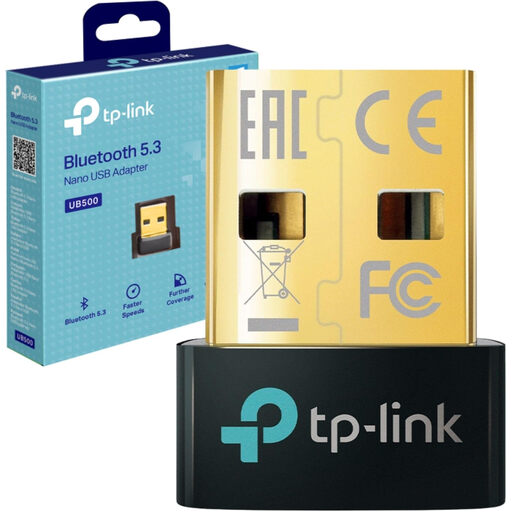
The UB500 is a compact USB Bluetooth adapter for a supported Windows PC that needs Bluetooth added.
- TP-Link United Kingdom lists Bluetooth 5.0, controller connectivity and support for Windows 11, 10, 8.1 and 7.
- TP-Link says Windows 7 requires its driver. Check the intended controller separately rather than treating Bluetooth support as a game-specific guarantee.
8BitDo
The USB Wireless Adapter 2 is a controller-focused option with a published list of supported controller families.
- 8BitDo lists particular Xbox Bluetooth, PlayStation and Switch controllers and describes configuration through Ultimate Software.
- 8BitDo Support says the adapter connects one controller at a time; check the exact controller and intended host before choosing it.
ASUS
The USB-BT500 is a USB Type-A Bluetooth adapter for a host within its stated operating-system support.
- ASUS United Kingdom lists Bluetooth 5.0 with EDR and Bluetooth Low Energy, a USB 2.0 Type-A interface, and Windows 8.1, Windows 10 and Linux support.
- Those interface and radio specifications do not establish how a particular controller will behave in a game; check the controller’s supported connection method.
Joybuy product choices
This choice is a USB Bluetooth adapter for adding Bluetooth to a compatible Windows PC. Check your controller’s Bluetooth support and Windows version before choosing it.
 No image available
TP-Link UB500 Bluetooth 5.0 Nano USB Adapter
For a Windows PC that needs Bluetooth added before pairing a compatible Bluetooth controller.
TP-Link lists Windows 11, 10, 8.1 and 7 support and dimensions of 14.8 × 6.8 × 18.9 mm. TP-Link says Windows 7 requires a driver; check that requirement and your exact controller model before buying.
View on Joybuy
Frequently asked questions
Do I need an adapter if my Windows PC already has Bluetooth?
Not if its Bluetooth works for your compatible controller. Check that Bluetooth is enabled and try pairing first; Microsoft Support recommends troubleshooting Bluetooth problems before treating an extra USB adapter as the solution.
Will any Bluetooth adapter pair with my controller?
No: confirm that your exact controller supports Bluetooth and that the connection is supported on your host device. For a controller-focused receiver, check its stated model list; 8BitDo lists particular controller families for the USB Wireless Adapter 2 rather than every wireless controller.
How do I pair a controller after fitting a USB Bluetooth adapter?
On a supported Windows PC, switch Bluetooth on, put the compatible controller into its documented pairing mode and add it through Bluetooth settings. If the PC cannot detect it, check the adapter’s driver requirements and follow the controller maker’s instructions; Microsoft Support also provides Bluetooth driver troubleshooting guidance.
Will the adapter make gaming in a study quiet?
The adapter provides connectivity, not control over game audio. Adjust game and system sound separately, and choose the adapter according to pairing compatibility, USB-port fit and setup requirements.


