A USB Bluetooth adapter can add connections for a mouse, keyboard, headset or other Bluetooth accessory without changing your two existing display connections; it will not add a video output. Check the mini PC’s operating system and driver requirements first, then choose a compact adapter for limited space, an adjustable-antenna model if positioning is difficult, or a feature-focused model only when your operating system and accessories support the functions you need.
Who needs a Bluetooth adapter?
Dual-screen mini-PC desk users
If your monitors are already connected, a USB Bluetooth adapter can add connections for wireless peripherals without taking over a display connection. Microsoft Support describes USB adapters as a way to add Bluetooth; connecting an extra monitor is a separate USB graphics task, as DisplayLink explains.
Users with unreliable desk-side Bluetooth
If accessories stutter or disconnect while the mini PC sits among USB equipment, check the adapter’s position before choosing by Bluetooth version alone. Microsoft Support notes that unshielded USB devices can sometimes interfere with Bluetooth connections; an adjustable antenna may give you another positioning option.
Users with specific audio or Linux requirements
If you need Linux support, Auracast or LE Audio, check the exact adapter, operating-system version and participating accessories. ASUS lists Linux compatibility for USB-BT540 but limits its LE Audio support to Windows 11 version 24H2 or later.
What to check before choosing
Start by confirming whether the mini PC needs an adapter at all and which operating system it runs. Then focus on the connection or placement issue that matters most at your desk.
| Concern |
What to check |
Who this matters to |
| Everyday peripherals |
Check whether Bluetooth is already available, then confirm support for your operating-system version and any driver requirement. |
If I just need to pair a mouse, keyboard or headset, I want a straightforward way to add Bluetooth without changing my screens. Around 40% of consumers put that basic connection first. |
| Connection reliability |
Consider whether another USB port or a position away from nearby unshielded USB equipment is available. Microsoft Support notes that such equipment can sometimes interfere with Bluetooth. |
When accessories skip or respond slowly at a crowded desk, I care most about keeping the connection steady. For around 30% of consumers, reliability is the primary concern. |
| Obstructed placement |
Check clearance around a hidden or mounted mini PC and whether an adjustable antenna can be positioned without obstruction. |
If my mini PC sits behind the monitors, I need room to position the adapter rather than leave it tucked against the PC. Roughly 20% of consumers put placement first. |
| Specific platform or audio features |
Confirm the adapter’s stated OS support and the requirements of every accessory involved; ASUS limits USB-BT540 LE Audio support to Windows 11 version 24H2 or later. |
For Linux or a particular audio feature, I need compatibility with my actual setup, not just a newer version number. That is the main priority for around 10% of consumers. |
Setup mistakes to avoid
-
Buying Bluetooth hardware to add another screen
A Bluetooth USB adapter connects wireless accessories; it does not provide an extra video output. DisplayLink describes USB graphics hardware as a separate way to connect additional monitors.
If you also need another display, check the mini PC’s video outputs and the compatibility of any proposed dock or USB graphics device separately.
-
Expecting a newer Bluetooth version to fix every drop-out
Nearby unshielded USB equipment can sometimes interfere with Bluetooth, according to Microsoft Support. A version number alone does not resolve adapter placement or make an unsupported audio feature available.
Try a different USB position if the connection is unstable. Before choosing a model for LE Audio or Auracast, check the operating system and every device that must use the feature.
-
Overlooking drivers or existing Bluetooth hardware
An unavailable Bluetooth connection may reflect a driver or recognition problem rather than a need for a second adapter. TP-Link’s installation guidance also addresses conflicts with built-in Bluetooth.
Identify the mini PC’s operating system and check its existing Bluetooth device before buying. For a new adapter, follow the manufacturer’s driver instructions for the exact model.
Relevant adapter brands
TP-Link
Its UB500 and UB500 Plus illustrate the choice between a small USB adapter and an adjustable-antenna model.
- TP-Link lists Windows 7, 8.1, 10 and 11 support for the 14.8 × 6.8 × 18.9 mm UB500.
- The UB500 Plus offers antenna adjustment but, at 81 × 42 × 16.8 mm, needs more clearance. TP-Link says its published speed, distance and capacity figures are based on laboratory conditions, so results can vary.
ASUS
The USB-BT540 is relevant when Linux compatibility or a specified newer Bluetooth feature is part of the purchase decision.
- ASUS specifies Bluetooth 5.4, Windows 10 and 11 and Linux compatibility, and support for up to seven connected Bluetooth devices.
- ASUS limits USB-BT540 LE Audio support to Windows 11 version 24H2 or later. Auracast also requires compatible participating devices.
Plugable
Its USB-BT5 is a Windows-focused option for ordinary Bluetooth accessory connections.
- Plugable lists Windows 10 and 11 compatibility and support for Bluetooth Classic and Bluetooth Low Energy.
- Plugable says USB-BT5 is not suitable for Mac, Linux, game consoles, TVs, car stereos or sound systems.
Joybuy options for compact Windows setups
This compact adapter is relevant if your Windows mini PC needs Bluetooth for nearby peripherals and you want to keep the hardware small. If your main problem is an obstructed USB position or a specific audio feature, check those requirements separately before choosing it.
 No image available
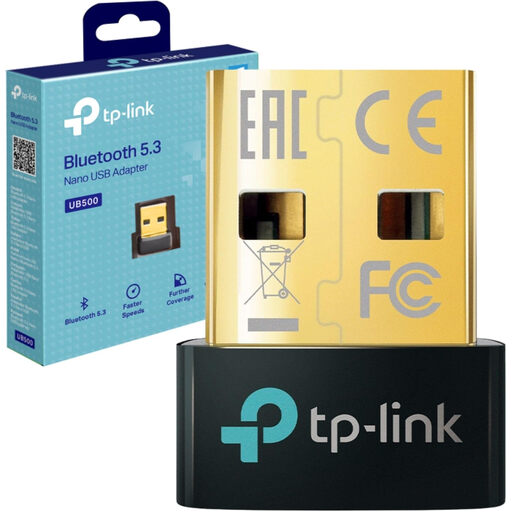
TP-Link UB500 Bluetooth 5.0 Nano USB Adapter
A compact choice for adding Bluetooth peripherals to a supported Windows mini PC without changing its display connections.
TP-Link lists Windows 7, 8.1, 10 and 11 support and dimensions of 14.8 × 6.8 × 18.9 mm for the UB500. If you have experienced drop-outs, consider whether the available USB position places the adapter near interfering equipment.
View on Joybuy
Bluetooth adapter questions
Will a Bluetooth adapter add a third screen or change my two monitors?
No. A USB Bluetooth adapter adds connectivity for Bluetooth accessories, not a video output. If you need another monitor, check the mini PC’s display capabilities and any proposed USB graphics device or dock separately.
How do I set up a Bluetooth USB adapter on a Windows mini PC?
Check whether Bluetooth is already present, then connect the adapter and follow its instructions for any required driver. Turn on Bluetooth in Windows, put the accessory into pairing mode and select it in Bluetooth settings; if the adapter is not recognised, Microsoft Support advises checking drivers and trying another USB port.
Are two monitors the reason my Bluetooth connection drops?
The number of monitors does not by itself identify the cause. Microsoft Support notes that nearby unshielded USB equipment can sometimes interfere with Bluetooth, so try another adapter position or USB port before replacing the adapter.
Do I need Bluetooth 5.4 for LE Audio or Auracast?
A Bluetooth 5.4 label alone does not establish that your complete setup can use either feature. For ASUS USB-BT540, ASUS limits LE Audio support to Windows 11 version 24H2 or later; for Auracast, check support on every device that needs to participate.


