One-controller desk users
You want to connect one nearby controller to a Windows desktop or older laptop without adding clutter. Check for working built-in Bluetooth first: Microsoft says many Windows devices already have it.


Check the Windows PC’s built-in Bluetooth before buying an adapter: Microsoft says most Windows devices already have it. If the PC needs an adapter, a compact model suits a nearby controller and an uncluttered desk, while an adjustable antenna offers more positioning options around obstructions and nearby Wi-Fi—not a guarantee of a reliable connection. Check the controller’s connection methods and required game features too; USB or an Xbox-specific wireless connection may suit some needs better than generic Bluetooth.
You want to connect one nearby controller to a Windows desktop or older laptop without adding clutter. Check for working built-in Bluetooth first: Microsoft says many Windows devices already have it.
Your controller is used near office Wi-Fi, docking equipment or partitions, so the adapter’s position matters more to you than its small size. TP-Link’s troubleshooting guidance identifies nearby 2.4 GHz Wi-Fi, USB 3.0 equipment and obstructions as possible interference factors.
You need to confirm what your particular controller and game can do over Bluetooth before choosing a connection. Xbox Support lists several PC connection methods, while PlayStation says supported DualSense haptic feedback on PC requires USB.
Start with the PC and controller, then consider the adapter’s position at the desk. A newer Bluetooth version or a published open-space range does not settle how a connection will behave beside office equipment.
| Concern | Buying check | Who this matters to |
|---|---|---|
| Whether an adapter is needed | Check whether Bluetooth can be enabled in Windows. If it cannot, investigate the PC’s Bluetooth hardware and driver before selecting a USB adapter with stated Windows support. | I would rather use the PC’s existing connection than occupy a USB port unnecessarily. Around 33% of consumers put establishing whether they need an adapter first. |
| Wireless conditions at the desk | Consider obstructions, nearby 2.4 GHz Wi-Fi and USB 3.0 equipment. An adjustable antenna or a different USB position gives you options to test. | When the controller is used beyond desk furniture or beside other wireless equipment, I need room to adjust the adapter’s position. Keeping that local connection dependable comes first for around 25% of consumers. |
| Controller and game features | Confirm the exact controller model, connection method and required game features. PlayStation says supported DualSense haptic feedback on PC requires USB. | I need more than a pairing confirmation if a feature I use depends on a wired or controller-specific connection. Around 25% of consumers prioritise that compatibility check. |
| Workplace setup | Check the supported Windows version, driver instructions and whether workplace IT permits a personal USB radio. | On a managed work PC, I need permission and a setup I can maintain without disrupting the machine. For around 17% of consumers, that is the primary concern. |
An extra adapter may occupy a USB port without addressing the pairing problem. Microsoft advises that most Windows devices already include Bluetooth, while a missing setting can indicate absent hardware or a driver issue.
Check whether Bluetooth can be enabled in Windows and whether the controller pairs. If it cannot, identify the cause before choosing an adapter supported by the PC’s Windows version.
An unnecessary adapter also takes time to install and manage.
Open-space specifications do not account for a particular desk layout. TP-Link identifies obstructions, USB 3.0 interference and nearby 2.4 GHz Wi-Fi as factors that can affect Bluetooth connections.
If placement is difficult, consider an adjustable antenna or another USB position, then test the controller where it will be used.
A Bluetooth connection can pair a controller without providing every feature through that method. PlayStation says DualSense haptic feedback on PC requires USB when the game supports the feature; Xbox Support lists USB, Bluetooth and the Xbox Wireless Adapter as separate choices.
Check the exact controller and the features needed in your game against the controller maker’s PC guidance before buying.
If a required feature needs another connection method, you may also need a suitable USB cable or separate wireless adapter.
Workplace device rules can affect whether you can use a personal USB radio. TP-Link’s troubleshooting guidance also identifies conflicting Bluetooth adapters and drivers as possible setup problems.
Ask workplace IT before connecting the device, and follow the adapter maker’s driver instructions where installation is permitted.
Its Windows USB-adapter range includes the compact UB500 and the antenna-equipped UB500 Plus.
The USB-BT500 is a compact USB-A Bluetooth 5.0 adapter to compare with the controller’s and PC’s requirements.
The DG45 is relevant if controller-specific Windows setup instructions matter to you.
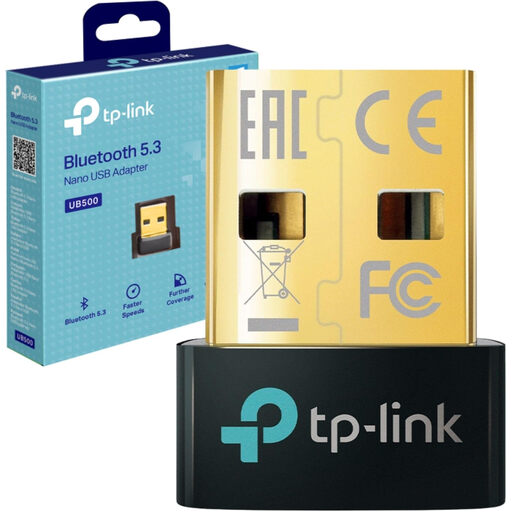
This compact USB adapter is a choice to consider when a Windows PC needs Bluetooth for a nearby controller and a small dongle suits the desk. Check the exact controller and workplace setup before purchasing.
 No image available
The nano design suits a desk where a small adapter is preferred for a Windows PC without working Bluetooth.
TP-Link lists Windows 7, 8.1, 10 and 11 support for the UB500. Confirm compatibility with your exact controller and required game features, and check workplace IT rules before connecting it.
Usually not if the PC’s Bluetooth can be enabled and pairs the controller reliably. Microsoft says most Windows devices include Bluetooth; if the setting is absent or cannot be used, check the hardware and driver before deciding whether a USB adapter is needed.
Enable Bluetooth in Windows, put the controller into its manufacturer-specified pairing mode and select it from Windows Bluetooth devices. For DualSense, PlayStation says to hold Create and PS until the light bar blinks, then select the controller in the device list.
No: PlayStation says DualSense haptic feedback on PC requires USB when the game supports that feature. Check the game’s feature support and use a wired connection if haptic feedback is essential to your choice.
No. Xbox Support lists Bluetooth and the separate Xbox Wireless Adapter for Windows as connection methods, alongside USB cable. Check your controller model and the connection you want before choosing either adapter.
For radio equipment supplied in Great Britain, the Office for Product Safety and Standards says the Radio Equipment Regulations 2017 address safety, electromagnetic compatibility and radio-spectrum use. Check guidance applicable to the delivery location rather than applying Great Britain guidance unchanged to Northern Ireland.