Choose a compact USB Bluetooth adapter if your peripherals are close to the mini PC and you want a low-profile fit. If the PC is tucked behind a display or connections are unreliable from your seat, an adjustable antenna or a way to reposition the receiver may matter more. Check operating-system support, USB port access and receiver placement before choosing by Bluetooth version.
Who is this for?
Quiet-study headphone users
If you use headphones or speakers while the mini PC sits near a monitor, dock or external storage, receiver placement deserves attention. Plugable's troubleshooting guidance identifies nearby USB 3.0 equipment and obstructions as possible causes of audio skipping or limited range.
Low-clutter mini PC owners
If you want to leave an adapter plugged in for a keyboard, mouse or headset, a small model may suit the available space. Check its stated operating-system support and clearance around the intended port; TP-Link publishes both for its UB500.
Owners with a hard-to-reach desk setup
If the mini PC is behind a display or under a desk, consider whether you can move or orient the receiver. TP-Link offers an adjustable antenna on the UB500 Plus, while Plugable suggests a USB extension as one way to change receiver position.
What matters when choosing?
For a mini PC in a quiet study, check where the receiver will sit, whether the adapter supports your operating system and how much room the USB port has.
Compact nano adapter
Consider it when: Your peripherals are close to an accessible mini PC and you want to leave a small adapter fitted.
Trade-off: A receiver beside the PC chassis or nearby USB equipment gives you less flexibility if its position causes connection problems.
Adjustable-antenna adapter
Consider it when: The mini PC is tucked away and changing antenna orientation would be useful.
Trade-off: It takes up more space than a nano adapter, and an adjustable antenna cannot guarantee a stable connection through obstructions.
| Concern |
What to check |
Who this matters to |
| Connection stability |
Check whether the receiver can be moved away from active USB 3.0 equipment and physical obstructions. |
If audio skips or a keyboard connection falters at my desk, I need a position that keeps the connection steady. Around 42% of consumers put connection stability first. |
| System compatibility |
Match your exact operating system to the manufacturer's support list and check for a suitable driver. |
Before plugging anything in, I need to know it works with the operating system on my mini PC. For around 33% of consumers, compatibility is the primary concern. |
| Port clearance |
Check the intended USB port and space beside adjacent plugs or cables. |
I want to leave the adapter fitted without crowding the other connections. Keeping the setup compact comes first for around 25% of consumers. |
Buying pitfalls
-
Choosing by Bluetooth version alone
A version number does not establish driver support for your mini PC. TP-Link lists Windows 11 for the UB500 and UB500 Plus, while the ASUS UK specification for USB-BT500 lists Windows 8.1/10 and Linux.
Check the current support page for the exact adapter and your installed operating system before ordering.
-
Leaving the receiver in a crowded rear port
Plugable identifies nearby USB 3.0 equipment and obstructions as possible causes of limited range or skipping audio. A poor connection in that position does not, by itself, show that the adapter is faulty.
Try a USB 2.0 port or move the receiver away from active drives and hubs before deciding whether to change adapters.
Changing its position may require a USB extension cable or hub.
-
Expecting open-space range at a furnished desk
ASUS states its USB-BT500 distance figures for open space, and TP-Link says its quoted performance figures come from laboratory conditions. Neither describes a connection through your particular desk, display or furniture.
If the mini PC is obstructed, plan for a receiver position you can change rather than treating a quoted range as a guarantee.
Brands to consider for this setup
TP-Link
Its UB500 and UB500 Plus illustrate the choice between a small nano adapter and a larger model with an adjustable antenna.
- TP-Link lists Windows 7, 8.1, 10 and 11 for the UB500 and gives its dimensions as 14.8 × 6.8 × 18.9 mm.
- The UB500 Plus takes more space, and TP-Link cautions that laboratory performance figures can vary in use.
ASUS
The USB-BT500 is worth checking when its published operating-system list matches the mini PC.
- The ASUS UK specification lists Bluetooth 5.0, USB 2.0 Type-A, Windows 8.1/10 and Linux.
- That specification does not list Windows 11; check current driver support before choosing it for a Windows 11 PC.
Plugable
Its adapter support guidance is useful when deciding whether receiver position could explain a connection problem.
- Plugable suggests trying a USB 2.0 port, hub or extension to move a receiver away from USB 3.0 interference and obstructions.
- That troubleshooting guidance does not establish how another adapter will perform in your study.
Joybuy product choices for a compact setup
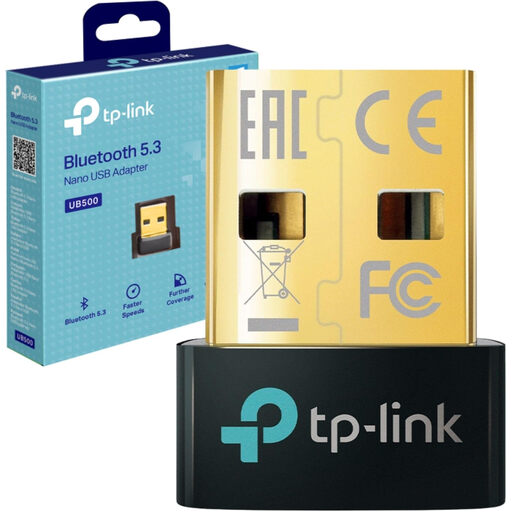
This nano adapter is an option for a mini PC where a small, permanently fitted receiver suits the port layout and the paired devices are nearby. Check its position if the PC is hidden or sits beside active USB 3.0 equipment.
 No image available
TP-Link UB500 Bluetooth 5.0 Nano USB Adapter
Consider this model if a small adapter can remain in an accessible port on your mini PC.
TP-Link specifies a 14.8 × 6.8 × 18.9 mm body and lists Windows 7, 8.1, 10 and 11 support. Confirm the connector and clearance at your intended port before buying.
If the PC is behind a display or beside active USB 3.0 equipment, you may need to change the receiver's position to address connection problems.
View on Joybuy
Frequently asked questions
Do I need the newest Bluetooth version for a quiet-study mini PC?
No: start with stated support for your operating system and the functions your peripherals need. Microsoft says Windows 11 version 22H2 supports Bluetooth Core Specification 5.3 in-box, but that does not establish driver support or a particular headset feature for every USB adapter.
What should I do if Windows does not detect the adapter?
Check the adapter's stated Windows support and its driver before changing hardware. Microsoft recommends checking for driver updates and, where needed, using the computer or adapter manufacturer's support resources to address detection and pairing problems.
Why might Bluetooth audio skip when the adapter is plugged into my mini PC?
Receiver position, obstructions or interference from nearby USB 3.0 equipment could be involved. Plugable recommends trying a USB 2.0 port, hub or extension to move the adapter away from the PC and nearby USB 3.0 devices.


