
24/7 Customer Support

Free returns

Same-day & Next-day Delivery

Quality Guaranteed

Unlock Your Welcome Offers: FREE Delivery | Up to 80% OFF | Free 30-day JoyPlus trial
Download the APP
An older car does not need a full stereo replacement to gain wireless music, hands-free calls and extra charging ports. A Bluetooth car FM transmitter can connect your phone to the vehicle’s existing radio through an unused FM frequency, making it a practical option for commuters, families and long-distance drivers.
However, product listings can make similar devices appear more capable than they are. Before choosing a car radio Bluetooth adapter, check the technical details rather than relying on phrases such as “crystal-clear sound” or “fast charging”. These are three common pitfalls worth avoiding.
An FM transmitter broadcasts audio to your car radio. If the selected frequency is already used by a local station, you may hear static, overlapping audio or intermittent noise. A device with a wide tuning range is useful, but it cannot remove every source of local interference.
You should be able to tune both the transmitter and the car stereo to the same frequency. It is also worth checking whether the device remembers the selected channel after the car is switched off.
Some transmitters include USB ports for charging, while others only provide a low-power connection for playing files from a USB flash drive. A car Bluetooth transmitter with USB should clearly state its charging output and whether USB playback is supported.
If you regularly use navigation and music streaming together, check whether the total output is sufficient for your phone. A Type-C port may support faster charging, but the result also depends on your phone, cable and charging protocol.
Most cigarette lighter FM transmitters are designed for a vehicle’s 12V socket, while some models also support 24V systems found in selected vans and lorries. Confirm the input range before ordering.
The socket should hold the transmitter firmly. A loose connection can interrupt audio or charging. Drivers should also remove the device when leaving the vehicle for an extended period, as an accessory left connected may continue drawing power depending on the vehicle.
Look for a published tuning range rather than an unspecified “wide compatibility” claim. The Oxerbog model listed below supports 87.5–108.0MHz, covering the standard FM range used by many car radios.
For clearer playback, choose an unused frequency in your area, set the same frequency on the transmitter and radio, then adjust only while the vehicle is stationary. The transmitter’s listed transmission distance is 10–15 metres, although performance can vary with the vehicle interior and surrounding radio signals.
A Bluetooth 5.0 FM transmitter may offer a modern connection standard, but Bluetooth version alone does not determine the final sound quality. Also check for practical features such as:
A hands-free car kit can reduce the need to handle your phone, but pairing, frequency selection and playlist changes should be completed before driving or while safely parked.
For multi-device households, dual USB ports and a Type-C car charger can be more useful than a decorative display. Check whether the product supports simultaneous charging and whether the stated output is shared across ports.
The Oxerbog transmitter has two USB ports and one Type-C port, with a stated 4.8A, PD and Type-C output configuration. It also supports music playback from Bluetooth, USB flash drives and Micro SD cards, with USB and Micro SD capacities listed up to 32GB. Supported audio formats include MP3, WMA, WAV, APE and FLAC.
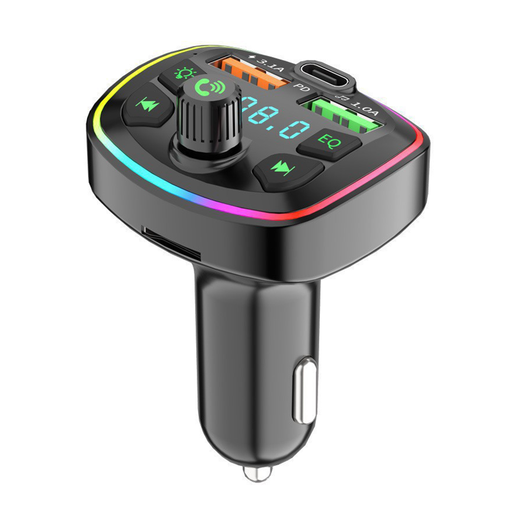
Why This Fits Their Persona: A practical all-in-one choice for drivers with an older stereo who want Bluetooth audio, hands-free calling and several charging connections without replacing the head unit.
Its published 87.5–108.0MHz range, automatic reconnection and playback memory help address uncertain tuning and repeated setup.
Bluetooth 5.0, dual USB and Type-C ports; also supports USB flash drive and Micro SD playback up to 32GB.
Why This Fits Their Persona: Suitable for drivers who prioritise a tidy dashboard and want one car audio adapter to combine streaming, calls and charging during regular commuting or motorway journeys.
The specification identifies the power range, transmission range and supported media formats, making it easier to compare with vague listings.
Supports 12V–24V vehicles and voice assistants including Siri and Google Assistant; listed CVC and wind-noise reduction features are intended for calls.
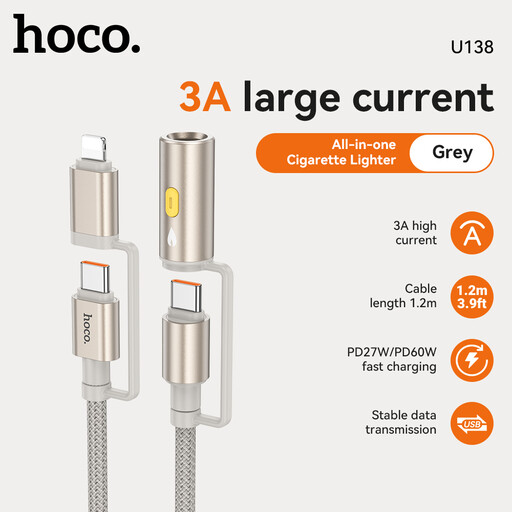
Why This Fits Their Persona: A useful companion for heavy commuters who need one cable arrangement for USB-C and Lightning devices while using a separate Bluetooth transmitter.
Its safety information highlights checks that are often missed, including avoiding damaged sockets, moisture, high heat and visible cable damage.
Combines USB-C and Lightning connections with a cigarette lighter adapter; suitable as a charging accessory rather than an FM transmitter.
It generally requires a working FM radio and a suitable 12V or 24V power socket. It is useful for cars without built-in Bluetooth, but reception can vary according to local FM congestion, vehicle design and the condition of the socket.
Many models include a built-in microphone and hands-free calling function. Call quality can be affected by cabin noise and microphone placement. Pair the phone and test the controls while parked, then keep attention on the road during use.
The transmitter normally draws power from the vehicle’s accessory socket. Its consumption is modest compared with larger electrical equipment, but leaving any accessory connected after the engine is off may contribute to battery drain, depending on the vehicle. Disconnect it when it is not needed.