For frequent entry of household bills and spending figures, choose a Bluetooth keyboard with an integrated numeric keypad, provided your computer or tablet supports Bluetooth. A compact keyboard takes up less desk space if you enter figures only occasionally, but it gives up the dedicated keypad; either choice still needs battery replacement or periodic charging rather than a permanent mains connection.
Who these keyboards suit
Frequent household-budget updaters
If you regularly enter bills, transactions and category totals, a dedicated numeric keypad is worth considering alongside Bluetooth connectivity. Dell and Apple each identify a numeric keypad on the models discussed below.
Small-desk, multi-device users
If you move between a laptop, tablet or phone and update your budget only occasionally, a compact keyboard may suit your space better. Logitech says its Pebble Keys 2 K380s can switch between three paired devices.
Mac household-finance users
If you use a compatible Apple-silicon Mac, Apple’s British English Magic Keyboard with Touch ID and Numeric Keypad combines a keypad with Mac-specific features. Check the macOS requirement before choosing the Touch ID model.
What matters when choosing
For a household-spending spreadsheet, start with how often you enter numbers, then check Bluetooth compatibility and how the keyboard will be powered and stored.
| Concern | What to check | Who this matters to |
|---|
| Repeated number entry |
Look for an integrated numeric keypad and the UK key layout you need. |
If I regularly enter bills and category totals, I want dedicated number keys rather than relying on the top row. Around 46% of consumers put this need first. |
| Socket and USB-port use |
Confirm Bluetooth compatibility with your device and check whether the keyboard uses replaceable batteries or needs charging. |
When spare sockets are scarce, I want to work without a permanent mains connection or a required USB receiver. This is the primary concern for around 36% of consumers. |
| Space and upkeep |
Check the layout’s size, keypad arrangement and battery type; assess any quiet-typing claim for the exact model. |
If I update the budget occasionally in a shared space, easy storage and manageable upkeep matter more to me than a dedicated keypad. Around 18% of consumers prioritise those needs. |
Buying pitfalls
-
Assuming every wireless keyboard leaves your USB ports free
A wireless keyboard may offer a receiver mode as well as Bluetooth. Dell lists both a USB receiver and Bluetooth 5.0 for the KB740.
If the USB port matters, check that your exact computer or tablet can connect to your chosen keyboard in Bluetooth mode.
-
Choosing a compact layout without checking the number keys
A smaller keyboard can free desk space, but a layout without an integrated numpad leaves repeated spending figures to the top number row.
If you enter amounts frequently, check the actual key layout before trading keypad space for a smaller board.
-
Reading a battery-life claim as a guaranteed runtime
Dell states up to 36 months for the KB740, while Keychron states up to 1,200 hours for the B6 Pro. These are makers’ figures for different products and are not directly comparable measures of everyday use.
Check the stated usage conditions and whether your chosen model needs replacement batteries or periodic charging.
Depending on the model, keeping it powered also means arranging replacement AA or AAA batteries or time to charge it.
-
Putting an old keyboard or its batteries in household rubbish
GOV.UK advises that electrical products and batteries marked with the crossed-out wheelie-bin symbol should not go in household rubbish.
Use an appropriate electrical-waste or battery collection point for marked items, checking local collection arrangements before disposal.
Relevant brands to consider
These examples concern specific keyboard models, not every keyboard made by each brand.
HP
The HP 460 Multi-Device Bluetooth Keyboard is an option for number entry across more than one device.
- The product information lists a full numpad, Bluetooth switching between up to three devices and two included AAA batteries for the HP 460.
- Check the key layout of the particular listing if UK key placement matters to you.
Dell
The KB740 combines a UK QWERTY layout and numeric keypad with a choice of wireless connection modes.
- Dell specifies Bluetooth 5.0, a USB wireless receiver and two AA batteries for this model.
- Dell’s stated runtime of up to 36 months is a maker specification, not a promise for every usage pattern.
Logitech
The compact Pebble Keys 2 K380s suits consumers who value a smaller Bluetooth keyboard for occasional budget updates.
- Logitech lists switching between three devices and compatibility with Windows, macOS, iPadOS, iOS and Android.
- If you regularly enter figures, inspect its key layout rather than assuming it offers a dedicated numpad.
Keychron
The full-size B6 Pro is worth considering when a UK ISO variant and a choice of connection modes matter.
- Keychron lists Bluetooth, 2.4 GHz wireless and wired modes, alongside a UK ISO variant.
- Keychron’s up-to-1,200-hour battery figure is a maker claim; its additional modes may add little to a straightforward household spreadsheet setup.
Apple
The British English Magic Keyboard with Touch ID and Numeric Keypad is a Mac-focused choice for spreadsheet work.
- Apple identifies its numeric keypad as useful for spreadsheets and finance applications and lists Bluetooth connectivity.
- The cited Touch ID version requires a Mac with Apple silicon running macOS 15.1 or later.
Joybuy keyboard choices
These keyboards are choices to examine for household-spending work where an extra mains socket is hard to spare. Compare each listing’s keypad, connection mode and power arrangement with your own device and desk space.
 No image available
Targus EcoSmart Full Size Wireless Keyboard (UK)
For frequent spreadsheet entries, this UK full-size model is worth checking if you want room for dedicated number keys. Confirm its keypad arrangement, Bluetooth compatibility with your device and battery-replacement needs before choosing it.
View on Joybuy
 No image available
ASUS ROG Strix Scope II 96 Wireless Gaming Keyboard (UK, black)
If desk space is tight but you still want to enter spreadsheet figures, examine the key arrangement on this UK-layout 96 model. Check its Bluetooth mode and charging arrangement; do not apply a battery-life figure stated for 2.4 GHz use with RGB off to Bluetooth use.
View on Joybuy
 No image available
AULA F99 Mechanical Wireless Keyboard (US QWERTY, Light Blue, Reaper Switch)
Consider this model only if its US QWERTY key placement suits your spreadsheet work; it is not identified as a UK-layout variant. Its listed connection modes are wired, Bluetooth and 2.4G. Check its charging needs if access to power is limited.
View on Joybuy
 No image available
Hyper HyperSpace Next Bluetooth Wireless Keyboard (UK, white)
For spending records on a UK-layout Bluetooth keyboard, check this model’s number-key arrangement against how often you enter figures. Confirm compatibility with your device and plan for periodic charging rather than assuming it never needs a power connection.
View on Joybuy
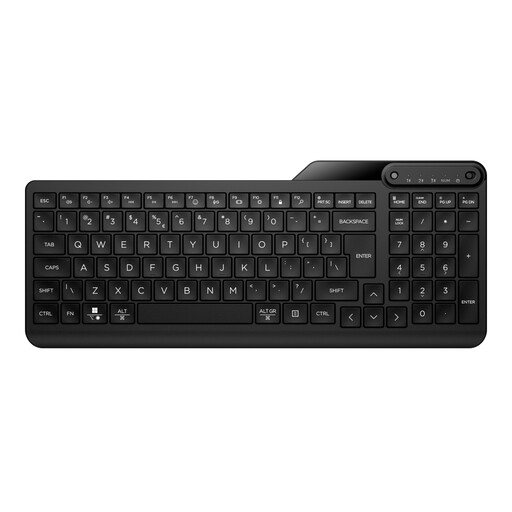 No image available
HP 460 Multi-Device Bluetooth Keyboard
For repeated spending entries across devices, the product information identifies a full numpad on the HP 460 model. Check this listing’s key legends for the layout you need, as well as its battery arrangement and compatibility with your devices.
View on Joybuy
Common questions
Will a Bluetooth keyboard free up a plug socket?
It can avoid a permanent mains connection while you work if it runs on replaceable or rechargeable batteries. You will still need replacement batteries or occasional charging, and your computer or tablet must support Bluetooth if you want to avoid using a USB receiver.
Do I need a numeric keypad for household-spending charts?
Choose an integrated keypad if you repeatedly enter amounts and totals in a spreadsheet. If updates are occasional and desk space matters more, a compact keyboard may suit you, provided you are comfortable using its top number row.
Will the Apple Magic Keyboard with Touch ID and Numeric Keypad work with any computer?
No: Apple specifies a Mac with Apple silicon running macOS 15.1 or later for the cited British English Touch ID model. Do not assume its Touch ID feature or full keyboard experience will transfer to Windows, Android or an older Intel-based Mac.
What should I do with an old keyboard or its batteries?
Use an appropriate collection route rather than household rubbish for electrical products and batteries marked with the crossed-out wheelie-bin symbol, as GOV.UK advises. Check your local electrical-waste and battery collection arrangements for the items you need to dispose of.


