Choose a general-purpose USB Bluetooth adapter if your mini PC needs to connect keyboards, mice or other peripherals, but match its stated operating-system support and connector to your computer first. An adjustable antenna gives you more placement flexibility when the mini PC is tucked away, though it cannot guarantee range. Consider an audio-only transmitter only for headphone output, after checking that it supports PC use and accepting that it may not connect other peripherals or a headset microphone.
Who needs which adapter?
Everyday peripheral users
If you want a mouse, keyboard, controller or speaker connected without opening the mini PC, start with an adapter that supports your operating system and intended devices. TP-Link and ASUS list different operating-system support for their USB adapters.
Users with a mini PC tucked away
If your mini PC sits behind a screen or furniture, consider whether you can position the adapter away from obstructions. TP-Link offers an adjustable-antenna model but cautions that obstacles and interference can reduce connection distance.
Wireless-headphone users
If headphone audio is your main goal, check PC compatibility and the headset features you need. An audio transmitter is not necessarily a full PC Bluetooth adapter: Avantree says its DG80-Gaming cannot connect microphones, keyboards or controllers.
What matters when choosing?
For a mini PC, establish operating-system and USB compatibility first; then decide whether connecting peripherals, working around the computer’s position or headphone-only audio drives your choice.
| Concern |
What to check |
Who this matters to |
| Compatibility and setup |
Match the exact operating system to the maker’s support list, check the USB connector, and account for any built-in Bluetooth adapter. |
I need the adapter to work with my mini PC before its other features matter. Around 36% of consumers put compatibility and setup first. |
| Peripheral support |
Check that the device adds general PC Bluetooth capability and supports the types of peripherals you intend to connect. |
If I use a keyboard or controller as well as headphones, an audio-only transmitter will not cover that need. Around 29% of consumers prioritise connecting different types of peripherals. |
| Placement and interference |
Consider obstructions, nearby USB 3.0 equipment and whether an adjustable antenna would help you position the adapter. |
With my mini PC behind a display or furniture, a usable connection matters more than a nearly flush dongle. For around 21% of consumers, placement and connection conditions come first. |
| Headphone audio |
For an audio transmitter, confirm PC support, the headphones’ codec and whether you need microphone input. |
If wireless headphone output is my main purpose, I need to know what the transmitter and headphones support together. Around 14% of consumers make audio-specific capability their primary concern. |
Mistakes to avoid
-
Choosing an audio transmitter for every Bluetooth task
An audio-only device may send sound to headphones while leaving a keyboard, mouse, controller or headset microphone unconnected. Avantree explicitly limits its DG80-Gaming to audio transmission.
If you need peripherals as well as audio, look for a general PC Bluetooth adapter and check support for the devices you plan to use.
-
Taking a range claim as a guarantee
TP-Link says obstacles and interference can reduce Bluetooth distance; Microsoft also warns that nearby unshielded USB devices can interfere with a connection. A newer Bluetooth version does not remove those conditions.
Check where the mini PC and accessory will sit. If the computer is tucked away, consider an adjustable antenna and keep the adapter away from likely USB 3.0 interference where possible.
-
Overlooking built-in Bluetooth and drivers
A separate USB adapter may not address a problem caused by the mini PC’s settings or existing Bluetooth setup.
Check the computer’s Bluetooth settings before buying. If you install a TP-Link UB-series adapter, follow TP-Link’s guidance on disabling built-in Bluetooth and handling existing third-party Bluetooth software where applicable.
Brands to consider
TP-Link
USB Bluetooth adapters for Windows PCs, including a compact nano model and an adjustable-antenna model.
- TP-Link lists Bluetooth 5.0 and Windows 7, 8.1, 10 and 11 support for the UB500. Its UB500 Plus has Bluetooth 5.3 and an adjustable antenna.
- Check support for the exact model and operating system rather than assuming macOS or Linux compatibility. TP-Link says obstacles and interference can reduce real-world distance.
ASUS
A compact USB-A option where the stated operating-system support may influence the choice.
- ASUS lists USB 2.0 Type-A, Bluetooth 5.0 with EDR and Bluetooth Low Energy, and Windows 8.1, Windows 10 and Linux support for the USB-BT500.
- Match the mini PC’s exact operating system to current model support. ASUS gives different open-space distance figures for classic Bluetooth and Bluetooth Low Energy; neither is a guaranteed distance in a home.
Avantree
Specialist audio transmitters to consider when wireless headphone output, rather than general peripheral connectivity, is the goal.
- Avantree lists Bluetooth 5.3 and aptX-family codec support for its DG80-Gaming audio transmitter.
- Avantree says the DG80-Gaming transmits audio only, cannot serve microphones, keyboards or controllers, and is principally aimed at consoles. Confirm PC compatibility before considering it for a mini PC.
Joybuy product choices
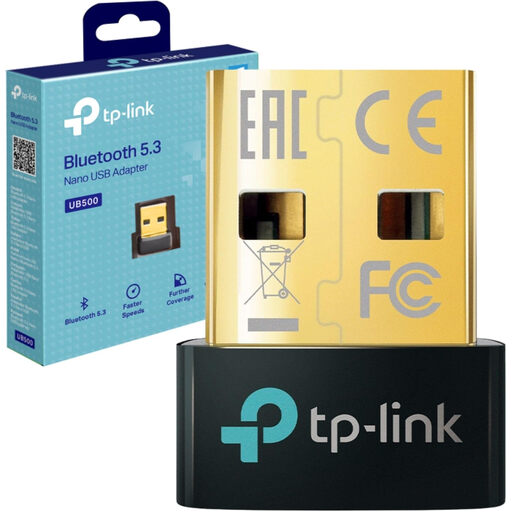
This compact adapter is a choice for adding general-purpose Bluetooth to a Windows mini PC when a small USB device suits the setup.
 No image available
TP-Link UB500 Bluetooth 5.0 Nano USB Adapter
For a Windows mini PC that needs a compact adapter for everyday Bluetooth peripherals.
TP-Link lists Bluetooth 5.0, Windows 7, 8.1, 10 and 11 support, and dimensions of 14.8 × 6.8 × 18.9 mm for the UB500. Check your mini PC’s USB port and whether built-in Bluetooth needs to be disabled before installation.
View on Joybuy
Common questions
How can I tell whether a USB Bluetooth adapter will work with my mini PC?
Match the mini PC’s exact operating system and available USB port to the adapter’s stated support. TP-Link lists Windows 7, 8.1, 10 and 11 for the UB500, while ASUS lists Windows 8.1, Windows 10 and Linux for the USB-BT500; do not assume an unlisted system is supported.
Should I buy an adapter if my mini PC already has Bluetooth?
Check the existing Bluetooth settings and troubleshoot the connection before replacing or supplementing it. If you use a separate TP-Link UB-series adapter, TP-Link advises disabling built-in Bluetooth and addressing third-party Bluetooth drivers or programs where applicable.
Will an external antenna guarantee a longer Bluetooth connection?
No. An adjustable antenna lets you change its position, but TP-Link says obstacles and interference can reduce coverage, and Microsoft warns that nearby unshielded USB devices can interfere with Bluetooth.
Can an audio transmitter be my mini PC’s only Bluetooth adapter?
Only if headphone output is your sole Bluetooth need and the particular transmitter supports PC use. Avantree says its DG80-Gaming transmits audio only and cannot connect microphones, keyboards or controllers, so it cannot replace a general PC Bluetooth adapter for those devices.


