Which setup do you have?
Count the computers connected to your screens before choosing Bluetooth hardware: display arrangement, adding Bluetooth and controlling another computer are different tasks.
One PC with two monitors
If both displays connect to one Windows PC, start with its display arrangement. Microsoft Support explains that arranging the displays helps the pointer move smoothly between them; the PC also needs working Bluetooth to pair a Bluetooth mouse.
A computer without working Bluetooth
If the computer has no usable Bluetooth connection, a USB adapter can provide one for a Bluetooth mouse, as Microsoft Support describes. Check the exact adapter’s operating-system support, driver instructions and USB connection before buying.
Two computers at one desk
If each screen belongs to a different computer, adding Bluetooth to just one will not move the pointer between hosts. A cross-computer workflow needs compatible mouse hardware and software; Logitech’s Flow setup, for instance, uses software on both computers.
What matters when choosing?
Check whether the screens share a computer, then whether that computer already has usable Bluetooth. Only after those questions should you choose an adapter or investigate a two-computer mouse setup.
| Concern |
What to check |
Who this matters to |
| Whether an adapter is needed |
Check that both displays connect to the same Windows PC. Arrange the detected displays in Windows and test pointer movement; check whether the PC’s Bluetooth already works. |
If my mouse pairs but the pointer will not cross between two monitors on one PC, I want to fix the display layout rather than buy another radio. Around 42% of consumers put avoiding an unnecessary adapter first. |
| System and driver compatibility |
Match the exact adapter model and hardware revision to the computer’s operating system. Check the manufacturer’s driver instructions, particularly for older Windows versions. |
When my computer has no usable Bluetooth, I need an adapter I can install on its operating system and use to pair the mouse. For around 33% of consumers, adding a compatible Bluetooth connection is the primary concern. |
| Control across two computers |
Confirm whether each screen has a separate host. Check multi-device mouse support and the intended software’s requirements on both computers. |
If my screens belong to separate computers, I want one mouse to switch control between them without mistaking a single-PC adapter for the solution. Around 25% of consumers put cross-computer control first. |
Relevant brands to consider
Compare the named adapter lines against your computer’s operating system and installation needs; a brand name alone does not establish compatibility for every model.
TP-Link
The compact UB500 and adjustable-antenna UB500 Plus offer different physical formats for adding Bluetooth to a Windows computer.
- TP-Link lists Windows 11/10/8.1/7 support and Bluetooth 5.0 for UB500; it lists Bluetooth 5.3 and an adjustable antenna for UB500 Plus.
- TP-Link’s UB500 instructions specify a Windows 7 driver. Its range, speed and capacity figures are qualified as laboratory results that can differ in use.
ASUS
The USB-BT500 is a compact USB Type-A option when its stated system support matches the computer.
- ASUS lists Bluetooth 5.0 + EDR/Bluetooth Smart, USB 2.0 Type-A and support for Windows 8.1/10 and Linux.
- The ASUS UK specification’s operating-system line does not list Windows 11. Check current support with ASUS or the seller before choosing it for a Windows 11 PC.
StarTech.com
The USBA-BLUETOOTH-V5-C2 is a USB Bluetooth option whose stated uses include computer mice and keyboards.
- StarTech.com lists Windows and Linux support, Bluetooth 5.0 with EDR and Low Energy, and a range specification of up to 10 m.
- The stated distance is a product specification, not a guarantee for a desk with obstructions or radio interference.
Plugable
The USB-BT5 is positioned for Windows computers needing a USB Bluetooth connection.
- Plugable lists Windows 11/10 support and Bluetooth Classic and Low Energy for USB-BT5.
- Plugable says the model is not suitable for macOS, Linux, televisions or game consoles. It also cautions against treating it as a way to run a second active Bluetooth adapter on a Windows PC.
Joybuy adapter choices
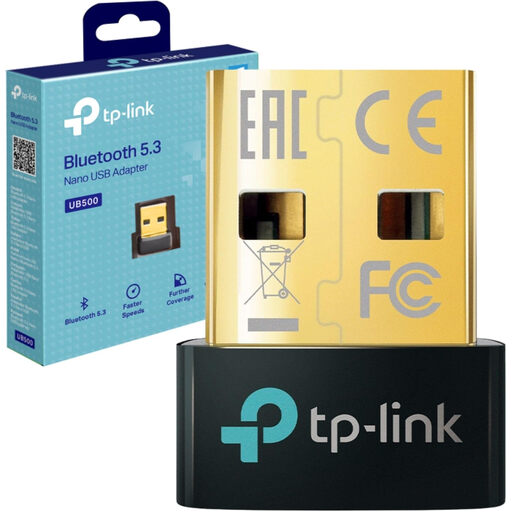
For a Windows computer without usable Bluetooth, this compact USB adapter is a way to add a connection for a Bluetooth mouse. It does not arrange monitors or provide cross-computer control.
 No image available
TP-Link UB500 Bluetooth 5.0 Nano USB Adapter
Consider this USB adapter if your Windows computer lacks usable Bluetooth and you need to pair a Bluetooth mouse.
- The product name specifies Bluetooth 5.0 and a nano USB format.
- TP-Link lists Windows 11/10/8.1/7 support for UB500. Check the instructions for your exact hardware revision and operating system; TP-Link specifies a driver for Windows 7.
- If both displays connect to this computer, arrange them in Windows separately from setting up the mouse connection.
Joybuy
Frequently asked questions
Do I need an adapter to move a Bluetooth mouse between two monitors?
No special adapter is needed if both monitors connect to one Windows computer that already has working Bluetooth. Arrange the displays in Windows so their on-screen positions match the desk; a USB Bluetooth adapter addresses a missing Bluetooth connection, not the display layout.
How do I pair the mouse after adding a USB Bluetooth adapter?
Install the adapter according to its manufacturer’s instructions, turn on Bluetooth in Windows and put the mouse into pairing mode before adding it in Windows Bluetooth settings. If the connection does not work, check the driver instructions for the adapter’s exact model and your operating system.
Can one Bluetooth adapter move my mouse between two computers?
No: a USB Bluetooth adapter adds Bluetooth to the computer it is plugged into. For pointer movement between separate computers, check for a compatible multi-device mouse and software workflow; Logitech’s Flow, for example, requires software on both computers, separate pairing channels and a shared Wi-Fi or Ethernet network.
Does a newer Bluetooth version guarantee a better mouse connection?
No; the version number alone cannot establish how an adapter and mouse will work in your setup. Check the exact model’s operating-system support and driver requirements, then consider the mouse, USB-port placement and possible interference rather than treating a stated range or speed as a desk-wide guarantee.


