Who needs which connection?

Windows workers adding Bluetooth to a desktop

If your mouse supports standard Bluetooth but your work PC has no usable built-in Bluetooth, a USB adapter can add it through a compatible port. Microsoft Support describes this option for Windows devices; check the adapter’s operating-system support and your workplace’s device policy before buying.

Desk users dealing with unreliable reach

If distance, furniture or nearby wireless equipment affects a standard Bluetooth mouse at your desk, an adapter with more flexible radio placement may be worth considering. TP-Link offers an adjustable antenna on the UB500 Plus, while Plugable describes how nearby USB 3.x equipment can introduce radio interference.

Workers with receiver-compatible mice

If your mouse expressly supports a dedicated receiver such as Logi Bolt, check that receiver route and your organisation’s pairing policy. Logitech describes Logi Bolt for compatible devices; it is not a generic adapter for every Bluetooth mouse.

What matters when choosing?

Start with the mouse’s connection mode and the PC’s compatibility; then decide whether desk placement or workplace approval changes the choice.

ConcernWhat to checkWho this matters to
Mouse and PC compatibility Confirm standard Bluetooth pairing, support for the installed operating system and a compatible free USB port. If my desktop needs Bluetooth added, I need the mouse and adapter to work with its operating system before range claims matter. Around 42% of consumers put this compatibility need first.
Connection at the desk Consider where the adapter can sit and whether an adjustable antenna or a different port would help with placement. When my mouse connection is unreliable at its assigned desk, I want room to change the radio’s position. Roughly 33% of consumers make desk connection their primary concern.
Workplace approval and receiver fit Check IT permission for external radios or drivers and whether the exact mouse supports a dedicated receiver. If my PC is managed, I need a connection route that my workplace allows and that fits my mouse. About 25% of consumers prioritise those requirements.

Mistakes to avoid

  • Assuming every wireless mouse uses standard Bluetooth

    A mouse that depends on a dedicated receiver may not connect through a generic Bluetooth adapter.

    Check the exact mouse model’s connection modes before choosing an adapter or its matching receiver.

  • Treating Bluetooth 5.x as a desk-performance guarantee

    TP-Link says its speed, distance and capacity figures are based on laboratory conditions and can vary in use. ASUS specifies an open-space distance for the USB-BT500; neither condition describes every shared desk.

    Check compatibility first. If reach or placement is the issue, consider an adjustable antenna as an option, not a guaranteed fix.

  • Ignoring where a nano adapter is plugged in

    Plugable explains that some USB 3.0 ports can leak interference in the 2.4–2.5 GHz band used by Bluetooth. This does not mean every such port will disrupt a mouse.

    If the connection is unreliable, try a different permitted port or reposition the adapter with a suitable extension before replacing the mouse.

  • Buying before checking workplace installation rules

    An employer-managed PC may restrict external Bluetooth hardware or driver installation, even when the mouse and adapter are otherwise compatible.

    Ask IT which radios, receivers and installation steps are permitted before choosing a connection route.

Relevant brands to consider

TP-Link

Its UB500 and UB500 Plus illustrate two Windows-oriented USB adapter formats: a compact nano design and a design with an adjustable external antenna.

  • TP-Link lists Bluetooth 5.0 and Windows 7/8.1/10/11 support for the UB500; the UB500 Plus has an adjustable antenna and Bluetooth 5.3.
  • TP-Link cautions that stated speed, distance and capacity figures are laboratory-based and may vary in actual use.

ASUS

The USB-BT500 is a compact USB Type-A adapter with clearly listed interface and operating-system specifications.

  • ASUS lists Bluetooth 5.0 with Classic/EDR and Bluetooth Low Energy, plus a USB 2.0 Type-A interface.
  • Its listed operating systems are Windows 8.1/10 and Linux. For a Windows 11 PC, check current support documentation rather than assuming compatibility.

Logitech

Logi Bolt offers a dedicated-receiver route for expressly compatible mice in a managed office, rather than a generic Bluetooth-adapter route.

  • Logitech says compatible Logi Bolt devices can use its USB receiver or Bluetooth Low Energy and positions the receiver for congested workplace environments.
  • Receiver compatibility depends on the exact mouse model; a Logi Bolt receiver cannot stand in for a generic adapter for an arbitrary Bluetooth mouse.

Joybuy product choices

For a standard Bluetooth mouse at a nearby Windows desk, this compact USB adapter is an option if the PC needs Bluetooth added and workplace policy allows it.
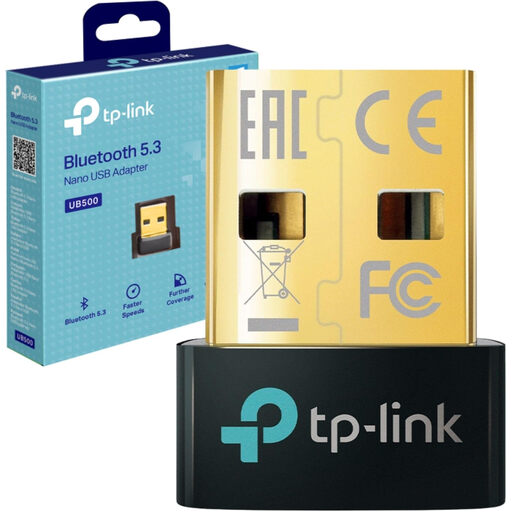
TP-Link UB500 Bluetooth 5.0 Nano USB Adapter

TP-Link UB500 Bluetooth 5.0 Nano USB Adapter

A compact option for adding standard Bluetooth to a compatible Windows PC when the mouse is used at a nearby desk.

TP-Link lists support for Windows 7, 8.1, 10 and 11. Confirm that the adapter fits an available port or approved dock, and check IT permission before installation. Its stated open-space range should not be treated as a shared-office connection guarantee.

Joybuy

Common questions

Do I need an adapter if my work PC already has Bluetooth?

Usually not if its built-in Bluetooth works with your mouse. Microsoft Support describes a USB adapter as a way to add Bluetooth to a Windows device that lacks it; if the built-in connection is malfunctioning, ask IT before adding or changing hardware.

Will a generic Bluetooth adapter connect any wireless mouse?

No. The mouse must support standard Bluetooth pairing; a mouse that uses a dedicated receiver needs compatibility with that receiver. Logitech, for example, specifies Logi Bolt receivers for compatible devices.

Why might a mouse still disconnect with a newer adapter?

A newer Bluetooth version alone does not settle desk placement or nearby interference. TP-Link cautions that its performance figures are laboratory-based, and Plugable explains that some USB 3.0 ports can introduce interference in Bluetooth’s radio band. Try another permitted adapter position and consider an adjustable antenna if placement remains difficult.

Could installing an adapter require more than plugging it in?

Yes, depending on the model, Windows version and workplace controls. TP-Link states that the UB500 needs a driver on Windows 7, while Plugable documents manual driver installation for its own adapter when Windows Update does not provide a working driver. Confirm your employer’s installation policy before buying.