Who needs a tracker?

Apple-device owners who misplace keys or bags

If you use an iPhone, AirTag and other compatible Find My accessories offer a way to look for personal items. Apple’s nearby Precision Finding feature depends on compatible hardware and software, and obstacles can affect it.

Android or Galaxy users choosing an item finder

Start with the network your phone can use. Google describes Find Hub support for compatible tracker tags on its Android-device network; Samsung’s SmartTag2 follows the SmartThings route. Check the requirements of the exact tag before buying.

Travellers tracking checked luggage

A tracker may offer another clue to a bag’s location when participating devices detect it, but it does not replace an airline’s baggage process. Check the battery specification and the operating airline’s rules for each itinerary.

What matters when choosing?

For keys, bags and luggage, establish phone compatibility first. Then decide whether travel use or the tracker’s physical fit and battery upkeep will shape your choice.

Concern What to check Who this matters to
Phone and network compatibility Confirm the exact phone, operating-system and app requirements for Apple Find My, Google Find Hub or Samsung SmartThings. If I misplace my keys, I need a tag I can actually pair with my phone. Around 42% of consumers put ecosystem compatibility first.
Finding luggage during travel Check how the finding network updates locations, the tracker’s battery specification and the operating airline’s baggage rules. When a checked bag is delayed, I want another location clue without mistaking it for live tracking or an airline report. Travel visibility is the primary need for around 33% of consumers.
Shape and battery upkeep Compare attachment or card format, dimensions and whether the battery is replaceable or rechargeable. A tracker for my wallet must fit without getting in the way, while one on my keys needs a workable attachment. Around 25% of consumers chiefly prioritise physical fit and upkeep.

Mistakes to avoid

  • Buying a tag before checking the phone ecosystem

    Apple Find My, Google Find Hub and Samsung SmartThings have different setup requirements. A tag’s shape will not help if you cannot register it with your phone and account.

    Check the exact model’s supported phone, software and app before choosing its format.

  • Expecting a live GPS location

    Updates away from you depend on participating devices detecting the tracker. Nearby directional finding has its own device and environmental limits.

    Choose a Bluetooth tracker for finding misplaced items, not for continuous location updates or guaranteed coverage.

  • Assuming every tracker can go in checked luggage

    The International Air Transport Association’s 2026 passenger guidance covers tracking devices but distinguishes battery specifications and how batteries are carried. The UK Civil Aviation Authority advises passengers to check with their airline.

    Before departure, check the operating airline’s current baggage rules for your itinerary and keep the tracker’s battery specification to hand.

    If the battery configuration cannot be accepted, you may have to remove the tracker or repack the bag.

  • Overlooking tracker alerts when sharing belongings

    An item tracker can prompt an unwanted-tracker alert for someone carrying an item you have lent them. Google also provides Android alerts to help people respond to trackers placed near them without their knowledge.

    Track your own belongings, review supported sharing settings before lending an item and take an unknown-tracker alert seriously.

Brands to consider for different tracker networks

Apple

AirTag and compatible Find My accessories are options for personal items such as keys and bags within Apple’s finding ecosystem.

  • Apple describes both map-based finding and nearby Precision Finding.
  • Precision Finding needs compatible iPhone hardware and software; obstacles can affect nearby finding. This is not a cross-platform setup route.

Samsung

Galaxy SmartTag2 is a keyring-style option for a compatible Samsung and SmartThings setup.

  • Samsung states that SmartTag2 has an IP67 dust- and water-resistance rating.
  • Check mobile-device and SmartThings requirements. Samsung’s stated battery life of up to 500 days comes from simulated internal testing and varies with use, device model and battery manufacturer.

Chipolo

Chipolo offers Apple Find My-only Spot models and a CARD model stated to work with either Apple Find My or Google Find Hub.

  • The card format is worth considering for a wallet or another slim item.
  • Check the exact model’s network, phone requirements and charging method. Published Bluetooth range under clear line-of-sight conditions may fall around obstacles or interference.

Pebblebee

Pebblebee presents its Universal collection as working with either Apple Find My or Google Find Hub.

  • Its stated network options may matter if you are choosing a tracker with a future phone change in mind.
  • Confirm the exact model’s selected network, setup and reset requirements, battery design and UK availability before ordering.

Joybuy trackers for Apple devices

These two trackers are options to assess if you use a compatible Apple setup for finding keys, bags or other personal items. Check each model’s pairing requirements before choosing it for your phone.
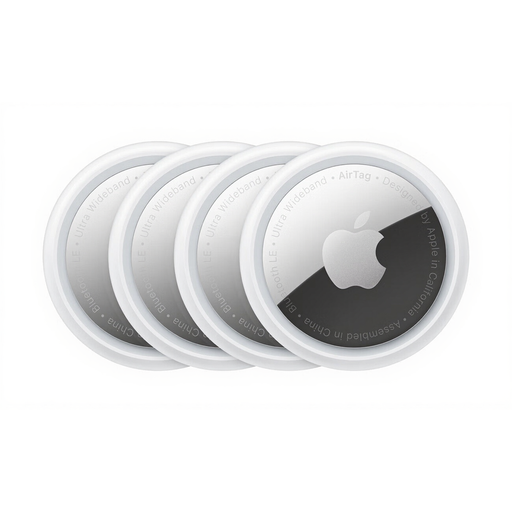
Apple AirTag, four-pack

Apple AirTag, 4 Pack

Consider the four-pack if you want Find My tags for several personal items and have a compatible Apple device.

Check your iPhone’s eligibility if nearby Precision Finding matters to you. For checked luggage, confirm the battery details and your operating airline’s rules before travelling.

View on Joybuy
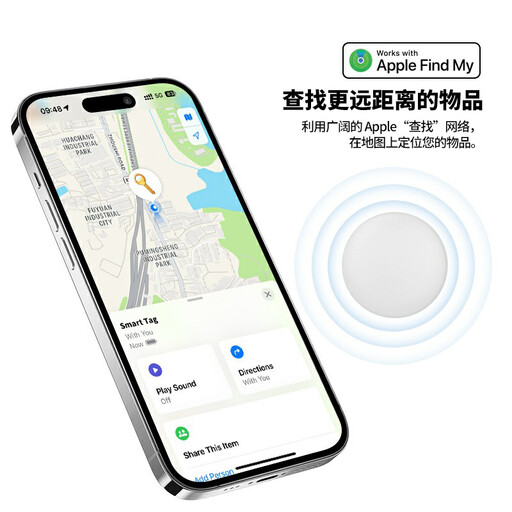
Rexsun RSH-iTag11 Bluetooth tracker for Apple Find My

Rexsun RSH-iTag11 for Apple Find My

Consider this model for keys or bags if you want a tracker advertised for Apple Find My; confirm its exact pairing requirements for your device.

The product name specifies a replaceable CR2032 battery, IP53 rating, sound alert, Lost Mode and left-behind notifications. Do not treat its finding network as live GPS coverage; check its battery details and airline rules before putting it in checked luggage.

View on Joybuy

Frequently asked questions

Is a Bluetooth item tracker the same as a GPS tracker?

No. Apple Find My and Google Find Hub item trackers rely on Bluetooth finding and participating devices for location updates away from you, rather than continuous GPS-style tracking. Nearby directional features also depend on the device and surroundings.

Can I put a tracker in checked luggage?

Check the particular tracker and trip rather than assuming every device is accepted. The International Air Transport Association’s 2026 passenger guidance distinguishes battery type, documented rating and how a battery is carried; it does not itself establish regulatory compliance. The UK Civil Aviation Authority advises checking the airline, so confirm the operating carrier’s rules for your itinerary.

Can a tracker replace a delayed-baggage report?

No. Report a delayed bag through the airline’s process. British Airways says an AirTag location link can be added to its delayed-baggage report and may help locate an item, but that facility is specific to the airline.

Will Android warn me about an unknown tracker?

Google says unknown-tracker alerts can help Android users identify and find a tracker placed near them or in their belongings without their knowledge. An alert does not itself disable the tracker; follow the relevant manufacturer’s instructions and seek help if you feel at risk.

What should I do before lending someone an item with an AirTag?

Use Apple’s supported AirTag sharing feature where available and make sure the borrower knows the item is tracked. Apple says a person with whom an AirTag is shared can find it in Find My without receiving tracking notifications for that shared item.