iPhone or iPad owners
For keys or luggage, consider AirTag or another Apple Find My-compatible tag. Apple Support says adding an AirTag requires iOS or iPadOS 14.5 or later; check the requirements for the exact model you intend to buy.


Choose a tracker that works with your phone’s finding network before comparing its other features: AirTag uses Apple Find My, Galaxy SmartTag2 is for compatible Galaxy devices, and Pebblebee Clip 5 can be set up with either Apple Find My or Google Find Hub. A sound helps when keys are nearby; finding luggage farther away depends on participating devices near the tag, not live GPS tracking built into it.
Your phone determines which finding network you can use; the item and likely loss location determine which finding features matter.
For keys or luggage, consider AirTag or another Apple Find My-compatible tag. Apple Support says adding an AirTag requires iOS or iPadOS 14.5 or later; check the requirements for the exact model you intend to buy.
Galaxy SmartTag2 is an option for finding belongings through Samsung’s network. Samsung Business UK specifies a Galaxy smartphone or tablet running Android 11 or later, and says some features require an ultra-wideband (UWB) device.
Check Google Find Hub support for an Android setup. If you may switch between Android and iPhone, Pebblebee says Clip 5 can be set up with either Google Find Hub or Apple Find My; confirm how changing networks works before buying.
Start with phone compatibility, then decide whether you mainly need to find an item nearby or hope to receive a network-assisted location when it is farther away.
| Priority | What to check | Your needs |
|---|---|---|
| Phone and network | Check the exact phone model, software version, account and finding app. Apple Find My, Google Find Hub and Samsung’s Galaxy network have different setup requirements. | I need a tag I can add to my current phone, rather than one whose finding features I cannot use. |
| Nearby finding | Check for an audible alert. If you want on-screen direction, confirm both the tag and your handset support the required feature; Samsung says some SmartTag2 features need UWB. | My keys usually go missing at home, so a way to locate the tag nearby matters more to me than a distant map update. |
| Distant location | Check which network can report a location after the tag leaves your phone’s Bluetooth range. Samsung says an out-of-range SmartTag needs nearby Galaxy Find Network devices; updates are not continuous live GPS tracking. | For a bag or luggage away from me, I can use a reported location while allowing for delayed or absent updates where participating devices are scarce. |
| Power and attachment | Check whether the battery is replaceable or rechargeable, how you will maintain it, and whether a suitable holder or attachment is included. | I want the tag to stay attached to the item and have power when I need to look for it. |
| Travel use | Check the installed battery details against the operating airline’s current baggage rules. The UK Civil Aviation Authority advises passengers to check with their airline. | Before putting a tag in checked luggage, I need to know whether it meets the rules for my particular journey. |
An Apple Find My-only tag will not provide a Google Find Hub setup for an Android-only owner. Samsung Business UK also limits SmartTag2 compatibility to qualifying Galaxy devices.
Check your phone model, software, account and finding-network settings before choosing a tag. Treat directional finding as a separate handset-dependent check.
Outside direct Bluetooth range, network-assisted finding needs participating devices near the tag. In an isolated place, a fresh location may not appear when you need one.
Use a Bluetooth tag to help recover belongings, not as a substitute for a standalone live-tracking device.
A depleted tag cannot help with a search. Apple Support specifies a replaceable CR2032 cell for AirTag, while Pebblebee describes Clip 5 as rechargeable.
Choose the arrangement you can maintain and check the battery before travel.
A coin-cell model needs suitable replacement batteries; a rechargeable model needs access to charging.
Battery type and whether a battery is installed or spare can affect travel requirements. The International Air Transport Association’s 2026 passenger guidance addresses baggage tags and tracking devices, while the UK Civil Aviation Authority directs passengers to their airline’s rules.
Check the operating airline’s current instructions for your tracker and journey before packing it.
These examples illustrate different phone-network and battery choices; a brand’s inclusion here does not mean every model works with every phone.
AirTag is an Apple Find My tracker for personal belongings.
Galaxy SmartTag2 uses Samsung’s finding features with compatible Galaxy devices.
ONE Spot is a keyring-style tracker for the Apple Find My route.
Clip 5 is a rechargeable tracker for keys and bags that offers a choice of finding networks at setup.
These options are for attaching an Apple Find My-compatible tracker to personal belongings. Check your phone and the attachment you need; neither option is a standalone GPS tracker.
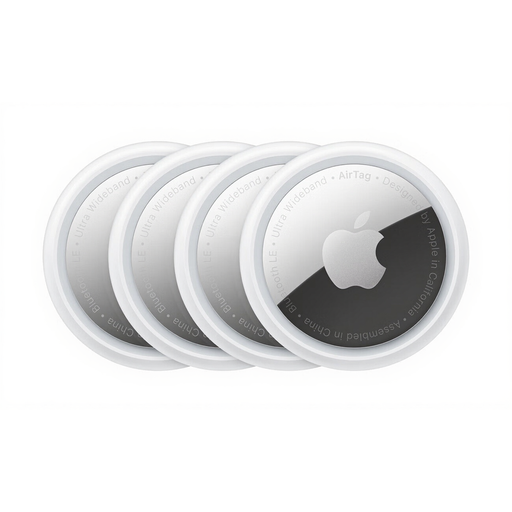 Image unavailable
A four-pack to consider if you want to track several belongings through Apple Find My. Confirm your phone meets the requirements for the exact AirTag generation, and check whether you need separate holders for keys or luggage.
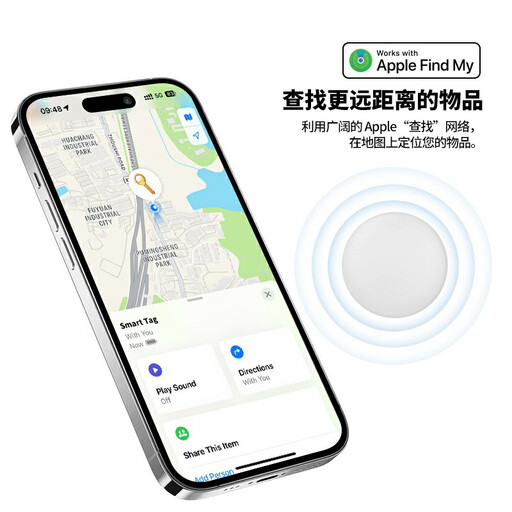 Image unavailable
An Apple Find My-labelled option for belongings such as keys or a bag; confirm its setup requirements for your phone. The product name specifies a replaceable CR2032 battery, sound alert and IP53 rating. IP53 should not be treated as protection against submersion, and no directional-finding feature is specified.
No. AirTag uses Bluetooth for proximity finding, according to Apple Support. Farther away, a compatible finding network needs participating devices near the tag to provide a location update; that is not continuous live GPS tracking.
Check the exact tracker model against your phone, software, account and finding app before buying. Apple Support specifies iOS or iPadOS 14.5 or later for adding an AirTag; Samsung Business UK specifies a Galaxy device running Android 11 or later for SmartTag2. For Google Find Hub, check your Google Account, Location, finding settings and screen lock.
Check with the operating airline for the particular journey rather than assuming every tag is accepted. The UK Civil Aviation Authority advises passengers to check airline rules; the International Air Transport Association’s 2026 passenger guidance covers tracking devices and distinguishes battery types and installed from spare batteries.
Follow the instructions for the exact model before relying on it for a trip. Apple Support specifies a CR2032 3V replacement cell for AirTag and notes that some bitterant-coated cells may not work; rechargeable trackers instead need charging.
Open the alert and follow Google Android Help’s steps to locate the tracker and turn it off using its manufacturer’s instructions. Google says switching off your phone’s Bluetooth or Location, or using Airplane Mode, does not itself stop the tracker from sharing its location. If you feel unsafe, move to a safe public place and contact someone you trust or law enforcement.