Choose a Bluetooth tracker by the phone and finding network it must work with before choosing its shape: Apple Find My suits a compatible iPhone or iPad setup, Google Find Hub suits compatible Android setups, and Samsung SmartTags require a compatible Galaxy device. A tracker can help you find an item nearby or receive a location sighting through participating devices, but it is not a dependable live GPS tracker, particularly where few devices pass by. Check the exact model’s setup requirements and unwanted-tracking safeguards before buying.
Who a tracker suits
iPhone and iPad item finders
If you want keys, a backpack or luggage to appear in Apple Find My, start with a compatible Find My item. Apple Support says nearby Precision Finding also depends on having a suitable iPhone with Ultra Wideband; it is not a feature to assume from the Find My name alone.
Android and Galaxy owners
If you use Android, distinguish a Google Find Hub-compatible tag from a Samsung SmartTag. Google describes Find Hub as using participating Android devices, while Samsung UK says its SmartTag setup requires a compatible Galaxy device and SmartThings rather than any Android phone.
People who misplace items nearby
If keys disappear around the house or a bag gets left in another room, a tracker that can ring from your phone may address the immediate problem. Check its speaker, attachment and direct Bluetooth connection rather than assuming a map view means GPS tracking; Which? distinguishes these two types of tracker.
What to check before buying
Start with the owner’s phone and the exact tag’s finding network. Then decide whether the priority is finding an item nearby, getting a sighting after it has travelled away, or fitting the tracker securely to the item.
| Concern |
Buying checks |
Who this matters to |
| Phone and account compatibility |
Check the exact model’s finding network, required app and phone software version. For a previously owned AirTag, Apple Support says the former owner must remove it from their Apple Account before it can be paired again. |
If I cannot register a tag with my existing phone and account, its shape will not rescue the purchase. Around 36% of consumers put phone and account compatibility first. |
| Finding an item away from home |
Distinguish direct Bluetooth finding from sightings through participating devices. If continuous live location is essential, assess a separate GPS and connectivity solution rather than assuming a Bluetooth tag provides it. |
When a bag goes missing away from me, I need to know whether I might get a later sighting or require live tracking. For around 29% of consumers, that difference is the primary concern. |
| Finding an item nearby |
Check for a controllable sound and whether the intended phone and tag support directional finding or left-behind alerts. Apple Support says Precision Finding requires a compatible Ultra Wideband iPhone. |
Keys lost inside a room call for a useful nearby search, not just a location on a map. Nearby finding comes first for around 21% of consumers. |
| Shape and attachment |
Match a fastening method to keys or a bag, or check the thickness of a wallet-format tracker. Check the exact variant’s battery arrangement and stated resistance to exposure. |
A tag for my slim wallet has to fit, while one on my bag needs to stay attached. Around 14% of consumers make physical fit their primary concern. |
Buying pitfalls
-
Buying by brand without checking the network
Models from one brand can use different apps or finding networks. Chipolo, for instance, distinguishes its regular iPhone-and-Android app trackers from its Apple Find My Spot and Android-oriented Point lines.
Confirm the exact model against the owner’s phone, account and intended finding app before choosing its format.
-
Reading a map location as live GPS tracking
A Bluetooth tag may show a sighting reported through a participating-device network, not a continuously updated position. Which? cautions that Bluetooth trackers may be of limited use in truly rural environments.
Use a Bluetooth item tracker for nearby searches and possible network-assisted recovery; assess a separate GPS and connectivity solution if dependable live tracking is the requirement.
-
Assuming unwanted-tracker alerts work identically on every phone
Apple Support and Google Android Help describe unwanted-tracker alerts, but their settings and alert conditions differ. Neither a tracker purchase nor the presence of an alert feature replaces checking how it works on the phone you use.
Review the phone’s current safety settings and learn how to identify and disable an unfamiliar tracker. Do not use an item tracker to follow someone without their knowledge or consent.
-
Choosing a tag that does not fit the item
A key-fob shape may be awkward in a slim wallet, while an insecure attachment can defeat the purpose of putting a tracker on a bag. A resistance rating also applies to the particular model, not every tracker from its brand.
Check dimensions, fastening, battery access and the exact model’s stated resistance against where the item will be carried.
Brands to consider
These brands illustrate different finding-network and format choices; a brand name alone does not establish that a particular model works with your phone.
Apple
AirTag and other compatible accessories use Apple Find My for personal items such as keys and bags.
- Apple Support documents Find My setup, item finding and unwanted-tracking notifications.
- AirTag setup requires a compatible iPhone or iPad. Apple Support specifies iOS or iPadOS 14.5 or later for AirTag, but 26.2.1 or later for AirTag (2nd generation); Precision Finding also depends on compatible iPhone hardware.
Samsung
Galaxy SmartTags use Samsung’s finding services for compatible Galaxy owners.
- Samsung UK describes direct Bluetooth finding and sightings through the Galaxy Find Network when a SmartTag is out of direct range.
- Samsung’s SmartTag support specifies a Galaxy device with SmartThings; it does not describe SmartTag as an option for iPhone or other Android phones.
Chipolo
Chipolo offers regular app-based trackers alongside models intended for particular phone finding networks.
- Chipolo says its regular app-based ONE and CARD trackers work with iPhones and Android phones for items misplaced nearby.
- Chipolo’s Spot and Point lines follow different network routes, so check the complete model name before expecting network-assisted finding.
Pebblebee
Pebblebee offers rechargeable item finders, including card-like formats and a Universal collection positioned for Apple Find My or Google Find Hub.
- The card format gives wallet owners a different physical option from a key-fob tag.
- Pebblebee’s Universal compatibility is the brand’s own positioning. Check the exact model’s network choice and registration requirements; do not assume it operates on both networks at once.
Tile
Tile is among the Bluetooth tracker brands considered in Which?’s UK testing for keys, luggage and other personal items.
- Which? examines tracker considerations including nearby finding, location accuracy, app use and Bluetooth reach.
- Check an individual Tile model’s phone compatibility and finding method rather than assuming they match an Apple, Google or Samsung network tag.
Joybuy products for Apple Find My
These two choices are for finding personal items through Apple Find My. If you use Android or need continuous GPS-style tracking, choose a compatible finding route or a different type of device before comparing these tags.
 No image available
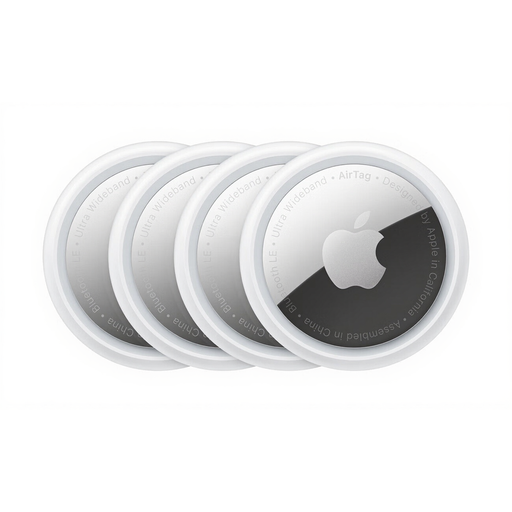
Apple AirTag 4 Pack
A four-pack to consider if you want separate Find My tags for several personal items and use a compatible iPhone or iPad.
Check which AirTag generation is offered before buying: Apple Support lists different minimum iOS and iPadOS versions for the original AirTag and AirTag (2nd generation). Also check how you will secure each tag to its item.
View on Joybuy
 No image available
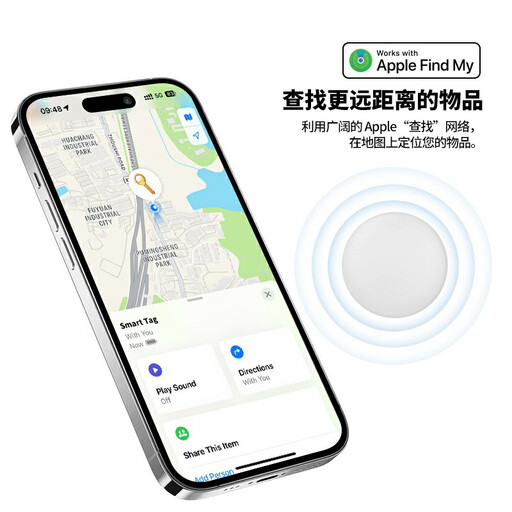
Rexsun RSH-iTag11 Apple Find My tracker
Consider this model for an Apple Find My item that you want to sound when it is nearby; its product name also identifies Lost Mode and left-behind notifications.
The named variant specifies a replaceable CR2032 battery and IP53 resistance. Check its setup requirements against your iPhone and confirm that its shape and attachment suit the item. Keep its button battery away from infants and small children; IP53 is not a claim that the tag can be submerged.
View on Joybuy
Common questions
Is a Bluetooth item tracker the same as a GPS tracker?
No. A Bluetooth tracker helps with nearby finding and, if its network supports it, can receive location sightings from participating devices beyond your phone’s direct range. Which? cautions that these are not GPS trackers and may be of limited use in truly rural places; do not rely on one for dependable live tracking.
Can an Android phone alert me to an unfamiliar tracker?
Yes, a supported Android phone can provide unknown-tracker alerts. Google Android Help explains that these alerts can help you identify and find a tracker travelling with you without your knowledge. Check the phone’s current alert settings and follow the on-screen safety guidance if one appears.
What unwanted-tracking alerts should an iPhone owner check?
Check that Tracking Notifications are enabled and that the iPhone or iPad has the relevant software, Bluetooth and Location Services settings in place. Apple Support says a separated Find My item seen moving with someone over time can trigger a notification or a sound from the accessory.
Can I share access to an Android tracker tag?
Google Find Hub supports sharing a tracker-tag accessory with other people, subject to its sharing requirements. Google Android Help says the sharing steps require Android 9 or later, so check the software on each phone before relying on shared access.


