
24/7 Customer Support

Free returns

Same-day & Next-day Delivery

Quality Guaranteed

Unlock Your Welcome Offers: FREE Delivery | Up to 80% OFF | Free 30-day JoyPlus trial
Download the APP
Spending hours at a desk can take its toll, and that familiar ache in your wrist or forearm is often the first sign. A standard mouse forces your arm into a twisted, palm-down position, which can lead to strain over time. If you're looking for a more comfortable way to work, a bluetooth vertical mouse could be the solution.
These devices are designed to support a more neutral "handshake" posture, reducing muscle tension from your wrist up to your shoulder. This guide is designed to help you understand the key features to look for and to highlight a few standout options, so you can find a mouse that fits your workflow and helps you work more comfortably.
Choosing the right ergonomic mouse involves more than just its shape. Here are a few practical points to consider before you make a decision.
A wireless vertical mouse typically connects in one of two ways. A direct Bluetooth connection is ideal for modern laptops, tablets and any vertical mouse for Mac, as it doesn't require a USB-A port, which are becoming less common. A 2.4GHz connection uses a small USB dongle and often provides a very stable, plug-and-play experience. For maximum flexibility, a dual mode wireless mouse that offers both options allows you to switch between devices seamlessly.
The core benefit of a vertical mouse is its shape. By promoting a natural handshake grip mouse posture, it keeps the bones in your forearm (the ulna and radius) from twisting over each other. This can help alleviate the pressure that contributes to discomfort, making it a popular choice for those looking for a mouse for carpal tunnel or general repetitive strain. Look for models with a comfortable angle and a thumb rest for added support.
DPI, or dots per inch, measures how sensitive a mouse is. An adjustable DPI vertical mouse is highly practical, allowing you to switch between lower settings for precise tasks like photo editing and higher settings for quick navigation across large screens. Additionally, extra programmable buttons (like forward and back) can significantly speed up your workflow, reducing unnecessary cursor movements.
Here are a few recommendations that cater to different needs, from all-day office work to on-the-go productivity.
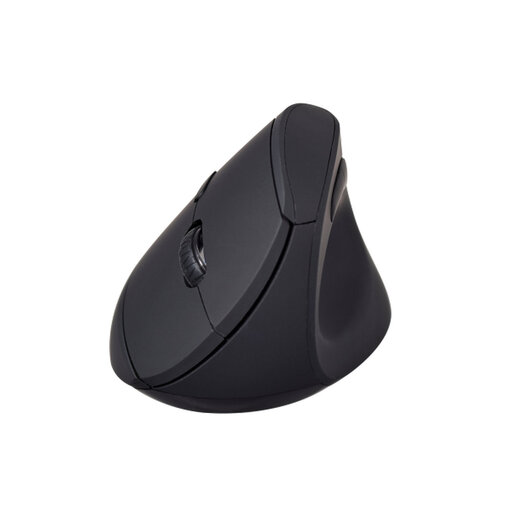
Why It Stands Out The V7 MW500BT is a purpose-built ergonomic mouse for wrist pain prevention and comfort. Its design centres entirely on the vertical handshake grip, with a soft-touch surface and a concave thumb rest that encourages a relaxed posture. The dual-mode connectivity adds a layer of versatility that is essential for modern multi-device workflows.
Pros
Who is it for? This mouse is an excellent choice for office professionals, remote workers and anyone who spends the majority of their day at a computer and wants to prioritise wrist comfort.
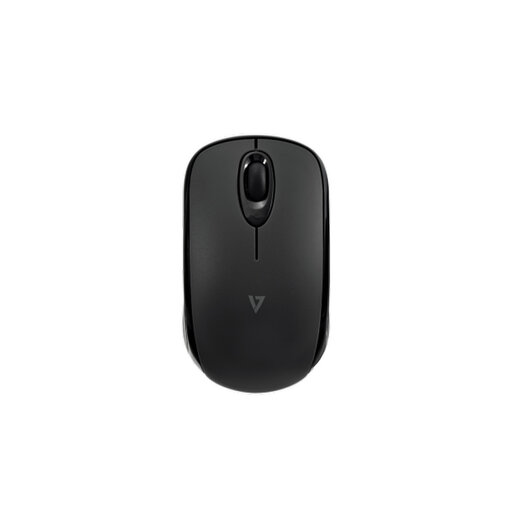
Why It Stands Out While not a vertical mouse, the MW150BT is a standout for those who prioritise portability and battery life. It uses Bluetooth 5.2 Low Energy, which provides an impressive battery life of up to 24 months. Its compact, ambidextrous design makes it easy to slip into a laptop bag, and the direct Bluetooth connection means no dongle to lose.
Pros
Who is it for? Perfect for frequent travellers, hybrid workers and users who need a reliable, long-lasting mouse for use with laptops, tablets and other Bluetooth-enabled devices.
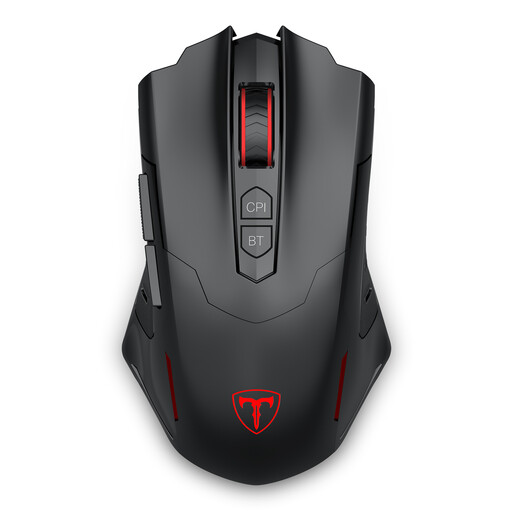
Why It Stands Out The ET PC400 combines an ergonomic shape with high-performance features. While designed for gaming, its features are equally beneficial for power users. It offers a very wide adjustable DPI range for ultimate precision, seven programmable buttons for custom shortcuts and dual-mode connectivity for versatility.
Pros
Who is it for? This mouse is aimed at gamers and power users who demand high precision, customisation and speed, all within a comfortable, ergonomic form factor.
These recommendations cover a range of common needs, but the right mouse is a personal choice. If you're looking for a different style, a wired model or simply want to see more, you can explore our full collection of computer and mouse peripherals.
A vertical mouse is designed to place your hand and wrist in a more neutral, untwisted posture, similar to a handshake. This can reduce the muscular strain on your forearm and wrist that is often associated with using a traditional flat mouse for long periods. While many users report increased comfort, it is an ergonomic aid, not a medical treatment.
There is usually an adjustment period. For most people, it takes anywhere from a few days to a week to become fully accustomed to the different grip and movement. It's often helpful to start by using the mouse for general web browsing and emails before moving on to more precision-heavy tasks like spreadsheet work or image editing.
Yes, most modern Bluetooth mice are compatible with macOS. A vertical mouse for Mac users is often a great choice, as the direct Bluetooth connection doesn't require a USB-A port, which are absent on many newer MacBook models. It is always a good practice to check the product's specific system requirements to ensure compatibility with your version of macOS. For example, the V7 MW500BT is listed as compatible with macOS 13.6 and above.