For a dedicated home setup, start by looking for a camera whose exposure and white balance you can control, with a screen you can see from the planned camera position; an APS-C interchangeable-lens kit is one route. Stable support and even, repeatable lighting matter more to consistent cover photographs than action-focused features. More pixels can help when you crop, but they will not correct glare or changing colour.
Who this setup suits
Colour-conscious catalogue makers
If you photograph many covers, consistent exposure, white balance and lighting help keep the resulting images coherent. RAW capture may be useful when you plan to adjust files afterwards, but it adds processing work.
Small-space home-studio beginners
If your camera sits on a tripod, copy stand or overhead arm, check whether you can see its screen and frame a whole cover without moving the support repeatedly.
Creators who crop and reuse cover images
If one photograph must serve several layouts, compare the source image dimensions with your intended crops. Keep the cover square to the camera and evenly lit before relying on extra resolution.
What to check when choosing
Work out where the camera and lights will stand before comparing bodies: that determines whether the screen and lens are convenient for the space, while your intended edits and crops determine the file features you need.
| Concern |
What to check |
Who this matters to |
| Consistent colour and exposure |
Check manual exposure and selectable white balance. Plan an even-light arrangement separately from the camera. |
If my covers are going into one catalogue, I need their colours and brightness to stay consistent from shot to shot. Around 42% of consumers put that consistency first. |
| Overhead framing |
Check screen visibility on your planned support and whether the lens frames your largest cover at the available distance. |
With the camera mounted above a book in a small room, I need to check the edges without disturbing its position. For around 33% of consumers, repeatable framing is the primary need. |
| Files for cropping |
Compare image dimensions and RAW options for the exact model, alongside your editing and storage workflow. |
If I will reuse a cover in different layouts, I need enough source image for the intended crops. That flexibility comes first for around 25% of consumers. |
Mistakes to avoid
-
Choosing autofocus speed over a repeatable setup
A stationary cover gives you time to frame and focus. Changes in exposure, white balance, camera position or lighting are more likely to disrupt consistency across a batch.
Plan the support and lighting first, then check the camera controls and screen position against that setup.
An action-focused camera still leaves you with the work of positioning a stable support and even lighting.
-
Expecting more pixels to remove reflections
Resolution can leave room for a crop, but it cannot correct glare on a glossy cover or illumination that varies across the page.
Choose image dimensions for your intended output, and test a glossy and a matte cover under the same lighting arrangement.
Larger source files can also increase storage and editing work.
-
Assuming a telephoto lens is needed for tabletop covers
Extra reach may be useful for other photography, but a small studio calls for a lens that frames the whole book at the distance you actually have.
Measure that distance and check the standard zoom's framing range before choosing a multi-lens kit.
A second lens adds equipment to store and carry even if it stays unused for cover shoots.
-
Publishing cover photographs without checking rights
A cover photograph can reproduce protected artwork, text and layout. GOV.UK explains that using copyright material generally requires permission unless a relevant exception or other rights basis applies; whether an exception covers a particular use depends on its circumstances.
For UK commercial listings or promotion, establish the rights basis for covers you photograph and seek permission or qualified advice when the intended use is uncertain.
Relevant camera brands
Canon
Canon UK lists the EOS R50 kit with a 24.2 MP APS-C sensor, vari-angle touchscreen and RF-S 18–45 mm lens.
- The movable screen is worth considering when the camera will be above the book.
- Check whether the kit lens frames your covers at the available distance; the camera and lens do not resolve lighting reflections on their own.
Nikon
Nikon UK specifies a 20.9 MP DX sensor and a 3.2-inch vari-angle touchscreen for the Z50II.
- The screen offers a way to check composition from an awkward camera position.
- If substantial cropping is central to your work, compare its final image dimensions with your required output before choosing it over another format or model.
Sony
Sony UK describes the α6400 as an APS-C camera; the Joybuy ILCE-6400L listing pairs it with an E 16–50 mm power-zoom lens.
- The listed 180-degree tilting screen and kit zoom are relevant to checking and adjusting composition.
- Confirm the exact kit and whether the screen remains visible on your intended support; action-focused features need not drive a stationary-cover decision.
Fujifilm
Fujifilm specifies a 26.1 MP APS-C sensor, 14-bit RAW and manual exposure options for the X-M5.
- Those file and exposure options are relevant if you expect to crop or edit cover photographs.
- Check the screen arrangement and your intended lens separately for an overhead setup; resolution alone does not settle either choice.
Joybuy cameras and kits for book-cover photography
These options include interchangeable-lens cameras and a pocket video-oriented camera. For a fixed cover setup, compare their framing, still-photo controls and lens arrangements against the space and files you need.
 No image available
Sony Alpha 7 III full-frame camera body
Consider this body if a full-frame camera fits a setup for which you will choose a suitable lens separately. Confirm the exact bundle before planning the shoot: the body-only title and lens information disagree.
View on Joybuy
 No image available
Sony Alpha ZV-E10 II K with 16–50 mm power zoom
For a setup that also calls for video, this APS-C kit includes a 16–50 mm f/3.5–5.6 power-zoom lens. If repeatable cover stills are the priority, check its manual still-photo exposure modes before choosing it.
View on Joybuy
 No image available
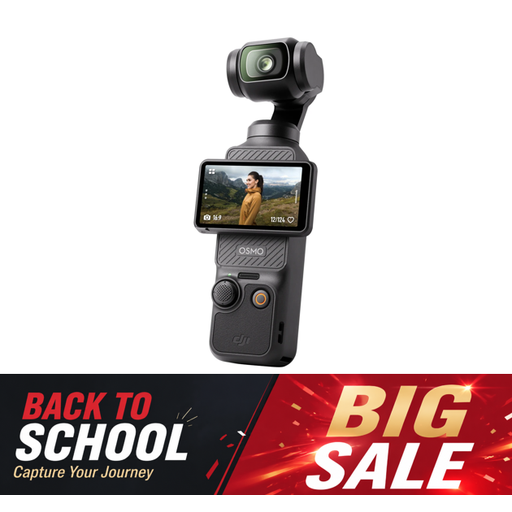
DJI Osmo Pocket 3
If you also want a pocket video camera, this model has a 1-inch CMOS sensor and a 2-inch rotatable touchscreen. For cover stills, check its white-balance controls and exact still-image dimensions against your colour and cropping needs.
View on Joybuy
 No image available
Sony A6700 APS-C with 16–50 mm lens
For photographing different cover sizes from one camera position, this APS-C kit includes a 16–50 mm lens. Check the still-photo exposure, white-balance and RAW settings you need for a repeatable workflow.
View on Joybuy
 No image available
Sony α6400 ILCE-6400L with 16–50 mm power zoom
For adjusting cover framing without moving the support, this APS-C kit pairs the camera with a 16–50 mm power-zoom lens. Check that the lens frames your largest cover at the available distance and that the screen is visible from your mount.
View on Joybuy
Common questions
Do I need a full-frame camera for book covers at home?
No, full-frame is not automatically necessary for a fixed book-cover setup. An APS-C camera with suitable controls and a lens that frames the cover may meet your needs; decide using your intended output size, cropping and available shooting distance, while keeping lighting and camera settings consistent.
Should I photograph book covers in RAW or JPEG?
Choose RAW if you expect to adjust colour or exposure afterwards and can manage the editing workflow. The U.S. National Archives and Records Administration notes that RAW requires suitable software and post-production experience; if you use JPEG, its guidance advises selecting the highest available quality and size.
Will changing cameras remove glare from glossy covers?
No camera body removes glare by itself. Norfolk Record Office guidance calls for light to be spread evenly across the subject; test your light placement with a glossy cover and keep the camera position stable before settling on a setup.
Can I use photographs of other publishers' covers in UK commercial listings?
Do not assume that owning a physical book gives you permission to reproduce its cover for commercial use. GOV.UK says use of copyright material generally requires permission or another valid rights basis, while UK Intellectual Property Office guidance explains that exceptions depend on the circumstances. Check the basis for your intended use and seek permission or qualified advice if it is uncertain.


