Choose the keyboard's power arrangement before its typing features: replaceable batteries avoid competing for a charging socket during a review session, while a rechargeable model makes more sense if USB power is reliably available between sessions. A compact mechanical keyboard with a wired option gives you another connection route, but cable use still needs a suitable USB port; whichever type you choose, check the physical layout and editing keys you will use.
Who these choices suit
Writer with limited access to sockets
If you draft on a laptop or switch between devices, you may want wireless typing without having to interrupt a session to charge the keyboard. Check both how it gets power and how it connects to each device you use.
Reviewer writing for long stretches
Drafting and revising for an extended period makes key position and the wider workstation worth considering. The Health and Safety Executive advises placing the keyboard just below elbow height; a different keyboard alone does not resolve an awkward screen position.
Writer who values switch feel
A compact mechanical keyboard may appeal if key feel, shortcuts and a cable connection matter to you. Check the exact switch and layout variant: mechanical keyboards do not all feel or sound alike.
What matters when choosing
Replaceable-battery Bluetooth
Choose it when: Avoiding a charging interruption matters most and you can keep the correct replacement batteries available.
Trade-off: Battery replacement takes planning, and a compact layout may change access to familiar editing keys.
Rechargeable compact keyboard
Choose it when: You can recharge between sessions and want features such as the illumination Logitech offers on MX Keys Mini.
Trade-off: Wireless use does not remove the need for access to USB power when charging is due.
Compact mechanical with wired mode
Choose it when: Switch choice and a cable connection matter more to you than keeping the setup simple.
Trade-off: Sound and feel depend on the switches, and wired use requires a suitable USB port. Keychron lists Bluetooth, 2.4 GHz and wired modes for its K3 Max ISO range.
| Concern | Buying checks | Who this matters to |
|---|
| Power access |
Check for replaceable batteries or USB charging, and confirm the required battery or charging connector for the exact model. |
When sockets are scarce, I want to finish a draft without stopping to charge the keyboard. Around 50% of consumers put uninterrupted power access first. |
| Long-session setup |
Consider key feel and sound alongside where the keyboard and screen will sit; the Health and Safety Executive advises positioning the keyboard just below elbow height. |
If I spend hours drafting and revising, I need a typing position I can sustain and key action that suits the space I work in. For around 30% of consumers, that long-session fit is the primary concern. |
| Layout and devices |
Confirm the physical UK layout, editing-key positions and compatibility with each intended device. |
Moving between notes and a draft makes misplaced punctuation or awkward navigation especially frustrating. Layout and device workflow come first for around 20% of consumers. |
Buying pitfalls
-
Assuming wireless means no power planning
A wireless keyboard still needs battery replacement or recharging. A wired-capable model also needs a suitable USB port when used by cable.
Decide which power arrangement you can manage during a review session, then check what the exact model requires.
Allow for replacement batteries or time and access to recharge, depending on the keyboard.
-
Overlooking the physical layout
A compact board may move navigation commands to other keys, while a US layout may put punctuation in unfamiliar positions for a UK writer.
Check the exact variant's key legends and whether Home, End, Delete, arrows and function keys have the access you expect.
-
Expecting a new keyboard to fix the whole workstation
The Health and Safety Executive's display-screen guidance considers keyboard height and alignment with the screen, not the keyboard in isolation.
For extended laptop writing, check whether you can position the separate keyboard centrally and place the screen appropriately.
That arrangement may also call for a laptop riser or a separate mouse.
-
Choosing lighting or mechanical switches by name alone
Illumination adds a charging consideration, while mechanical switch sound and feel depend on the variant. Neither feature settles the choice for every writing space.
Decide whether visibility, quiet typing or tactile feedback matters most, and check the exact lighting and switch configuration.
Relevant brands to consider
Logitech
Its compact range offers different approaches to power and typing. Logitech describes Pebble Keys 2 K380s as a keyboard that switches between three devices, while MX Keys Mini has illuminated, shaped keys.
- The range gives writers a choice between device switching and an illuminated compact setup.
- Check power requirements, battery-life conditions and key feel for the exact variant rather than treating the range as one keyboard.
Keychron
Its compact low-profile mechanical keyboards are relevant if you want to choose switches or use more than one connection method. Keychron lists Bluetooth, 2.4 GHz and wired operation for the K3 Max ISO range.
- Check the selected K3 variant for the UK-ISO layout and the connection and switch options you want.
- Switch sound and feel vary; confirm the exact layout and variant before buying.
Microsoft
Microsoft's Designer Compact Keyboard is a replaceable-battery Bluetooth option for a compatible Windows setup.
- Replaceable batteries avoid routine cable charging during a writing session.
- Microsoft specifies Windows 10 or 11 and Bluetooth 4.0 or later for its Windows setup; its Expressive key requires Windows 11. Check the requirements against your main device.
Joybuy keyboard choices
These keyboards offer full-size or compact layouts for writing without a mains connection during wireless use. Some list a wired mode too; compare each model's physical layout and power needs before choosing.
 No image available
Targus EcoSmart Full Size Wireless Keyboard (UK)
Consider this if familiar full-size key spacing matters more than a small desk footprint. It is a wireless UK keyboard; check its battery requirements and the space available on your desk.
View on Joybuy
 No image available
HyperX Alloy Rise 75 Wireless Keyboard
Its 75% wireless design may suit a smaller writing desk. Before relying on it for UK punctuation or a long session, confirm the physical key layout, charging arrangements and runtime for your intended lighting settings.
View on Joybuy
 No image available
Rapoo E9050L 75% Wireless Membrane Keyboard, US layout, White
Consider this compact option if a US physical layout works for your editing habits and you can plan for recharging. The product name identifies a 78-key membrane keyboard with 2.4 GHz and Bluetooth 5.0/4.0 modes; check compatibility with the devices you intend to use.
View on Joybuy
 No image available
GravaStar Mercury K1 Lite 75% Tri-Mode Keyboard, Chinese Retail Version, US layout, Black
This compact mechanical option is worth checking if you want both wireless use and a USB-C wired mode. Its name specifies Bluetooth 5.0, 2.4 GHz and a US QWERTY layout; confirm that layout suits your writing and how often the keyboard will need charging.
View on Joybuy
 No image available
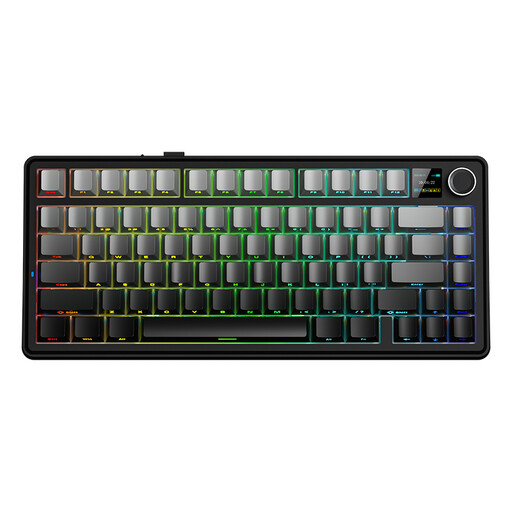
AULA F75 MAX 75% Mechanical Wireless Keyboard, US layout, Gradient Grey Side-Engraved Keycaps, Reaper Switch
Consider its 75% mechanical layout if you want Bluetooth, 2.4 GHz and wired connection options. The named variant has a US QWERTY layout and Reaper Switch; check whether its key positions, battery arrangements and wired connection suit your review-writing setup.
View on Joybuy
Common questions
Should I choose a rechargeable keyboard when sockets are limited?
Choose one if you can reliably recharge it between writing sessions. If USB power is unpredictable, a replaceable-battery keyboard avoids waiting for a charge, provided you keep the correct batteries available.
Does a book-review keyboard need a UK layout?
A UK layout is worth choosing if you expect familiar UK key positions and punctuation while editing. Check that the exact variant specifies UK English or UK-ISO; a QWERTY label alone does not establish the physical layout.
Is a compact keyboard suitable for a long writing session?
It can be, but compact size alone does not determine how the whole workstation fits you. The Health and Safety Executive advises placing the keyboard just below elbow height and centrally in front of the screen; check that you can arrange both comfortably for extended laptop writing.


