If you play brass band music from a work computer and want fewer separate components, start by looking for a powered stereo system with an input that matches your computer. Compact active monitors suit a defined listening position but need a suitable output arrangement; passive bookshelf speakers make more sense if you already have, or want to choose, a separate amplifier. In any route, check that the pair will fit and can be positioned around your desk rather than judging it by specifications alone.
Who each setup suits
Computer-first music listener
If you want to play music from a desktop or laptop without a separate amplifier, look for a powered pair with the computer input you need. Q Acoustics lists USB connectivity for the M20, while KEF lists USB-C for the LSX II LT.
Focused desk listener
If you usually listen from one seat and can arrange the speakers around it, compact active monitors are worth considering. Genelec’s placement guidance emphasises symmetry, aiming and the listening position.
Separates-system upgrader
If you own an amplifier or want to select one independently, passive bookshelf speakers offer that system arrangement. Check the exact speaker’s amplifier guidance, the source connection, cabling and available space.
What matters when choosing
Powered bookshelf system
Choose it when: You want built-in amplification and a direct connection from your computer; Q Acoustics lists USB for the M20 and KEF lists USB-C for the LSX II LT.
Trade-off: Integrated functions differ by model, so check whether you would use extras such as the LSX II LT’s HDMI ARC and streaming features.
Compact active monitors
Choose them when: You listen from a defined desk position and are willing to arrange and aim both speakers for that seat.
Trade-off: Genelec lists one XLR analogue input and one speaker per 8010A package; a stereo setup needs two units and a suitable source and volume-control arrangement.
Passive speakers and amplifier
Choose them when: You already have a suitable amplifier or want to choose and change components separately.
Trade-off: A passive pair also needs an appropriate amplifier, speaker cable and a way to connect your music source.
For consumers choosing speakers to play brass band music at a home-office desk, decide on the system arrangement before comparing individual models. The proportions below describe which concern consumers might put first when those needs overlap.
| Concern | What to check | Who this matters to |
|---|
| Computer connection and clutter |
Check for built-in amplification and a USB or USB-C input compatible with your computer. |
If I play music from my work computer, I want to connect it without finding room for another amplifier. Around 36% of consumers would put this straightforward connection first. |
| Stereo placement |
Check whether both speakers can sit at similar distances from your chair and be aimed towards it; Genelec suggests a 60° angle between monitors as a starting point. |
When I listen from the same seat, I want a consistent left-right presentation rather than an awkward layout dictated by the desk. Roughly 29% of consumers would make placement their primary concern. |
| Desk fit |
Compare cabinet dimensions, stand or mounting options and cable clearance with the space beside your screen. |
My screen and work materials leave little space for two speakers, so the installed footprint decides what I can use. Around 21% of consumers would prioritise fit. |
| Component flexibility |
For passive speakers, check the exact model’s impedance and amplifier guidance, then plan the source connection and cable run. |
If I want to keep or choose my own amplifier, I can accept more components on the desk or nearby. Roughly 14% of consumers would put that flexibility first. |
Mistakes to avoid
-
Treating passive speakers as a complete computer-audio system
Passive speakers need external amplification. Bowers & Wilkins publishes amplifier guidance for its 607 S3, rather than presenting the speaker pair as a direct computer connection.
Plan the whole chain: speakers, a suitable amplifier, speaker cable and a connection from your computer or other source.
You may also need a device to connect the computer to the amplifier.
-
Ordering one monitor for stereo listening
Genelec specifies one 8010A monitor per package; stereo playback calls for left and right speakers.
Confirm the quantity supplied and how your source will feed and control both channels.
A second matching monitor and suitable output hardware may be needed.
-
Leaving speaker placement until after purchase
An uneven desk layout can affect what reaches your listening position. Genelec’s setup guidance addresses symmetry, speaker angle and aiming.
Measure the available positions before ordering, and consider whether stands or pads would let you aim the speakers towards your seated position.
-
Assuming all powered speakers have the same inputs
KEF lists USB-C, HDMI ARC and optical connections for the LSX II LT; Q Acoustics lists USB and Bluetooth among the M20’s connection options. A shared system label does not tell you whether your source will connect.
List the devices you intend to use and check each required input on the exact model.
Brands to consider for these systems
Q Acoustics
The M20 is a powered bookshelf option for listeners who want to connect a computer without a separate amplifier.
- Q Acoustics lists USB computer input and Bluetooth for the M20.
- Check the M20’s dimensions and the input required by your own computer before choosing an integrated system.
KEF
The LSX II LT is a compact powered pair for buyers who may use computer audio alongside other connected sources.
- KEF lists USB-C, HDMI ARC, optical input and a subwoofer output for the LSX II LT.
- If you will only play music from a computer, decide whether its additional connections and streaming functions matter to you.
Genelec
The 8010A represents the compact active-monitor route for a defined desk listening position.
- Genelec specifies an XLR analogue input for the 8010A and publishes guidance on monitor placement.
- Each package contains one monitor, so plan for two units and a suitable output arrangement for stereo.
Bowers & Wilkins
The passive 607 S3 suits a system built around a separately chosen amplifier.
- Bowers & Wilkins specifies 8-ohm nominal impedance and recommended amplifier power of 30 W to 100 W into 8 ohms on unclipped programme for the 607 S3.
- The speaker pair still needs an appropriate amplifier, cabling and a source connection.
Joybuy products for these setups
These choices include a compact desktop speaker option for computer playback and two passive bookshelf pairs for systems with a separate amplifier. Check the supplied quantity and the space each setup needs before deciding.
 No image available
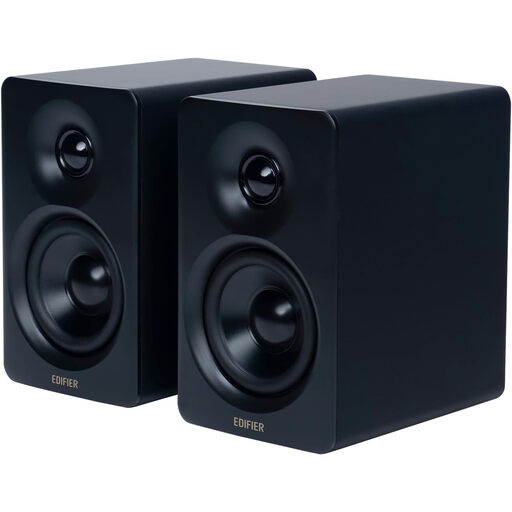
Edifier M60 Bluetooth 5.3 desktop speakers
Consider these for a computer desk if USB-C or AUX matches your source; confirm how many speakers the offer supplies if you want stereo playback.
The product title lists Bluetooth 5.3, 66 W RMS, USB-C and AUX inputs, a 3-inch mid-bass driver and a 1-inch tweeter. Those figures do not establish how brass band recordings will sound in your room.
View on Joybuy
 No image available
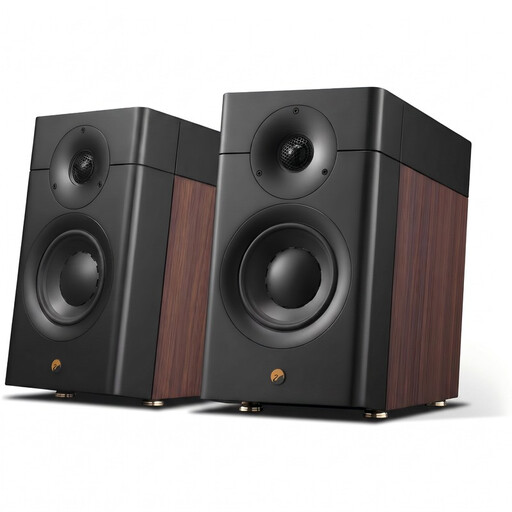
HiVi-Swans D3.1MKII passive bookshelf speakers
Consider this passive pair if you have or plan to add an amplifier; check the amplifier connection and desk clearance before ordering.
The product title lists a two-way design, a 6.5-inch mid-bass driver, a 28 mm tweeter, rear bass reflex, 8-ohm impedance and 10–120 W power handling. An amplifier and speaker cable are needed for a passive setup.
View on Joybuy
 No image available
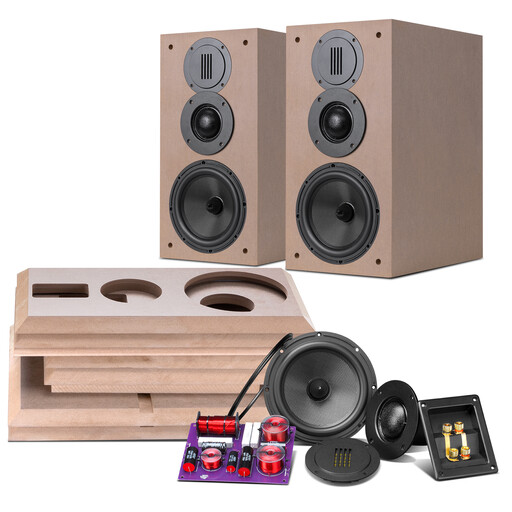
HiVi-Swans DIY3.1 passive bookshelf speakers, one pair
This pair is an option for a separately amplified system. Check its dimensions against your desk and confirm amplifier compatibility before buying.
The product title identifies a passive bookshelf pair with a 6.5-inch driver. You will need an amplifier and speaker cable.
View on Joybuy
Common questions
Do all bookshelf speakers need a separate amplifier?
No: powered speakers and active monitors have amplification built in, whereas passive bookshelf speakers need an external amplifier. For a passive model, check its own matching guidance and allow for speaker cable and a connection from your music source.
How should I position a stereo pair at a home-office desk?
Start with a symmetrical arrangement and aim both speakers towards your usual listening seat. Genelec suggests a 60° angle between monitors as a starting point and advises placing the acoustic axis near ear level for a typical two-way setup; adjust the layout to what your desk permits.
Can a work computer connect directly to powered speakers?
Yes, if the speaker input and computer output are compatible. Q Acoustics lists USB computer connectivity for the M20, while KEF lists USB-C for the LSX II LT; check your computer’s port and the cable required by the exact speaker model.


