Desk-first chamber-music listeners
You listen close to a computer desk and want a compact stereo setup that connects to your usual source without crowding the workspace.


For recorded chamber music, choose a powered system if you want laptop and streaming connections without a separate amplifier, compact active speakers if desk space and a direct analogue connection matter most, or passive standmounts if you have a compatible amplifier. Whichever route suits your sources, check that you can position a stereo pair evenly around your seat; nearby walls can affect bass balance, particularly with rear-ported speakers.
You listen close to a computer desk and want a compact stereo setup that connects to your usual source without crowding the workspace.
You already have a suitable stereo amplifier, or want to choose separate components, and can make room for speaker cable and careful left-right placement.
Your desk, shelves or nearby walls restrict where the speakers can go. Physical fit and the ability to adjust their position matter alongside the speaker choice.
For chamber-music playback in a home office, start with the sources you need to connect and whether you want a separate amplifier. Then check whether the speakers can form a comfortably positioned stereo pair at your listening seat.
Choose when: You want laptop and streaming connections in one system. KEF UK lists USB-C, Bluetooth and streaming for LSX II LT.
Bear in mind: Amplification is built in, and KEF says LSX II LT needs a compatible home Wi-Fi network for its full feature set.
Choose when: A small desk footprint and direct analogue connection suit your source. Genelec positions its amplified G One for computer sound in smaller spaces.
Bear in mind: The G One has an RCA analogue input; a source without a suitable output needs another connection solution.
Choose when: You own a compatible amplifier or want to select one separately. KEF LS50 Meta, Dynaudio Emit 10 and Q Acoustics 5020 are passive standmount options.
Bear in mind: Allow space for an amplifier and speaker cable, and check the requirements of the exact speakers you choose.
| Concern | What to check | Who this matters to |
|---|---|---|
| Computer and streaming connections | Match the speaker inputs to your computer and regular music sources. If you want streaming, check the chosen system’s network requirements. | If I play music from a laptop throughout the working day, I want a straightforward connection without choosing a separate amplifier. Around 42% of consumers put that connection need first. |
| Stereo placement for instrumental detail | Check that both speakers can face your seated position at similar distances. For passive speakers, also check amplifier compatibility. | When I sit down to hear a small ensemble, I want its instrumental lines and left-right placement to remain clear, even if setup takes more space. Around 33% of consumers make that listening need their priority. |
| Fit and bass balance near walls | Measure the available desk or stand space and allow for adjustments to speaker angle and wall distance, particularly with rear-ported designs. | With a desk close to the wall, I need a pair I can position without the bass overwhelming the music at my seat. Roughly 25% of consumers place that room-and-placement need first. |
KEF UK notes that rear-ported speakers can be sensitive to distance from the wall behind them. Uneven space around the left and right speakers can also complicate stereo placement.
Measure the usable surface before choosing a pair. Where possible, place the speakers evenly, then adjust wall distance and their angle towards your seat.
Desk pads, stands or additional repositioning space may be needed for the layout you choose.
A passive pair needs external amplification. KEF UK specifies a 40–100 W amplifier requirement for LS50 Meta; that figure is specific to that model.
Check the chosen speaker’s amplifier requirements and plan the source connection, amplifier and speaker cable as one system.
KEF UK lists USB-C and network features for LSX II LT, while Genelec lists an RCA analogue input for G One. Built-in amplification does not tell you how your computer connects.
List the sources you intend to use and check the exact inputs and network needs of the model before ordering.
An adapter, interface or other source component may be needed if your existing output does not match the speaker input.
A bass specification does not establish how clearly a cello or piano will sound at your desk. Wall distance and stereo positioning also affect what you hear there.
Check the available placement space first. If deeper bass is important, confirm that the chosen system has a suitable documented connection or expansion option.
These brands illustrate different system designs relevant to a compact office; the choice depends on the particular model and your existing equipment.
The LSX II LT is an amplified desktop and streaming system, while the LS50 Meta belongs in a separate-amplifier setup.
The G One is a compact active speaker that Genelec positions for computer sound in smaller spaces.
The 5020 is a passive standmount option for a conventional amplifier-and-speaker setup.
Dynaudio describes Emit 10 as a compact, two-way passive standmount for smaller rooms.
These choices cover a compact active desktop setup and a passive bookshelf pair for a separate-amplifier system. Compare their connections and placement needs with the space and equipment you already have.
 No image available
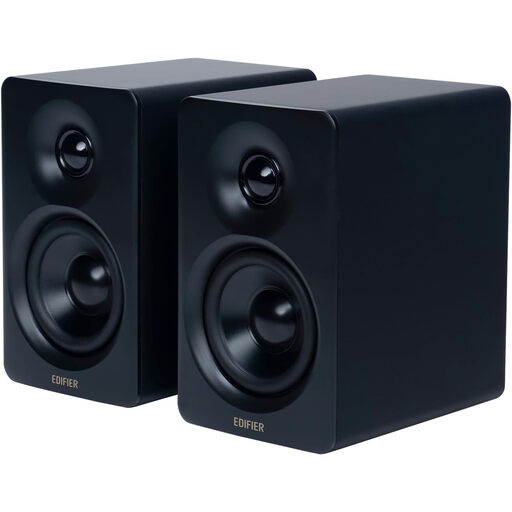
Consider the M60 for a desk-based active setup when its listed wired or wireless connections match your sources.
 No image available
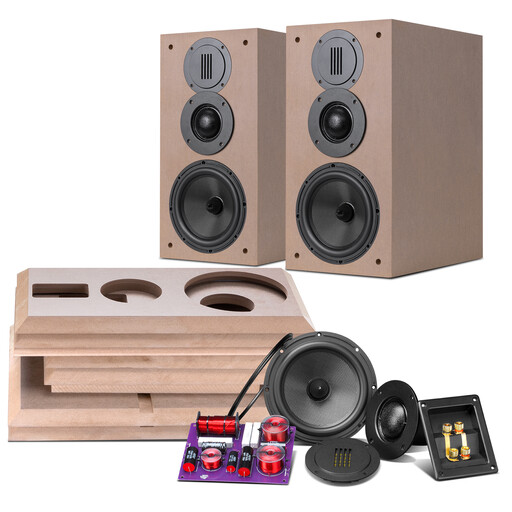
Consider this pair if you want a separate-amplifier stereo system and have space to position both speakers around your listening seat.
Choose active speakers if you want amplification built into the speaker system; choose passive speakers if you have or intend to buy a compatible amplifier. Connection types still vary: Genelec lists an RCA analogue input for G One, while KEF UK specifies a 40–100 W amplifier requirement for the passive LS50 Meta.
Start with the left and right speakers at similar distances from your seat and aimed towards it. Genelec’s monitor-placement guidance uses a 60-degree angle at the listening position as a starting point; adjust the layout to account for your desk and nearby walls.
They can, but leave room to adjust their position. KEF UK notes that rear-ported speakers can be more sensitive to distance from the wall behind them, so check the chosen model’s placement guidance and listen for changes in bass balance.
Not every connection needs Wi-Fi, but the answer depends on the model and feature you intend to use. KEF UK lists a USB-C input for LSX II LT and says a compatible home Wi-Fi network is needed for its full feature set; check your intended connection before buying.