One-device home-office listeners
If you usually start songs from the same laptop or phone, an active pair with a matching input and accessible volume control keeps the setup straightforward.


For straightforward playback from a phone or work computer, start with active speakers, which have amplification built in. Choose a pair with an input your device can use and controls you can reach easily; passive bookshelf speakers make more sense if you already have an amplifier or want to choose one separately. Keep playback at a modest level and place the speakers and cables securely when children are nearby.
If you usually start songs from the same laptop or phone, an active pair with a matching input and accessible volume control keeps the setup straightforward.
When children may be nearby, modest volume, secure placement and controls that make it easy to stop or adjust playback matter alongside sound quality. The World Health Organization notes that both loudness and listening duration affect risk.
If you want to choose or change your amplifier independently, passive bookshelf speakers offer that route. They need an external amplifier before they can play music, as KEF explains in its bookshelf-speaker guide.
For children's songs in a home office, decide how you will connect your usual playback device before considering extra system features. Then check where the speakers and their cables can sit safely.
Choose when: You want playback from a compatible phone, computer or display without a separate amplifier.
Trade-off: The pair's built-in inputs and amplification determine which sources you can use directly.
Choose when: A compatible laptop is your main source and you also want streaming or TV connections.
Trade-off: Check the system's app, network and speaker-to-speaker connection requirements rather than assuming a simpler desk setup.
Choose when: You already own suitable amplification or want to select the amplifier separately.
Trade-off: The speaker pair alone cannot play from a phone or laptop; the system also needs amplification and cabling.
| Concern | What to check | Who this matters to |
|---|---|---|
| Connection and control | Match Bluetooth, analogue, optical or USB-C input to your usual device. Check how you will change the volume. | If I start songs from my work laptop or phone, I want playback and volume changes to take little effort. Around 36% of consumers put that connection-and-control need first. |
| Volume and placement | Choose an accessible volume control and a stable position away from reachable cables and liquids. Follow the model's ventilation instructions. | When children share my workspace, I want to keep playback modest and the equipment secure. That is the primary concern for around 27% of consumers. |
| Desk fit | Measure the available width and depth, allowing room for cables and any required ventilation clearance. | I have limited space beside my monitor, so the pair must fit without crowding my work area. Around 19% of consumers prioritise that physical fit. |
| Future flexibility | Decide whether you need TV, streaming or subwoofer connections, or would rather choose a separate amplifier. | If these speakers may become part of a larger system, I care about the connections or components I can add later. For around 18% of consumers, flexibility comes first. |
Passive speakers need an external amplifier, so a speaker pair on its own will not provide simple playback from a laptop or phone.
If you want fewer components, consider active speakers. If you prefer passive speakers, plan the complete signal path before choosing a pair.
You will also need speaker cable and may need separate hardware to connect your chosen source.
Inputs differ between models: Edifier lists Bluetooth, analogue, optical and coaxial connections for the R1280DBs, while KEF lists USB-C and HDMI ARC among the LSX II LT's connections.
Check the output on your work computer or display against the exact speaker model before buying.
Mismatched connections may mean using an adapter or interface.
A power figure does not tell you where to set the volume around children. The World Health Organization identifies sound level and listening duration as factors in hearing risk.
Use only the level needed in the room, and turn it down for longer listening sessions.
Edifier's R1280DBs manual warns against liquids and blocked ventilation and advises keeping small supplied parts away from children.
Use a stable position, route cables out of reach and follow the clearance and safety instructions for the model you buy.
These brands illustrate different speaker setups; the features below apply to the named models, not every product each brand makes.
The compact active MR1 mk2 suits an office where Bluetooth, analogue or optical playback is useful.
The active R1280DBs is a reference point for buyers wanting several conventional inputs and remote or side controls.
The active LSX II LT suits a setup that needs a direct compatible USB-C source connection and may also serve a TV or networked system.
The compact 3010c represents a passive bookshelf-speaker route for a separately assembled system.
These choices include a desktop active pair for direct playback from a compatible source and two passive bookshelf pairs for systems with separate amplification. The Edifier M60 is described as a desktop speaker system rather than a bookshelf model, so check whether that form fits where you intend to place it.
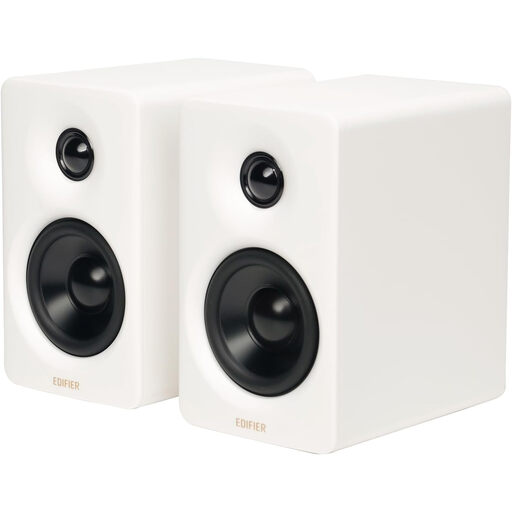 Image unavailable
Consider this active desktop pair if you want to play songs from a device with a compatible Bluetooth, USB-C or auxiliary connection. Check USB-C audio compatibility with your computer before relying on that input.
The product name specifies 66 W RMS and a 3-inch mid-bass driver with a 1-inch tweeter; the power figure is not a recommended listening level. Confirm the supplied plug and package details for your setup.
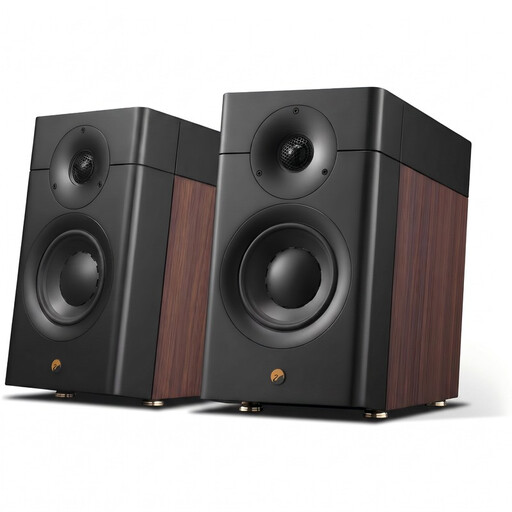 Image unavailable
Consider this pair if you want passive bookshelf speakers and are prepared to use a separate amplifier. Check amplifier compatibility and where the speakers will fit before assembling the system.
The product name specifies a two-way design, a 6.5-inch mid-bass driver, a 28 mm soft-dome tweeter and 8-ohm impedance. Passive speakers also need speaker cable and a way to connect your playback device through the system.
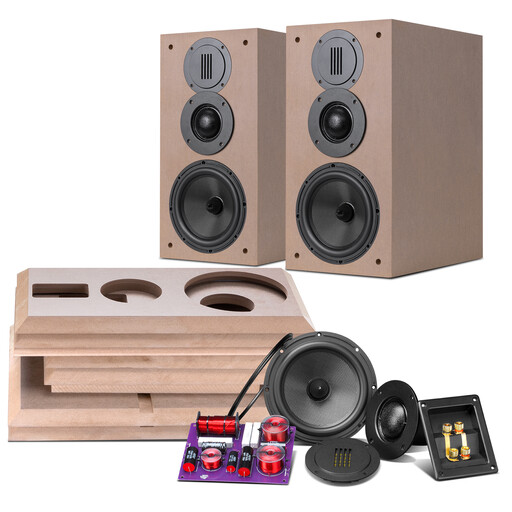 Image unavailable
This is another passive pair to consider if you intend to choose the amplifier and source connections separately. Confirm amplifier compatibility and measure the intended speaker positions before buying.
The product name identifies a 6.5-inch bookshelf-speaker pair. It will need external amplification and speaker cable for playback.
Active speakers are usually the simpler setup because amplification is built in, while passive speakers require an external amplifier. Choose passive if you already have suitable amplification or want to select the system's components separately.
Keep playback modest rather than relying on a particular position on the volume dial. Actual loudness varies with the source, speaker and listening position; the World Health Organization notes that both sound level and listening duration affect hearing risk.
Check the exact model's ventilation instructions before enclosing powered speakers. For example, Edifier's R1280DBs manual recommends at least 5 cm of clearance for ventilation and says not to block its openings.
Check your local authority's electrical-equipment collection arrangements or the retailer's take-back information rather than assuming ordinary household disposal is appropriate. UK government guidance describes waste electrical and electronic equipment rules as supporting recovery, reuse and recycling.