Desk-based cast-recording listeners
If recordings play mainly from your work laptop, cabinet size, a direct computer connection and room to position two speakers around the monitor are immediate concerns.


For musical-theatre recordings played mainly from a desk, choose a powered pair with a direct computer input if you want laptop playback without a separate amplifier. A compact desktop pair suits limited monitor-side space; if you can place larger cabinets sensibly, a mid-size powered pair is another option for listeners prioritising orchestral passages and stereo placement. Choose streaming and TV connections only if those sources are part of your setup.
If recordings play mainly from your work laptop, cabinet size, a direct computer connection and room to position two speakers around the monitor are immediate concerns.
If overtures and ensemble numbers are a focus, you may be willing to give larger powered speakers more desk or shelf space. Check placement rather than assuming cabinet size alone predicts how recordings will sound.
If you alternate between a laptop, phone, TV or streaming service, choose inputs and wireless functions for the devices you actually use, not speaker size alone.
Start with the space around your monitor and the connection from your main playback device. Then decide whether room for a larger stereo pair or connections for other sources will change your choice.
| Concern | What to check | Who this matters to |
|---|---|---|
| Laptop connection and desk fit | Check for the computer-audio input you need and measure both cabinets, including cable and power clearance. | If my laptop is the main source, I need speakers that connect directly without crowding my monitor. Around 36% of consumers would put desk fit and computer connection first. |
| Space for stereo listening | Check cabinet and driver dimensions and whether the left and right speakers can be positioned apart. | For overtures and ensemble recordings, I would make room for a larger pair rather than squeeze both speakers behind a screen; around 29% of consumers would prioritise that placement and physical scale. |
| Several playback sources | List the inputs your devices need, including USB, optical or HDMI ARC where relevant, and check wireless-platform compatibility. | When I move between laptop playback, phone streaming and TV audio, compatible connections matter more than unused features. Around 21% of consumers would make source flexibility their primary concern. |
| Simple, flexible inputs | Check the wired inputs and Bluetooth connection you will use; confirm the supplied power arrangement and any intended subwoofer connection. | I want a straightforward powered pair for familiar wired and wireless sources, without relying on network streaming. For around 14% of consumers, that simplicity would come first. |
A Bluetooth codec supported by a speaker will only be used when the transmitting device is compatible too.
If dependable wired computer playback matters, check the speaker’s USB input and your computer’s audio connection before ordering.
Cabinets also need room for power connections, cables and sensible left–right placement around a monitor.
Measure each available position, allowing for cabinet depth and the cable route between speakers.
Stands, desk pads or a longer inter-speaker cable may be needed for the arrangement you choose.
An output provides a connection option; it does not mean a subwoofer is included or suited to a small office.
Choose the main pair for your present listening setup, and check compatibility before planning an additional subwoofer.
An added subwoofer also needs a connection cable and placement space.
Powered speakers contain mains-powered electronics. Edifier’s R1280DBs manual recommends at least 5 cm ventilation clearance and warns against moisture and heat sources.
Follow the manual for the exact model you buy, keeping drinks and heat sources away and leaving its required airflow clear.
The powered M20 is relevant to direct computer listening, while the 3020c is a conventional standmount speaker and calls for a different system setup.
The LSX II LT is relevant when one compact active stereo system needs to connect to a laptop, TV and streaming services.
The A2+ Gen 3 is a desktop-oriented powered pair for a computer or smaller room.
The R1280DBs is relevant when conventional wired inputs and Bluetooth matter more than network-streaming functions.
This desktop-oriented option is relevant if you want to connect a computer directly and are checking how speakers will fit around a home-office monitor. Confirm the package contents and power arrangement before planning a stereo layout.
 No image available
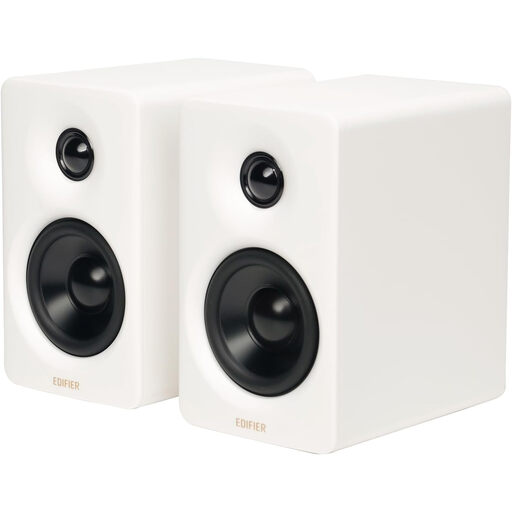
For desk-based listening from a computer, the M60 lists USB-C and AUX inputs alongside Bluetooth 5.3. Its stated specifications include 3-inch mid-bass drivers, 1-inch tweeters and 66W RMS output. Before ordering, confirm that the package contains the stereo pair you need, how the speakers are powered and whether your computer supports the listed USB-C audio connection.
Choose a compact pair when monitor-side space and close-range computer playback come first; consider a larger powered pair when you can give the cabinets and stereo spacing more room. Audioengine positions the A2+ Gen 3 for desktop use, while the Q Acoustics M20 has 125 mm mid/bass drivers and a USB computer input. Those specifications help distinguish the setups, but do not establish which pair will sound better in your room.
Bluetooth can be convenient, but check that your laptop supports any codec you intend to use. If you want a direct digital computer connection, check USB audio compatibility instead: Q Acoustics lists USB input for the M20, and Audioengine lists USB-C audio for the A2+ Gen 3.
Yes, if the exact speaker model has an appropriate output and the planned subwoofer is compatible. KEF lists a subwoofer output on the LSX II LT, as do Q Acoustics on the M20 and Edifier on the R1280DBs; Audioengine lists a variable line output on the A2+ Gen 3. Allow for the separate subwoofer, its cable and its position in the office.
Follow the instructions for the exact model rather than applying one clearance figure to every speaker. Edifier’s R1280DBs manual recommends at least 5 cm for ventilation and warns against moisture and heat sources; leave access to power connections and keep drinks away from the speakers.