Who each setup suits

Laptop-first classical listener

If your computer or a streaming service is the main source for piano sonatas, a compact active pair can avoid a separate amplifier. KEF lists USB-C, Bluetooth and streaming support for the LSX II LT; check that its connection and Wi-Fi requirements fit your setup.

Listener working around desk placement

If the speakers must sit close to your desk or nearby walls, adjustable acoustic settings may be useful. Edifier lists desktop and acoustic-space controls for the MR3, alongside several wired inputs.

Separate-system hi-fi builder

If you want to choose amplification and speaker placement separately, a passive pair is an option. Q Acoustics presents cables and stands as separate recommendations for the 3020c, so plan the complete route from computer to speakers.

What matters when choosing

Wireless active pair

Consider when: You want computer playback and streaming in a compact stereo system without choosing an amplifier.

Trade-off: On the KEF LSX II LT, full feature access requires home Wi-Fi, and there is no 3.5 mm analogue input, according to KEF.

Monitor-style active pair

Consider when: Speakers will sit close to the desk or wall and placement controls matter more to you than built-in network streaming.

Trade-off: Check that the wired inputs or Bluetooth on the model you choose work with your music source.

Passive bookshelf pair

Consider when: You want to select the amplifier and other parts of a conventional stereo system yourself.

Trade-off: The speakers alone cannot play from your computer; amplification, cabling and the source connection need separate planning.

Concern What to check Who this matters to
Direct playback Match the computer output to the speaker input; check how any streaming features connect and whether they require home Wi-Fi. I want to start a sonata from my computer without assembling a separate hi-fi system. Around 33% of consumers put straightforward direct playback first.
Desk placement Allow room for left and right speaker spacing; look for useful desktop or acoustic controls if placement is constrained. My desk and nearby walls limit where the speakers can sit, so positioning is my main concern. For around 42% of consumers, placement takes priority.
Separate components Plan compatible amplification, speaker cable, physical support and a connection from the computer. I would rather choose the parts of my stereo system individually, even if setup takes more work. That flexibility comes first for around 25% of consumers.

Buying pitfalls

  • Comparing a passive pair with a complete active system

    A passive pair needs more than speakers to play music from a work computer. Q Acoustics lists cables and stands separately alongside the 3020c.

    Write out the amplifier, cable, source connection and speaker support you would use before deciding between setups.

    The extra components also need space and time to connect and position.

  • Leaving placement until after choosing

    Uneven distances from the listening seat or limited space around the speakers can complicate a stereo setup. KEF recommends starting with an equilateral listening triangle, then experimenting with wall distance and speaker angle.

    Measure the available desk space and try a symmetrical position before treating a speaker change as the only answer.

  • Assuming every active speaker accepts every source

    Inputs differ by model: KEF lists USB-C on the LSX II LT but says that model has no 3.5 mm analogue input.

    Check the outputs of the computer and any other source you intend to use against the exact speaker model.

  • Overlooking regional after-sales support

    Edifier says service requested outside the country or region of purchase can depend on local inventory and may involve a fee.

    Confirm the intended market version and the seller's applicable support terms, and keep your proof of purchase.

Brands to consider

KEF

The LSX II LT represents a compact wireless active route for computer and streaming sources.

  • KEF lists USB-C, Bluetooth, streaming support and a subwoofer output for this model.
  • KEF says home Wi-Fi is required for the full feature set; the LSX II LT has no 3.5 mm analogue input.

Edifier

The MR3 represents a monitor-style active route for close desk listening.

  • Edifier lists balanced TRS, RCA and AUX inputs, Bluetooth, and acoustic-space and desktop controls for the MR3.
  • Check whether those inputs and controls suit your source and the positions available on your desk.

Q Acoustics

The 3020c represents a passive standmount route for a separately assembled stereo system.

  • Q Acoustics provides separate cable and stand recommendations for the 3020c.
  • You still need to choose suitable amplification and a way to connect your music source; the brand's sound descriptions are not piano-specific listening results.

Joybuy product choices

These choices cover two ways to build a home-office stereo setup: a powered desktop pair for direct computer playback and a passive bookshelf pair for a system with separate amplification. Check fit and connections before choosing either for piano sonatas.
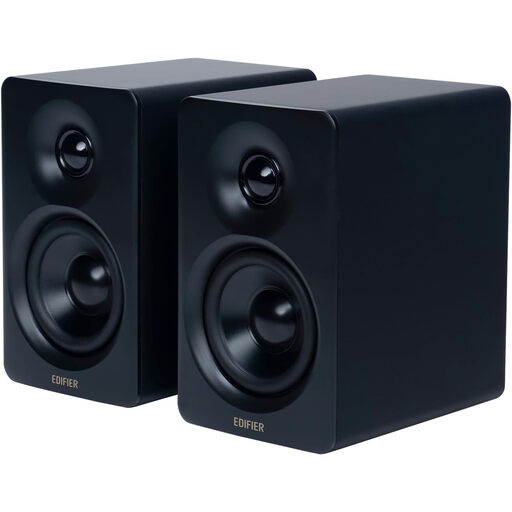
Edifier M60 desktop speakers

Edifier M60 Bluetooth 5.3 desktop speakers, 66 W RMS

Consider this powered pair if your home-office music source connects by USB-C, AUX or Bluetooth.

The product name specifies 3-inch mid-bass drivers and 1-inch tweeters. Check that your desk allows the speaker spacing you want; these specifications do not establish how piano sonatas will sound in your room.

View on Joybuy
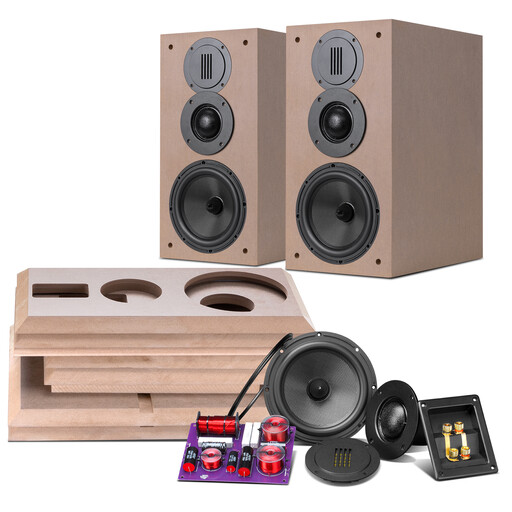
HiVi-Swans DIY3.1 passive bookshelf speaker pair

HiVi-Swans DIY3.1 passive bookshelf speakers, 6.5-inch pair

Consider this pair if you want to build a stereo system with separate amplification rather than connect speakers directly to your computer.

Check amplifier compatibility, the computer-to-amplifier connection and where the pair will stand. The stated driver size alone cannot establish its sound in your office.

View on Joybuy

Common questions

Should I choose active or passive speakers for a work computer?

Choose active speakers if you want a compatible direct connection with fewer components; choose passive speakers if you are prepared to add suitable amplification and cabling. KEF lists USB-C for the LSX II LT, while Edifier lists TRS, RCA, AUX and Bluetooth for the MR3, so check the connections on the particular pair you choose.

How should I position two speakers for piano sonatas at my desk?

Start with the left and right speakers equally distant from your listening position. KEF recommends an equilateral triangle as a starting point, then experimenting with wall distance and speaker angle to suit the available space.

Does the KEF LSX II LT need Wi-Fi?

Yes, KEF says a home Wi-Fi network is required for the LSX II LT's full feature set and updates. Check that the network where you plan to use the speakers meets its setup requirements.

Can I connect an analogue turntable directly to the KEF LSX II LT?

Not through a 3.5 mm analogue input: KEF says the LSX II LT does not have one and describes Bluetooth as its turntable connection route. If turntable playback matters, check your turntable's output and the proposed connection before choosing this model.