Quiet-time electronic listeners
If kick drums, bass lines and synth textures matter to you, compare the stated low-frequency response of compact speakers and consider whether you want bass controls or a later subwoofer option.


For quiet electronic music at a desk, start with a speaker’s bass adjustment and your available placement space rather than choosing by wattage alone. A compact active pair suits listeners who want a straightforward desktop setup; a connected wireless system makes more sense when streaming and TV inputs matter too. Check each model’s stated bass response, connections and sales unit before assuming it will meet your low-volume listening needs.
If kick drums, bass lines and synth textures matter to you, compare the stated low-frequency response of compact speakers and consider whether you want bass controls or a later subwoofer option.
If speakers must sit among furniture or near a wall, leave room to adjust their position. Genelec notes that desks, walls and other surfaces create reflections; placement and available room controls deserve attention alongside speaker size.
If the same stereo system needs to serve a phone, laptop or TV, make a list of your sources before choosing. PreSonus and KEF offer different combinations of wireless and wired connections on the models discussed below.
Start with the bass you expect to hear and where the speakers will stand, then match the connections and setup effort to your listening habits.
| Concern | What to check | Who this matters to |
|---|---|---|
| Bass and rhythm at low volume | Compare the exact model’s stated low-frequency response and measurement condition; check for bass adjustment or a subwoofer option. | If I listen quietly, I still want bass lines and kick patterns to make musical sense without turning up the volume. Around 33% of consumers would put that bass-and-rhythm need first. |
| Desk and wall placement | Check the available bass or room controls and whether you have space to adjust speaker position. | When my speakers have to sit close to a wall, I want to manage uneven or excessive bass at my seat. That placement need would come first for around 27% of consumers. |
| Everyday connections | Match your actual sources to the exact variant’s Bluetooth and wired inputs, such as USB-C, HDMI ARC, optical, RCA or 3.5 mm. | I want to move between music, a computer and perhaps a TV without assembling extra source equipment. Around 20% of consumers would make connection convenience their primary concern. |
| Nearfield setup | Confirm the intended listening distance, input compatibility, placement guidance and whether the sales unit is one speaker or a pair. | If I also work on electronic music, I may care more about setting up a consistent listening position than built-in streaming. Nearfield setup would be the leading concern for around 20% of consumers. |
Those figures do not tell you how bass will balance at your listening position. Published frequency-response figures also need their stated measurement conditions before you compare models.
Check the exact model’s response specification, then decide whether bass controls or a subwoofer option matter for the music you play.
Walls, desks and furniture can affect the sound reaching your seat, as Genelec’s room-acoustics guidance explains. Yamaha provides ROOM CONTROL on its HS3 and HS4 monitors to address exaggerated low end near walls.
Try the speakers in their intended positions, adjust available room or bass controls, and follow the manufacturer’s orientation guidance.
Genelec describes the 8020D package as one monitor, while PreSonus describes the Eris 3.5BT as a pair. The package contents change what you need for a stereo setup.
Confirm speaker quantity, included cables and source compatibility, along with any accessories needed for your planned placement.
Individually supplied monitors require two units for stereo listening; stands, desk pads, a longer interspeaker cable or a subwoofer may also be separate items.
The Eris 3.5BT is a compact powered pair aimed at desktop listening and entry-level monitoring.
The compact HS3 and HS4 are powered, wired studio monitors with controls relevant to desk or wall-adjacent placement.
The LSX II LT is an active stereo system for listeners who want streaming and several everyday sources in one setup.
The 8020D is a compact active nearfield monitor for a listener prepared to pay attention to positioning and room response.
These choices cover a compact speaker with Bluetooth and wired inputs for a desk, and a passive bookshelf design for use with a compatible amplifier. Check the sales quantity and the bass information relevant to your setup before choosing between them.
 No image available
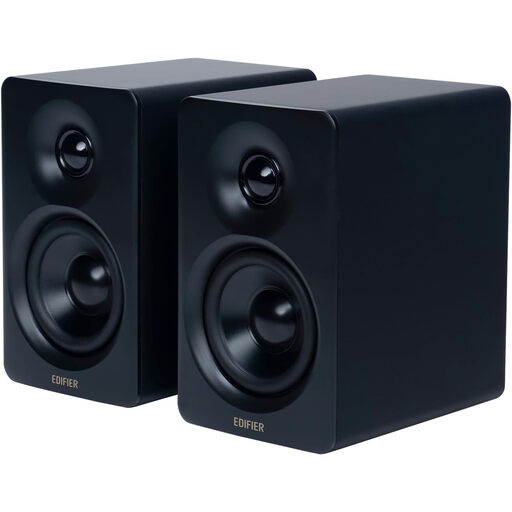
Consider these for desktop listening if Bluetooth, USB-C and AUX match the sources you use.
The listing names 66 W RMS, a 3-inch mid-bass driver, a 1-inch tweeter and LDAC.
Confirm the number of speakers supplied and check the low-frequency response and available bass controls if quiet-playback bass balance is a priority.
 No image available
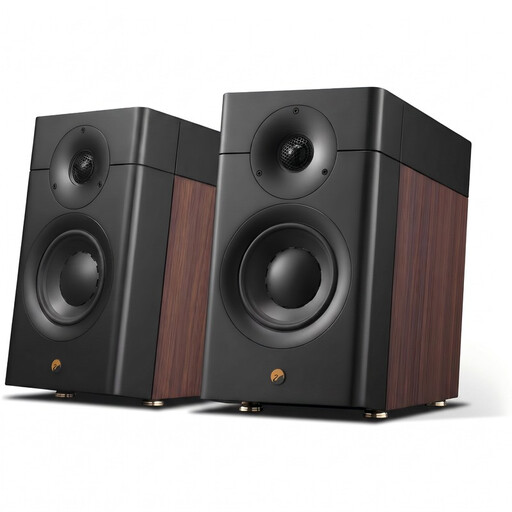
Consider this passive design if you have, or plan to use, a compatible amplifier.
The listed specifications include a 6.5-inch mid-bass driver, a 28 mm soft-dome tweeter, a rear bass-reflex port, 8-ohm impedance and a 10–120 W range.
Check amplifier compatibility, the number of speakers supplied and the stated low-frequency response; the driver size alone does not establish how much bass you will hear at low volume.
Position them for your listening seat, then adjust any available bass or room control once they are in place. Yamaha says HS3 and HS4 ROOM CONTROL can reduce exaggerated low end near walls, while Genelec notes that desks and other surfaces create reflections. Follow the manufacturer’s orientation guidance for the model you choose.
Do not decide from driver size alone. PreSonus specifies the Eris 3.5BT at 80 Hz–20 kHz and offers a matched subwoofer option; compare the exact speaker’s stated response conditions and decide whether you need that upgrade path.
Choose by the sources and setup you need, rather than assuming either type sounds better at low volume. KEF lists streaming, Bluetooth, HDMI ARC, USB-C and optical input for the LSX II LT; wired studio monitors are worth considering when nearfield placement and room-response adjustment matter more to you than integrated connections.
Not always, so confirm the sales unit for the exact listing. Genelec describes its 8020D package as one monitor, whereas PreSonus describes the Eris 3.5BT as a pair.