Who this suits

Homes near a pavement or neighbouring entrance

A doorbell can be useful for visitors, but the likely view may include a pavement, neighbouring drive or another entrance. The Information Commissioner’s Office recommends positioning cameras to capture your own property where possible; Ring and Arlo describe privacy controls on supported devices.

Residents with shared drives or communal entrances

Check the real sightline before choosing a doorbell or camera where people regularly use a shared driveway, corridor, gate or garden entrance. Close-facing flat entrances and cameras covering communal approaches are practical situations raised by UK residents.

Homeowners covering a wider private approach

A fixed or wireless camera may be more suitable than a visitor doorbell for a gate, path or driveway. Choose a controllable mounting position, then check how the exact model handles privacy zones, motion settings and storage.

What to prioritise

Smart doorbell

Choose it when: your main need is to identify or speak to callers at a private front door and the camera can be aimed tightly at the doorstep.

Watch for: a doorbell can still capture images or voices beyond your property, and privacy or audio controls can vary by model and plan.

Fixed home camera

Choose it when: a particular private gate, path, garden access or driveway needs coverage from a stable mounting point.

Watch for: a higher or wider position can include a street, neighbour’s property or shared access even when that is not the intention.

Wireless home camera

Choose it when: cable routing would prevent a sensible mounting position and a movable unit can be placed closer to the access point.

Watch for: moving the camera changes the view, so revisit privacy masking and the real field of view after every repositioning.

Priority What to check Your needs
Physical field of view Mark the intended mounting point; check the view includes only the necessary private entrance or approach; favour positioning that narrows the frame before relying on software masking. I want to monitor my own doorstep, gate or driveway without routinely viewing a neighbour’s entrance, a shared area or the pavement.
Privacy and motion controls Confirm whether the exact model has privacy zones, motion or activity zones, audio controls and the behaviour of each setting in live view, recordings and notifications. I need to know whether a setting hides part of the image, reduces alerts, or does both. These controls are not interchangeable.
Storage behaviour Check cloud-plan requirements, local-storage operation and whether footage outside a configured activity zone can still be saved in the storage mode you intend to use. I want the recording setup to match the area I actually need to monitor, rather than assuming an alert setting also limits stored video.
Close-facing layouts Test the proposed sightline for another resident’s door, a shared drive, corridor, gate or garden entrance; assess each camera separately in multi-camera systems. My entrance or approach is close to other homes or shared spaces, so a broad view may be unsuitable even if it appears convenient.

Common pitfalls

  • Choosing a wide-angle view before checking the installed frame

    A camera mounted at a door, window, eave or drive can include a neighbour’s property, pavement or communal area. The Information Commissioner’s Office says data protection law applies when home CCTV captures another person’s property, a public area or communal space.

    Mark the mounting point before buying and identify every part of the proposed frame. Prefer a position that physically limits the view to your property, using privacy masking only for a fixed residual area.

  • Assuming a privacy mask stops all recording or motion processing

    Privacy-zone behaviour differs between systems. Arlo says its Privacy Zones can conceal selected areas while motion may still trigger video and notifications; eufy describes different behaviour for supported eufyCam 2 and 2C variants.

    Read the support information for the exact model, then test live view, event recordings, alerts and the selected storage mode after installation.

  • Assuming activity zones limit local recordings

    Arlo says Local Storage saves all videos regardless of whether activity occurs inside an Activity Zone. A notification setting may therefore not create the recording boundary you expect.

    Compare cloud and local-storage behaviour before purchase, and check how the chosen camera handles motion outside configured activity zones.

  • Overlooking model-specific features and camera movement

    Ring states that Privacy Zones are unavailable on some listed devices and warns that moving a camera can mean a previously configured zone no longer covers the intended area.

    Confirm the exact SKU’s privacy controls, any plan conditions and whether the camera will remain in a fixed position before relying on a software feature.

    Some controls may require a compatible subscription or may not be available on the exact model.

Relevant brand feature references

Ring

Relevant for smart-doorbell and home-camera buyers comparing app-based privacy and motion controls on supported UK-facing devices.

  • Ring states that supported devices can use up to two Privacy Zones blocked in live and recorded video, and compatible devices can disable audio streaming and recording.
  • Privacy Zones are unavailable on several listed devices, and Ring warns that a camera move can leave the intended area uncovered. Check the exact model and settings.

Arlo

Relevant when comparing a visual privacy mask with motion or activity-zone controls on security cameras and video doorbells.

  • Arlo states that supported cameras can have up to three Privacy Zones excluding selected areas from recordings or live streaming.
  • Arlo says motion may still trigger video and notifications around Privacy Zones, while Local Storage saves all videos regardless of Activity Zone status.

eufy

Relevant for buyers seeking a supported camera with a privacy-zone function that blacks out a fixed area and changes motion handling within that area.

  • For cited eufyCam 2 and 2C variants, eufy states that privacy zones black out selected areas in live view and recordings and prevent motion detection and event recording there.
  • This manufacturer statement is limited to the named compatible variants and should not be assumed for all eufy doorbells or cameras.

Joybuy product options

Joybuy product options for wider private approaches such as gates, paths and driveways. Check the installed view and the exact model’s privacy and storage behaviour before deciding whether either kit suits a boundary-close property.
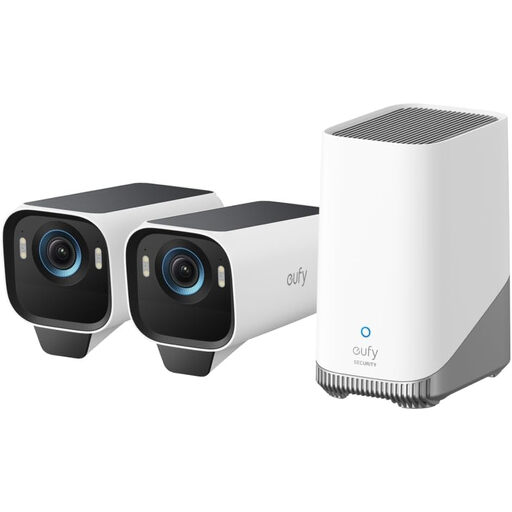
eufy Security eufyCam S3 Pro 2-Cam Kit

eufy Security eufyCam S3 Pro 2-Cam Kit

A two-camera kit for separately positioning coverage around a private gate, path or driveway rather than relying on one broad view.

Stated features include outdoor wireless cameras, solar panels, 4K capture, radar-and-PIR motion detection and expandable local storage.

Confirm the exact kit’s privacy-zone support and local-storage recording behaviour, and assess each camera’s sightline individually.

Joybuy
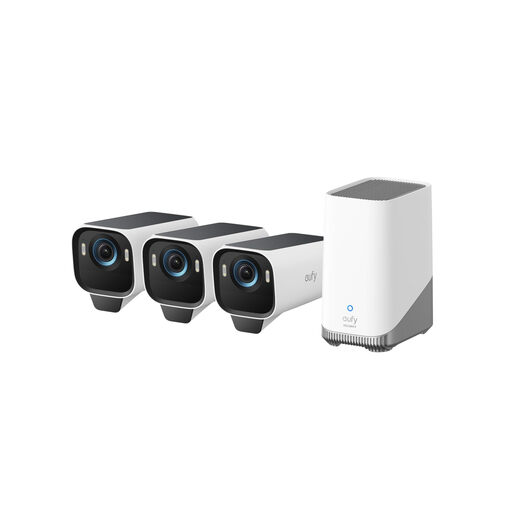
eufy Security eufyCam S3 Pro 3-Cam Kit

eufy Security eufyCam S3 Pro 3-Cam Kit

A three-camera option for several private access points where separate physical placement can avoid an over-wide single-camera view.

Stated features include outdoor wireless solar cameras, 4K capture, radar-and-PIR motion detection and built-in local storage up to 16TB.

Check every proposed camera position, plus the exact model’s privacy-zone availability and local-storage behaviour outside configured detection areas.

Joybuy

Frequently asked questions

Can I install a smart doorbell or home camera at my UK home?

Yes, but position it to capture your own property where possible. The Information Commissioner’s Office says data protection law applies if home CCTV captures someone else’s property, a public area or communal space; its home-CCTV guidance is under review following the Data (Use and Access) Act, so assess the particular installation carefully.

Is a privacy zone the same as an activity or motion zone?

No. A privacy zone conceals a selected part of the picture, while an activity zone focuses motion detection. Arlo says its Privacy Zones can exclude selected areas from recordings or live streaming, but motion may still trigger a recording and notification, and Local Storage can still save all videos.

Can privacy masking exclude a neighbour’s door from camera footage?

On supported models, it can obscure a fixed area. eufy states that privacy zones on cited eufyCam 2 and 2C variants can black out a neighbour’s door and prevent motion detection and event recording there, but Ring and Arlo describe different behaviour, so check the exact device.

What should I check if someone asks for footage containing them?

Choose a system that can locate and extract relevant footage and redact third-party information where necessary. The Information Commissioner’s Office says people can request footage containing their personal information, which is particularly relevant where a camera records outside your property boundary.

Should I record audio as well as video?

Enable audio only when it is necessary for the intended use and you can control it on the exact device. Ring states that compatible devices can disable audio streaming and recording, although this control requires a compatible subscription; consider whether a tightly framed video-only setup meets your needs.