For a recipe-index desk beside a bright window, deal with reflections before choosing a monitor by resolution or connections. The Health and Safety Executive advises positioning the screen to avoid glare and using blinds or curtains where needed; if the desk position is difficult to change, look for a stated anti-glare finish and an adjustable stand. Choose between QHD and 4K according to the text and image detail you need, and consider USB-C docking only after checking your laptop’s video and charging requirements.
Who this setup suits
Bright-window desk users
If the monitor must sit near a sunlit window, screen position and reflections deserve attention before extra pixels or ports. The Health and Safety Executive advises arranging the screen to avoid glare and adjusting blinds or curtains to control intrusive light.
Recipe-and-image organisers
A visual recipe index can put text, photographs and browser references on the same desktop. The 27-inch QHD and 4K models specified by ASUS, LG and iiyama offer different resolution choices; decide how much detail you need at a text size you find comfortable.
Laptop-first desk users
If a laptop moves between rooms, a monitor with suitable connections may simplify the fixed desk. Check the laptop’s video output before planning a one-cable USB-C setup; Joybuy’s monitor guidance identifies DisplayPort Alt Mode as a requirement for that connection route.
What to check when choosing
Settle the screen’s position relative to the window first. Then choose the resolution, connections and colour features that matter to your recipe work.
| Concern |
What to check |
Who this matters to |
| Reflections and daylight |
Check where window reflections fall, whether blinds can help, and the exact model’s stated screen finish. |
If the window catches the screen throughout the day, I need to control reflections before paying for more detail. Around 36% of consumers put reflection control first. |
| Text and image detail |
Compare QHD and 4K at the intended screen size, including whether text remains comfortable with your preferred display scaling. |
When I keep recipe lists, references and photographs open together, readable text and image detail take priority. For around 29% of consumers, that is the main concern. |
| Laptop connection |
Confirm USB-C video support on the laptop and check the monitor’s power-delivery rating and required cable if you want one-cable use. |
If I regularly move my laptop, reconnecting it simply matters more than extra display features. Around 21% of consumers make laptop setup their first priority. |
| Image colour |
For food-photo editing, compare colour-coverage and calibration claims for the exact model rather than assuming they apply across a product line. |
When I edit food photographs, consistent image colour matters beyond ordinary recipe reading. It comes first for around 14% of consumers. |
Buying pitfalls
-
Buying on brightness or an HDR badge alone
An HDR designation does not describe how a screen handles direct window reflections. The Health and Safety Executive advises avoiding glare through screen placement and control of window light.
Check the proposed screen position and blinds or curtains first, then compare the exact model’s stated anti-glare or low-reflection treatment.
-
Assuming every USB-C connection works with one cable
A USB-C socket does not, by itself, establish that a laptop can send video to the monitor or receive suitable charging power. Joybuy’s monitor guidance notes the need for DisplayPort Alt Mode for its one-cable USB-C route.
Check the laptop’s video capability, the monitor’s input and power-delivery specifications, and the cable required.
-
Overlooking stand adjustment beside the window
When daylight changes, a fixed viewing position can make it harder to keep reflections out of the screen. LG and iiyama specify adjustable stands on the cited 4K models, but adjustment differs by model.
Check the exact stand’s height and tilt range, or confirm mounting compatibility if you intend to use a separate arm.
-
Treating colour calibration as essential for every recipe index
ASUS lists colour-coverage and calibration specifications for the ProArt PA278CV. Those claims are more relevant if you edit food photographs than if you chiefly organise recipe text, and they do not establish reflection control.
Decide whether colour-sensitive image work is part of the project before prioritising those specifications over screen placement and readability.
Relevant monitor lines
These lines illustrate specifications worth comparing for a recipe-index desk; features vary between models, even within one line.
ASUS ProArt
A creator-oriented IPS line to consider when the recipe index includes food photography or the desk needs flexible positioning.
- ASUS specifies LuxPixel anti-glare and low-reflection treatment, an ambient-light sensor and USB-C power delivery of 96 W for the PA278CFRV. Its description of the reflection benefit is the brand’s own claim.
- The PA278CV has separate QHD, colour and stand specifications; do not assume it has the PA278CFRV’s LuxPixel treatment or ambient-light sensor.
Dell UltraSharp
A line with 27-inch models spanning QHD adjustment-focused displays and 4K hub monitors for laptop desks.
- Dell specifies a 4K Thunderbolt hub and ambient-light sensor for the U2725QE; the QHD U2724D has height, tilt, swivel and pivot adjustment.
- Check the exact model’s screen finish separately when direct window reflections are the main concern.
LG UltraFine
A 27-inch 4K IPS option for comparing text and image detail alongside USB-C connectivity.
- LG specifies USB-C and height, pivot and tilt adjustment for the 27UP85ZK-W.
- Its DisplayHDR 400 designation is not a measure of resistance to window reflections; check the surface details and screen position separately.
iiyama ProLite
A 27-inch 4K IPS route for shoppers concentrating on resolution and an adjustable desktop position.
- iiyama specifies 4K resolution and a height-adjustable stand for the XUB2792UHSU-B6.
- For a bright-window position, check the exact model’s screen finish rather than treating 4K resolution as glare control.
Joybuy monitor choices
These monitors offer different ways to build a recipe-index desk, from QHD and 4K displays to a larger Full HD screen. Match the model’s screen finish, adjustment and connections to your window position and computer.
 No image available
ASUS ProArt PA278CV IPS WQHD
A QHD IPS choice for organising recipe text and photographs. ASUS specifies a 27-inch, 2560 × 1440 display and USB-C for the PA278CV; check laptop video compatibility if you plan to use that connection, and confirm the exact screen finish for your window position.
View on Joybuy
 No image available
iiyama ProLite XUB2792UHSU-B6 27-inch 4K UHD
Consider this 4K IPS model when recipe text and image detail are priorities. iiyama specifies a 27-inch display and height-adjustable stand; check the screen finish before choosing it for a position with persistent reflections.
View on Joybuy
 No image available
ASUS Eye Care VY27UQ 4K UHD 60Hz
A 4K UHD option for readers prioritising recipe-page and photograph detail. Check its screen finish and stand-adjustment range against the planned window-side position.
View on Joybuy
 No image available
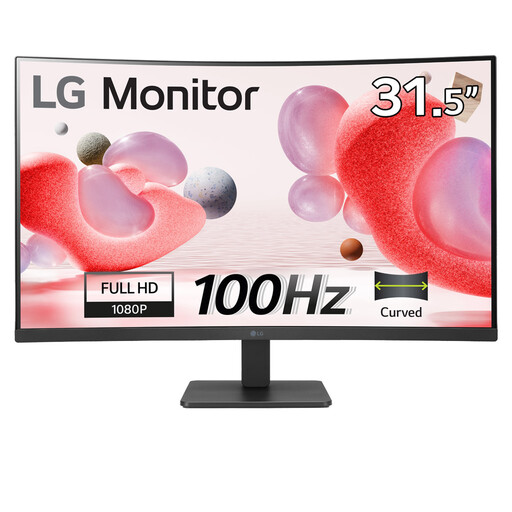
LG Electronics 32MR50C-B 32-inch Full HD curved monitor
Consider the larger curved screen if physical display size matters more to you than the finer detail of the QHD and 4K options. Its stated features include a Full HD VA panel, anti-glare finish, HDMI and 100Hz refresh rate; check whether its stand can place the screen where reflections are manageable.
View on Joybuy
 No image available
ASUS ProArt PA24ACRV IPS QHD
A QHD IPS alternative for organising recipe pages and images. If you want a one-cable laptop desk or need to manage window reflections, check this exact model’s video and charging connections, screen finish and stand adjustment before ordering.
View on Joybuy
Common questions
Will a brighter monitor solve reflections from a window?
Not on its own: screen position and window light still matter. The Health and Safety Executive advises arranging the screen to avoid glare and using blinds or curtains to prevent intrusive light; treat a stated anti-glare finish as an additional consideration.
Does DisplayHDR 400 mean a monitor will work well beside a window?
No. The Video Electronics Standards Association defines DisplayHDR 400 through HDR performance criteria, not through a measure of direct window reflections. Check screen placement and the exact model’s surface separately.
Can I connect my laptop to any USB-C monitor with one cable?
Only if the laptop and monitor support the required USB-C video connection. Joybuy’s monitor guidance identifies DisplayPort Alt Mode for its one-cable route; also check whether the monitor’s charging output meets your laptop’s needs and which cable is required.
Should I choose QHD or 4K for a 27-inch recipe-index monitor?
Choose according to the detail you need and the text size you find comfortable, not as a way to fix glare. ASUS specifies 2560 × 1440 QHD for the 27-inch PA278CV, while LG specifies 4K for the 27-inch 27UP85ZK-W; with 4K, you may want to adjust display scaling if text looks too small.


