For a household sharing video calls, streaming and gaming, check the broadband available at the address, then compare a wired test with performance near the router and in the rooms where problems occur. If the incoming connection is inadequate even on Ethernet, compare available broadband packages; if distant rooms are the issue, review router placement or consider a compatible router or mesh system. For fixed devices, Ethernet can bypass a weak Wi-Fi link, while 5G or satellite needs an address-specific reception or installation check rather than an assumption that it will match a fixed-line service.
Who this guidance is for
Households with simultaneous use
Several people need calls, streams or large downloads to work at the same time, so it helps to assess both the incoming connection and the home network. Ofcom notes that ultrafast broadband may be more appropriate for households with several people online or doing data-heavy activities.
Homes with weak rooms
If the connection works near the router but struggles in distant rooms, check coverage and router placement before assuming the broadband package is the problem. Ofcom distinguishes in-home Wi-Fi issues from the speed of the broadband service.
Homes with limited wired options
When available fixed-line services may not meet household needs, compare what is offered at the address with 5G reception or satellite installation conditions. Ofcom advises checking availability and predicted speeds for the specific property.
What to check before choosing
Ofcom’s guidance helps distinguish an address-level broadband issue from weak Wi-Fi in particular rooms or a problem with one device.
| Concern |
What to check when buying |
Who this matters to |
| Capacity for simultaneous use |
Check address-specific download and upload estimates, busy-time performance and how many people use data-heavy services at once. |
When several people need calls, streaming and downloads to run together, I want the incoming connection to suit that shared use; around 33% of consumers put simultaneous-use capacity first. |
| Coverage across rooms |
Compare a wired or near-router test with results in problem rooms; consider router position and where mesh units could be placed. |
If Wi-Fi works near the router but not where I work or relax, I want to address room-to-room coverage; around 27% of consumers prioritise multiroom reach. |
| Stability for a fixed device |
Test the computer or console by Ethernet if possible, and check the device’s ports and a practical cable route. |
For a fixed work or gaming device, I want to know whether its Wi-Fi link is causing interruptions before changing the whole network; around 20% of consumers put device stability first. |
| Service available at the property |
Check the address with Ofcom and providers; investigate 5G reception at the property or whether a satellite dish can have an unobstructed position. |
Where fixed-line choices may be limited, I need to know which incoming services can work at my property; around 20% of consumers prioritise availability. |
Buying pitfalls to avoid
-
Buying a faster package to fix a weak room
A faster incoming connection does not, by itself, improve Wi-Fi reach in a distant room.
Compare a wired or near-router test with performance in the affected room before changing the package.
-
Treating an advertised mesh rate as a room-speed promise
Product wireless rates do not establish the speed a device will receive in a particular room.
Choose a system for the coverage problem and available unit positions, and assess the broadband line separately.
-
Choosing 5G or satellite from a general coverage claim
Ofcom notes that wireless-service performance can vary by location. Starlink says obstructions to the dish’s view of the sky can interrupt service.
Check the specific offer and reception at the address, and assess the proposed dish location before deciding.
Relevant brands to consider
BT
A provider to compare for an address-available full-fibre or part-fibre package when the incoming connection is the issue.
- BT describes full fibre as running to the home and provides a postcode checker for availability.
- An available package does not establish that a particular property qualifies or resolve weak in-home Wi-Fi.
Three
A 4G or 5G home-broadband option to investigate where a fixed line may be unsuitable or limited.
- Three advertises a landline-free hub and asks customers to check coverage.
- Reception and service suitability need checking at the property; advertised features do not establish performance at every address.
Starlink
A satellite option for households assessing alternatives to limited wired connectivity.
- Starlink says the dish needs a clear view of the sky.
- Starlink identifies obstructions as a cause of service interruptions, so installation suitability is property-specific.
TP-Link
Its Archer AX55 router and Deco X50 mesh system illustrate different approaches to upgrading a router or distributing Wi-Fi across rooms.
- TP-Link lists gigabit ports for the Archer AX55 and optional Ethernet backhaul for the Deco X50.
- Advertised Wi-Fi rates and coverage are product claims, not measured room speeds or evidence that a system will fix a slow broadband line.
NETGEAR
The Orbi RBK762S is a mesh-system example for households comparing multiroom networks.
- NETGEAR describes a dedicated router-to-satellite connection and wired ports on this model.
- Its advertised wireless rate and coverage should not be treated as an achieved household speed.
Joybuy product choices
These Joybuy choices focus on home Wi-Fi distribution, a 5G-based home connection and wired links for fixed devices.
 No image available
NETGEAR Orbi 370 RBE373 WiFi 7 Mesh System, 3-Pack, Dual-Band BE3600, 2.5Gbps Ethernet, White
Consider this mesh system when you want to distribute Wi-Fi across multiple rooms and connect fixed devices near its network units.
The three-unit setup comprises one router and two satellites. The listing describes dual-band Wi-Fi 7, BE3600 and 2.5Gbps Ethernet ports on the router and satellites.
Home-network equipment does not increase the speed of the incoming broadband service.
View on Joybuy
 No image available
TP-Link Archer NX500 5G AX3000 Wireless Dual Band Gigabit Router
Consider this router if you are assessing a SIM-based mobile-network connection for the home; check the service and reception available at your address.
The listing identifies 5G and 4G support, SIM setup, dual-band Wi-Fi 6 and Ethernet ports.
Mobile broadband availability and performance depend on the property and provider offer.
View on Joybuy
 No image available
TP-Link Deco BE22 (3-Pack) BE3600 Whole Home Mesh Wi-Fi 7 System
Consider this three-unit mesh system when household members need Wi-Fi in different rooms.
The listing specifies Wi-Fi 7 and wired and wireless backhaul options for linking the mesh units.
A mesh system distributes the home network; it does not increase the speed of the incoming broadband service.
View on Joybuy
 No image available
D-Link DGS-108GL 8-Port Gigabit Unmanaged Desktop Switch
Consider a switch when you need additional wired network connections for fixed devices.
The listing specifies eight Gigabit Ethernet ports and unmanaged operation.
A switch adds wired connections; it does not provide Wi-Fi or fix an inadequate incoming broadband service.
View on Joybuy
 No image available
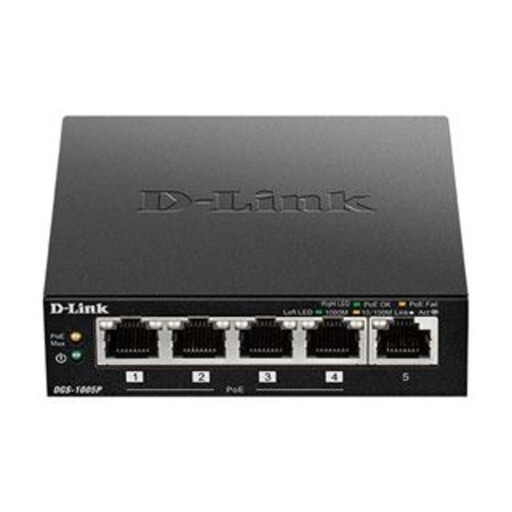
D-Link DGS-1005P 5-Port Desktop Gigabit PoE+ Switch
Consider this switch for wired network expansion when the connected devices and setup suit its listed ports.
The listing specifies five Gigabit Ethernet ports, including four PoE+ ports, and plug-and-play operation.
PoE+ is relevant only to compatible devices. The switch does not provide Wi-Fi or fix an inadequate incoming broadband service.
View on Joybuy
Common questions
How can I tell a slow broadband line from weak Wi-Fi or one slow device?
Test with a suitable device connected to the router by Ethernet, then compare with Wi-Fi near the router and in the problem room. Ofcom recommends Ethernet for a more accurate speed test. If the wired connection is also slow, ask the provider to investigate; if the problem is limited to a room or device, check its Wi-Fi link and local conditions.
Where should I put the router, and what should I check with mesh units?
Ofcom advises placing the router centrally, off the floor and away from obstructions or interfering electrical equipment. For mesh, check that units are powered and appropriately positioned; if a fault starts, Ofcom suggests checking and restarting the router, mesh equipment and affected devices before reporting an unresolved service fault.
Does a minimum-speed guarantee cover slow Wi-Fi or gaming latency?
Do not assume it does. Ofcom’s broadband speed code describes remedies for an applicable provider’s network-side speed problem that it cannot fix within 30 days; it does not establish a guarantee for every room’s Wi-Fi or gaming latency. Check whether the provider and contract are covered and what speed is guaranteed.
Should I check permission before installing a satellite dish?
Check with the relevant local planning authority and, where applicable, the property owner before mounting a dish. The answer can depend on the property and proposed installation, so a general conclusion should not be assumed for every UK address.


