What to check before buying
Check what is available at the property and compare it with simultaneous household use; then decide whether the remaining issue is service capacity, room coverage or wired connections. Ofcom recommends checking availability at your address, and says household devices, time of day and Wi-Fi versus wired use can affect experienced speeds.
| Concern |
What to check when buying |
Who this matters to |
| Capacity for overlapping work |
Compare the address-specific upload and download information with concurrent activity. Zoom publishes requirements of 2.6 Mbps upload and 1.8 Mbps download per 720p group call; two such calls require 5.2 Mbps upload and 3.6 Mbps download for the calls alone, not the whole household. |
If several people are on calls or moving cloud files at once, I would check both directions rather than rely on download speed alone. Around 33% of consumers put capacity for overlapping calls and cloud work first. |
| Coverage in work rooms |
Consider room layout, node placement and whether nodes can use Ethernet backhaul. Advertised coverage does not establish how Wi-Fi will perform in a particular home. |
If our workspaces are in separate rooms, I would focus on reaching those locations and on how the mesh units connect. Around 27% of consumers prioritise useful Wi-Fi coverage at their workspaces. |
| Wired connections at fixed desks |
Check that each workstation has a compatible Ethernet connection and that cable routes are practical. If more ports are needed, check the switch’s port count and link speed. |
For desks that stay put, I would rather check whether cabling is practical and whether there are enough ports than assume another Wi-Fi device is needed. Around 20% of consumers prioritise wired connections for fixed workstations. |
| Contract and commitment |
Check the contract term and the provider’s personalised service information before committing. Ofcom’s published speed guidance is not a guarantee of performance at every workstation. |
If I need the connection to suit a particular length of stay, I would check the contract terms alongside the service details. Around 13% of consumers put the whole-contract commitment first. |
| Setup and ongoing support |
Before replacing supplied equipment, check the provider’s connection requirements and what support is available for third-party devices. Confirm the exact hardware version and its manufacturer support information. |
If I want a setup I can maintain confidently, I would check who handles configuration and updates before changing equipment. Around 7% of consumers prioritise compatible setup and ongoing support. |
Joybuy product choices
These choices cover mesh Wi-Fi for workspaces spread around the home and Ethernet switches for fixed wired connections. They are home-network equipment options to consider alongside, not instead of, an address-available broadband package.
 No image available
NETGEAR Orbi 370 RBE373 WiFi 7 Mesh System, 3-Pack, Dual-Band BE3600, 2.5Gbps Ethernet, White
Consider this mesh system when workspaces are spread across rooms and the household needs a home Wi-Fi network.
The three-unit system has a 2.5Gbps LAN port on the router and each satellite. It requires a high-speed internet connection and an existing modem or gateway.
View on Joybuy
 No image available
TP-Link Deco BE22 (3-Pack) BE3600 Whole Home Mesh Wi-Fi 7 System
Consider this three-unit mesh system for workspaces in different parts of the home where a mesh setup suits the layout.
The listed backhaul options are wireless and wired combined backhaul. The setup instructions specify connecting a unit to a modem.
View on Joybuy
 No image available
D-Link DGS-108GL 8-Port Gigabit Unmanaged Desktop Switch
Consider a wired switch when fixed workstations need Ethernet connections and a cable route is practical.
The product is described as an 8-port Gigabit unmanaged desktop switch with plug-and-play operation.
View on Joybuy
 No image available
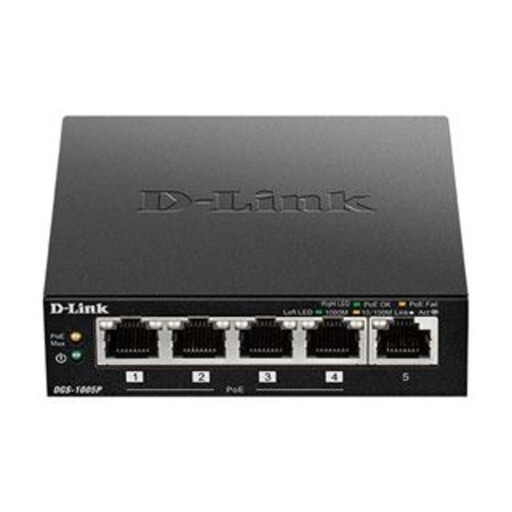
D-Link DGS-1005P 5-Port Desktop Gigabit PoE+ Switch
Consider this switch for a fixed wired setup when connected devices need Ethernet and compatible devices also require power over Ethernet.
Four of its five Gigabit ports support PoE+ for compatible IEEE 802.3af/at devices.
View on Joybuy
 No image available
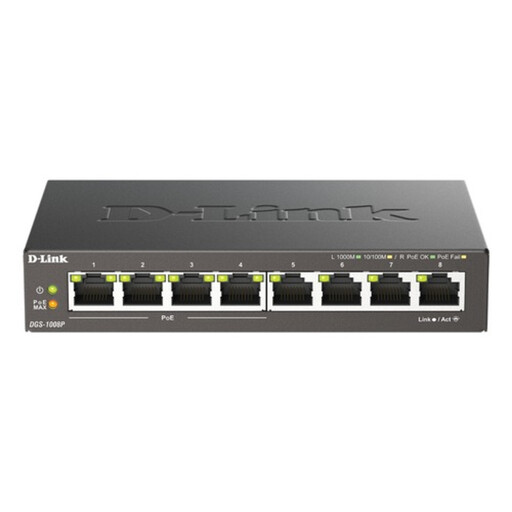
D-Link 8-Port Gigabit PoE Unmanaged Desktop Switch
Consider this switch for fixed workstations or other wired devices when additional Ethernet connections are needed.
It has eight Gigabit Ethernet ports, four of which support PoE and PoE+ for compatible IEEE 802.3af/at devices.
View on Joybuy
Frequently asked questions
How should I shortlist broadband before buying home-network equipment?
Check which services are available at your address, then compare the provider’s information with your household’s simultaneous use. Ofcom recommends checking address-level availability; assess upload and download needs before deciding whether the remaining issue calls for different home-network equipment.
Does “fibre” mean fibre reaches the home?
Not necessarily. Ofcom distinguishes full fibre, where fibre reaches the premises, from part-fibre services that use copper between the street cabinet and the home. Check the access technology stated for the specific service available at your address.
Can a TP-Link Deco X50 replace every type of broadband modem?
Do not assume it can. TP-Link’s setup guide describes connecting a Deco unit to a modem, Ethernet outlet or other internet service. Check your provider’s required connection arrangement and equipment before replacing a supplied device.
What should I check when maintaining home network equipment?
Check the manufacturer’s support period and keep security updates current. The National Cyber Security Centre advises avoiding connected devices that are no longer supported where possible; for a Deco product, identify the hardware version and its regional support information.


