Remote workers sending large files
You regularly upload work files while others at home stream, browse or join calls. The upload figure for your package and its performance during busy periods matter alongside download speed.


Test your work device over Ethernet at different times before changing your broadband package. If wired uploads remain inadequate while the household is online, compare the upload speeds of packages available at your address; if the wired connection works well but Wi-Fi at your desk does not, improving the home network is the more targeted step. Neither a faster download headline nor a new router alone tells you how quickly large files will leave your home.
You regularly upload work files while others at home stream, browse or join calls. The upload figure for your package and its performance during busy periods matter alongside download speed.
Your connection may perform differently beside the router and in your work room. Ofcom recommends a direct Ethernet connection when checking broadband performance, which helps separate a wireless problem from a service problem.
You need to check which technologies and packages can serve your address before comparing upload speeds. Providers including Hyperoptic and Zen Internet offer address-based availability checks.
Consider this when: Repeated wired tests show that large uploads remain too slow, particularly during simultaneous household use.
Trade-off: A suitable upload tier must be available at your address, and its advertised speed is not a promise of the same result over Wi-Fi.
Consider this when: The wired connection is adequate but the work device struggles over Wi-Fi in its usual room.
Trade-off: Ethernet, router placement or mesh coverage may help the local connection, but cannot increase the broadband line's upload capacity.
| Concern | What to check | Who this matters to |
|---|---|---|
| Upload capacity | Find the upload speed for the exact address and package, not just its headline download speed. Check the stated conditions for any equal-upload option. | If I send large files repeatedly, I need to know whether the upstream connection can handle that work. Roughly 36% of consumers put upload capacity first. |
| Simultaneous use | Note when slowdowns happen and what else is running at home; compare performance at the times the connection is busiest. | When other people stream or join calls during my uploads, I want work to remain usable. Keeping up during shared use comes first for roughly 29% of consumers. |
| Wi-Fi or service? | Compare an Ethernet test at the router with Wi-Fi at the desk, repeating tests at different times as Ofcom advises. | If my desk connection is unreliable, I want to identify the bottleneck before changing the package. For around 21% of consumers, that diagnosis is the primary concern. |
| Address and contract details | Check availability for your property, the exact plan's upload information and the personalised speed information supplied at sale. | I need an option I can actually order, with speed terms I can assess before committing. Around 14% of consumers prioritise that certainty. |
Sending work files depends on upload speed, which can differ markedly from the download figure. Virgin Media, for example, lists average uploads of 104 Mbps for Gig1 and 200 Mbps for Gig2.
Compare the stated upload figure for each available package, and check whether an equal-upload option applies to the specific plan and address.
Distance from the router, wireless interference or the work device can affect Wi-Fi performance even when the broadband connection is adequate. Ofcom recommends Ethernet for a direct connection to the router.
Compare wired performance with a Wi-Fi test from your work area before deciding whether to change the service, move the router or improve coverage.
Full-fibre availability and the packages offered depend on the property. A provider's national speed claim does not establish what you can order at your address.
Use the provider's address checker, then review the technology and upload information for the resulting plans.
The time of day, simultaneous household use and the local wireless connection can all affect what your work device experiences.
Record when the slowdown occurs, repeat wired tests and give those results to your provider if the connection itself appears to be underperforming.
These providers illustrate different package details to check; availability and upload information must be confirmed for your address.
BT offers Full Fibre where available and describes it as a fibre connection directly into the home.
Virgin Media publishes separate average download and upload figures for its Gig1 and Gig2 packages.
Hyperoptic advertises equal upload and download speeds on its 150 Mb to 1 Gb full-fibre packages.
Zen Internet offers full-fibre packages where the relevant network reaches the address, alongside home Wi-Fi options.
These routers and mesh systems are options to consider when Wi-Fi or the local network is the bottleneck. They are not broadband packages; test the wired connection first if large uploads are slow throughout the home.
 No image available
Consider this three-pack if Wi-Fi is weak away from the main router; confirm that its layout suits your home and existing modem or gateway.
The listed variant is dual-band BE3600 with 2.5 Gbps Ethernet. Those equipment specifications do not indicate the upload speed of your broadband service.
 No image available
Consider this system when coverage at the work location is the issue rather than the broadband line's upload capacity.
Check how the three units would connect to your existing modem and where you could place them; BE3600 describes the Wi-Fi equipment, not your service upload speed.
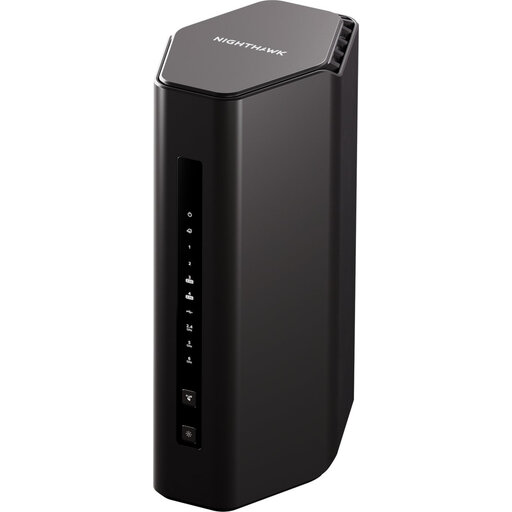 No image available
A router replacement is worth assessing if tests point to a local-network issue, rather than inadequate broadband upload capacity.
Confirm compatibility with your existing setup and whether coverage will reach the work location before choosing this model.
 No image available
Consider this three-pack if the work room needs better Wi-Fi coverage across the home, not as a way to raise the broadband line's upload speed.
If you intend to wire the work device to a mesh unit, check the required Ethernet connections and placement before buying.
Compare repeated Ethernet tests at the router with Wi-Fi performance at your work location. If wired uploads are adequate but Wi-Fi is poor, examine coverage, router placement and a wired connection for the device; if wired performance remains inadequate, compare the service with your package information. Ofcom advises testing on different days and at different times.
Check upload speed first when the task is sending large files. Download speed still matters for receiving files and other household activities, but the two figures need not match: Virgin Media publishes different average upload and download speeds for its Gig1 and Gig2 packages.
An advertised speed does not promise the same result over Wi-Fi at your desk. Check the address-specific speed information offered with the package, then account for the device's connection, router distance and simultaneous use; Ofcom says customers covered by its Broadband Speeds Code should receive a peak-time estimate and personalised minimum guaranteed speed.
Record wired test results at different times and contact your provider for diagnosis. Compare the results with the speed information in your own contract, checking which measures it covers, rather than assuming a Wi-Fi result or a headline download figure establishes a fault with your upload service.