
24/7 Customer Support

Free returns

Same-day & Next-day Delivery

Quality Guaranteed

Unlock Your Welcome Offers: FREE Delivery | Up to 80% OFF | Free 30-day JoyPlus trial
Download the APP
By Joybuy Product Recommendation Officer
Buying a printer for a UK home, student room or small office can appear straightforward until you compare ink systems, paper sizes, connectivity and subscription plans. The headline price is only part of the cost. A printer that seems affordable may become expensive if it uses low-yield cartridges, lacks automatic duplex printing or cannot handle the paper sizes your work requires.
This guide explains the main buying pitfalls and compares suitable options across the Brother printers UK range.
A low-cost Brother inkjet printer may include starter cartridges with a lower page yield than standard or XL replacements. Check both the included yield and the maximum yield of compatible cartridges before buying.
For example, the Brother DCP-J1260W includes approximately 200 black and 200 colour pages, while its XL cartridges are listed at up to 500 pages. Occasional users may find this adequate, but households printing schoolwork, forms and photos regularly should calculate the likely replacement cost.
A Brother wireless printer can connect to a home network, but not every model includes the same mobile-printing features or wired networking options. Check whether the printer supports dual-band Wi-Fi, Wi-Fi Direct, Apple AirPrint, Mopria or Brother Mobile Connect.
Wi-Fi Direct can be useful for guests or students printing from a phone without joining the main home network. For a busy office, Ethernet may provide a more consistent connection than Wi-Fi.
A Brother all-in-one printer may provide print, scan and copy functions, while some models also include faxing and an automatic document feeder (ADF). A flatbed scanner is suitable for occasional pages, photographs and identity documents. An ADF is more practical when scanning or copying multi-page contracts, invoices or coursework.
Also check whether duplex printing is automatic. Manual two-sided printing requires you to turn pages yourself and can be inconvenient for regular reports.
A4 is sufficient for most households, but an A3 printer may be worthwhile for posters, plans, menus, brochures or business documents. The Brother MFC-J6760DW supports A3 printing, a 250-sheet input tray and a 50-sheet ADF. The MFC-J6540DWE also supports A3 and can reach up to 500 sheets with its optional lower tray.
For everyday A4 use, a 150-sheet tray is common on compact models. A 250-sheet tray reduces refill frequency in small offices. If you print reports or invoices, automatic duplex printing can reduce paper consumption compared with single-sided output.
Check the cartridge or bottle reference before purchase. Genuine supplies such as the Brother LC-3219XL multipack are designed for compatible Brother inkjet models including the MFC-J5330DW, MFC-J5335DW, MFC-J5730DW, MFC-J5930DW, MFC-J6530DW, MFC-J6930DW and MFC-J6935DW.
The LC-3219XL multipack is specified for up to 3,000 black pages and up to 1,500 pages per colour cartridge, measured using ISO/IEC 24711 methodology. Always confirm compatibility with your exact printer model rather than relying on the product family alone.
Some devices are compatible with Brother EcoPro, which may offer automatic supply delivery, recycling and subscription-related warranty benefits. Treat a trial as a way to assess convenience, not as proof that it will be the lowest-cost option for every printing volume. Compare the monthly fee, included pages, additional-page charges and cancellation terms.
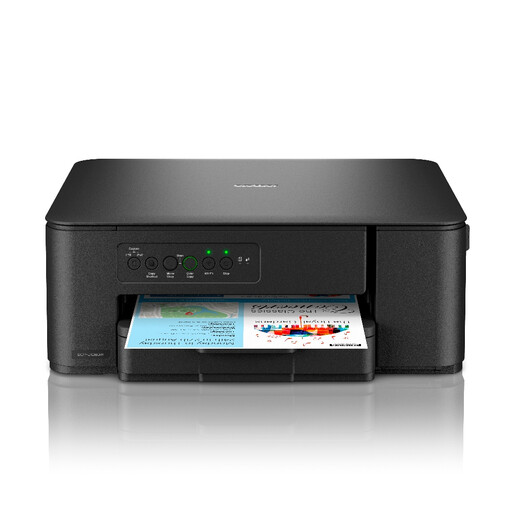
Why This Fits Their Persona: A compact three-in-one printer for students, families and occasional home users who need colour printing, scanning and copying without a large office footprint.
Its listed XL yield is higher than the included starter yield, making it easier to compare future supply costs before purchase.
Dual-band Wi-Fi, Wi-Fi Direct, A4 borderless printing and a 150-sheet input tray.

Why This Fits Their Persona: Suitable for home offices and small workgroups needing colour print, copy, scan and fax functions in one device.
It makes the workflow clear: automatic duplex, a 50-sheet ADF and a 250-sheet tray reduce manual handling and frequent refills.
Up to 18 ppm in mono and colour, 8.8 cm colour touchscreen, Ethernet, Wi-Fi and fax.

Why This Fits Their Persona: Designed for high-volume colour printing in a home office, small business or busy household where cartridge changes are inconvenient.
Its refillable tank design and stated high bottle yields make running-cost comparisons more transparent than using only the printer’s purchase price.
Up to 15,000 black pages and 5,000 colour pages from the supplied bottles, plus automatic duplex and a 20-sheet ADF.

Why This Fits Their Persona: A focused option for online sellers, retail counters, offices and small businesses printing address, shipping or filing labels.
It avoids unnecessary ink or toner purchases because direct thermal printing uses compatible DK labels rather than liquid ink or toner cartridges.
Up to 71 mm per second, 300 × 600 dpi resolution, an integrated cutter and USB 2.0 connectivity.
We have compiled a complete, real-time list of products that fully satisfy these strict selection criteria and UK safety regulations.
Yes. A compact wireless inkjet model can handle documents, scanning and occasional colour work, while a mono laser model may suit text-heavy home offices. Check tray capacity, duplex printing and whether the device supports your computer and mobile operating systems.
Many current models support Brother Mobile Connect, Apple AirPrint and Mopria. Wi-Fi Direct is also useful when you want to print from a mobile device without joining the main wireless network. Confirm the exact compatibility listed for the model you are considering.
Choose a printer based on your actual page volume. Compare ISO-rated cartridge yields, consider XL supplies for regular printing and assess whether an ink tank model is suitable for your needs. EcoPro may add convenience through automatic delivery and recycling, but compare the subscription terms with buying genuine Brother replacement ink separately.