What to check before buying
Set your browser-testing and shared-use requirements before choosing a chassis; then check whether its size and connections work at the desk. Compact Mac desktops, Tiny business PCs and small-form-factor desktops offer different configurations, so compare exact models rather than relying on a range name.
| Concern | What to check | Who this matters to |
|---|
| Desk space and connections |
Check dimensions or mounting options, then match display outputs and accessible peripheral ports to the desk. |
I need the computer to leave room for the shared desk’s screens and input devices without making connections awkward. Around 31% of consumers put that space-and-connectivity need first. |
| Browser and operating-system fit |
List the browser families you must test and confirm that the proposed operating system supports your workflow. |
If my extension must work across browser families, I need a practical way to test each target before I commit to one desktop. Around 31% of consumers place that testing need first. |
| Room for development tools |
Check installed memory, SSD capacity and processor against the browsers and local tools you expect to run together. |
I may have several browsers and development tools open at once, so the editor’s requirement alone cannot guide my choice. Around 23% of consumers make workload headroom their primary concern. |
| Separate shared use |
Plan individual operating-system accounts and decide how browser profiles and local project files will be managed. |
When colleagues take turns at the computer, I want each person’s work and sign-ins kept apart. Around 15% of consumers put account separation and maintenance first. |
Joybuy desktops for this setup
These desktop choices include mini PCs for a space-limited desk and a larger desktop to consider if the available space permits. Match each machine’s operating system, monitor connections and account setup to your own development workflow before choosing.
 No image available
Lenovo IdeaCentre Mini PC 01IRH10R, 91B2000XUK
A mini desktop to consider when the system unit must leave more of the shared work surface free.
The listed configuration has an Intel Core 5 processor, 16 GB RAM and a 512 GB SSD. Check its display connections against the desk’s monitors.
View on Joybuy
 No image available
SOYO Y5Pro Mini PC, Core i5-8250U/i5-8350U, 8 GB DDR4, 256 GB SATA SSD
A small desktop option for a shared surface; decide whether its memory and storage suit the tools you plan to keep open.
The processor is listed as an i5-8250U or i5-8350U, so confirm which one is installed before comparing configurations.
View on Joybuy
 No image available
Apple Mac mini (2026) M6, 12-core CPU and GPU, 24 GB RAM, 512 GB SSD
A compact Mac desktop to consider if macOS fits the browsers and organisation tools required for your extension work.
Check the selected configuration’s monitor connections and how separate users and project data will be managed at the shared desk.
View on Joybuy
 No image available
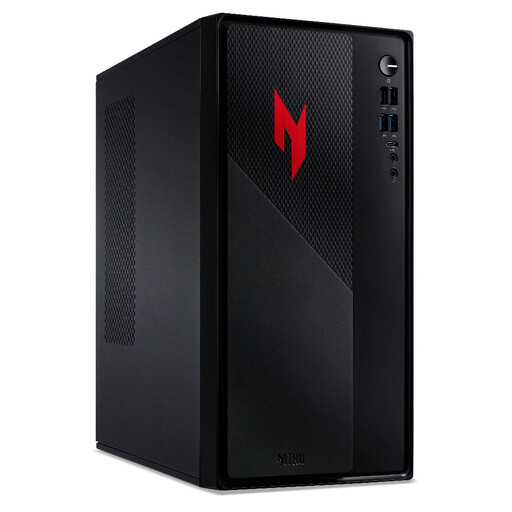
Acer Nitro N20, Core i5-13420H, GeForce RTX 5060, 16 GB RAM, 512 GB SSD
A larger desktop to consider only if its chassis fits comfortably at the shared desk.
The product name lists Windows 11. Check its supported display arrangement against your monitors rather than assuming that its graphics specification settles connectivity.
View on Joybuy
 No image available
FIREBAT F1 Mini PC, Ryzen 5 7640HS, 24 GB LPDDR5, 512 GB PCIe 4.0 SSD
A mini-PC option when desk space and the ability to connect several screens both matter.
The product title claims support for three 4K displays and lists USB 4.0 and HDMI 2.1. Confirm the supported monitor arrangement, installed operating system and separate-user setup before buying.
View on Joybuy
Frequently asked questions
Do I need a gaming desktop to build a browser extension?
Not by default: Chrome describes extensions as using HTML, CSS and JavaScript, and Visual Studio Code publishes modest requirements for the editor itself. Size the desktop for the browsers, developer tools, local services and project files you will use together, rather than treating the editor’s recommendation as a complete workstation specification.
Can several people use one shared-desk desktop?
Yes, provided the machine is set up for the people who will use it. Microsoft documents separate Windows accounts with individual settings and files; its Shared PC options are intended for more deliberately managed use, so check any account-deletion settings before relying on local project data.
Are Chrome profiles enough to keep my work private?
No: Chrome profiles organise browser data but do not prevent someone with access to the device from switching profiles. Google advises that another user may see information such as browsing history, so use separate operating-system accounts and lock the computer when you leave it.
Should I test my extension in more than one browser?
Yes, if you intend to support more than one browser family. MDN Web Docs notes differences in extension API implementation and coverage, so identify your target browsers before deciding whether the desktop and operating-system setup can accommodate your testing plan.


