
24/7 Customer Support

Free returns

Same-day & Next-day Delivery

Quality Guaranteed

Unlock Your Welcome Offers: FREE Delivery | Up to 80% OFF | Free 30-day JoyPlus trial
Download the APP
Finding a tablet that can handle everything from your daily commute entertainment to your child’s homework doesn't have to mean spending a fortune. The market for the budget Android tablet has expanded significantly, offering powerful features, large screens and useful accessories without the premium price tag.
However, with so many options, it can be challenging to determine which device offers the best value for your specific needs. This guide is designed to help you navigate the choices, understand the key features to look for and discover some of our top recommendations for 2026 that deliver performance and versatility.
Making an informed decision comes down to understanding a few key specifications. Here are the most important factors to consider when searching for a cheap tablet UK.
The display is your window to everything you do, so its size and quality are paramount. A large screen tablet (11 inches or more) is ideal for watching films, multitasking with split-screen apps, or as a drawing tablet with screen. For portability or for a kids tablet, a more compact 8 to 10-inch screen is often more manageable. Pay attention to the resolution—a higher resolution (like 2K) provides a sharper, more detailed picture. Some models also feature a higher refresh rate (e.g., 120Hz), which makes scrolling and animations appear much smoother.
A tablet's performance is largely determined by its processor and RAM (Random Access Memory). For general use like web browsing and streaming, 3GB to 4GB of RAM is usually adequate. However, if you plan on gaming, heavy multitasking, or using creative applications, look for 8GB or more. Many modern budget tablets, including some from Alldocube and TECLAST, now offer virtual RAM expansion, which cleverly uses a portion of the device's storage to boost performance when you need it most. For storage, 32GB is a starting point, but 128GB or 256GB will give you much more room for apps, photos and offline media.
Consider where you'll be using your tablet. A Wi-Fi-only model is perfect for home, school or office use. If you need internet access on the go, a 4G LTE tablet with a SIM card slot offers true portability. Additionally, look for bundles that include accessories. An Android tablet with keyboard and stylus can instantly transform your device into a capable workstation, making it an excellent tablet for students or professionals. These inclusions add significant value and save you from making separate purchases.
Here are a few standout models that offer a compelling combination of features, performance and value for different types of users.

Why It Stands Out: The Alldocube Kido is purpose-built for young users. It combines a durable, child-friendly design with robust parental controls, creating a safe and engaging digital environment for learning and play.
Pros:
Who is it for?: This is an excellent choice for parents looking for a durable, secure and affordable first kids tablet for educational apps, games and videos.

Why It Stands Out: The ArtPad Pro is a creative and productivity powerhouse. It bundles a large, high-resolution screen with a powerful processor and a full set of accessories, making it an exceptional value package for artists and students.
Pros:
Who is it for?: Ideal for digital artists, note-takers and students who need a versatile drawing tablet with screen and a capable work device without a high-end budget.
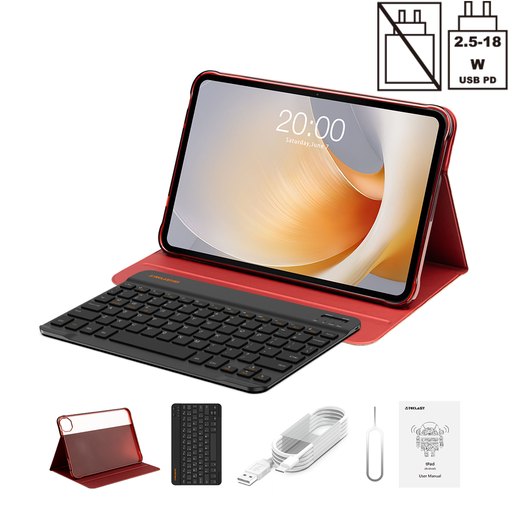
Why It Stands Out: The T65 Plus is built for an immersive media experience. Its expansive 13.4-inch screen with a high refresh rate makes it perfect for streaming video, gaming and browsing, offering features typically reserved for more expensive tablets.
Pros:
Who is it for?: This large screen tablet is perfect for users who prioritise media consumption, from watching films to playing games, and want a smooth, high-performance display.
While RAM is a key internal component, protecting your tablet's exterior is just as vital. If you are also searching for accessories to complement your device, you can explore our range of tablet accessories to find cases and other useful add-ons.
Q1: Can a cheap tablet UK be good for drawing? A: Yes, many affordable tablets are now well-suited for digital art. To ensure a good experience, look for a drawing tablet with screen that offers a high-resolution display, supports pressure sensitivity and ideally includes a stylus. Models like the TECLAST ArtPad Pro are specifically designed with these features in mind.
Q2: How much RAM is enough for a budget Android tablet? A: For basic daily tasks such as browsing, social media and video streaming, 3GB to 4GB of RAM is generally sufficient. If you plan to use your tablet for more intensive multitasking, gaming, or creative software, aiming for 6GB or 8GB of physical RAM is advisable. Some tablets also boost performance with virtual RAM, which is a helpful feature to have.
Q3: Are Alldocube and TECLAST good tablet brands? A: Alldocube and TECLAST have become popular choices in the UK for those seeking feature-rich tablets at competitive prices. These brands often pack impressive specifications—such as large displays, generous RAM and storage and included accessories—into their devices, offering strong value for budget-conscious consumers.