
24/7 Customer Support

Free returns

Same-day & Next-day Delivery

Quality Guaranteed

Unlock Your Welcome Offers: FREE Delivery | Up to 80% OFF | Free 30-day JoyPlus trial
Download the APP
Finding a device that can seamlessly switch between work, study and entertainment without costing a fortune can be a challenge. Many people in the UK are looking for a versatile tool that doesn't require buying expensive add-ons. The search for a budget Android tablet with keyboard often leads to a maze of specifications and hidden costs for essential accessories.
This guide is designed to help you navigate the market. We will outline the key features to look for when seeking a cheap Android tablet UK deal and highlight some compelling options that come as a complete package. Our focus is on value and practicality, ensuring you get a ready-to-use device straight out of the box.
Before diving into specific models, it's useful to understand what makes a good affordable tablet deal. Here are a few practical points to keep in mind during your search.
One of the most significant value propositions in the budget tablet market is the inclusion of accessories. A tablet with case and keyboard not only saves you money but also guarantees a perfect fit and immediate productivity. A protective case is essential for durability, especially for a device used by the whole family or a busy student. A bundled keyboard transforms the tablet from a media consumption device into a capable tool for typing emails, essays and notes. For those with a creative streak, a package that also includes a stylus offers an entry into the world of digital art, making it a functional drawing tablet with stylus.
The screen is your main point of interaction, so its quality is paramount. For watching films or multitasking with split-screen apps, a large screen tablet (11 inches or more) provides a more immersive experience. However, resolution is just as important as size. Look for a display with at least an HD resolution (1280 x 800 pixels), though a Full HD (1920 x 1200 pixels) screen will offer noticeably sharper text and more vibrant images.
For a budget tablet, you don't need a top-of-the-line processor. An octa-core processor is more than capable of handling everyday tasks like web browsing, video streaming and light productivity. In terms of memory, 4GB of RAM is a good starting point for smooth multitasking.
Equally important is the operating system. An Android 15 tablet will provide access to the latest features, security updates and a user-friendly interface, ensuring the device feels modern and responsive for longer.
Here are a few TECLAST tablet options that offer a strong combination of features, accessories and value.
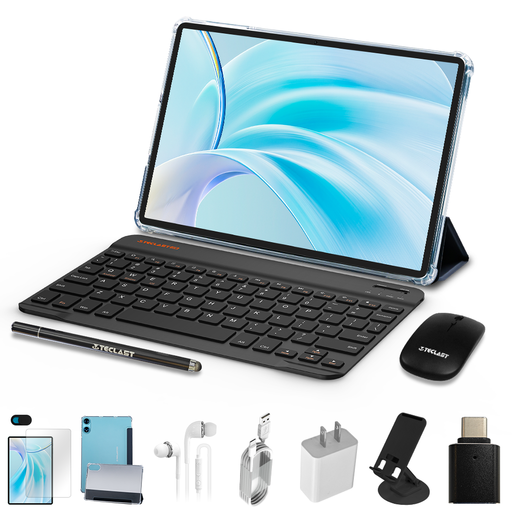
Why It Stands Out: The TECLAST P50 bundle represents exceptional value. For a very accessible price, it provides a complete setup including a protective case, a Bluetooth keyboard and even a mouse. It runs on the latest Android 15 and features a large 11-inch display, making it a fantastic entry-level option.
Pros:
Who is it for?: This is an ideal choice for students, families or anyone needing a basic, all-in-one device for light tasks like browsing, streaming and email without any extra purchases.
View the TECLAST P50 Deal on Joybuy
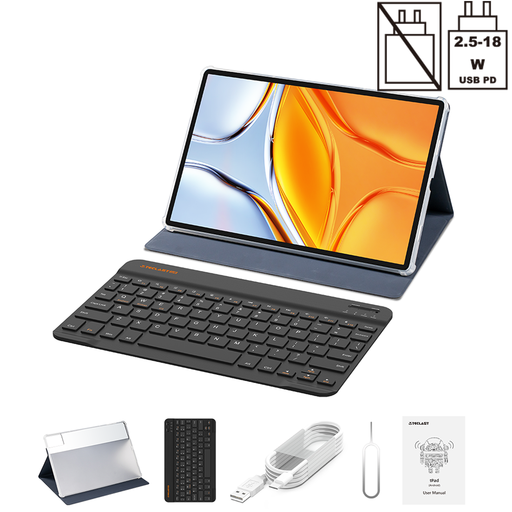
Why It Stands Out: If screen size is your priority, the TECLAST T70 is a compelling option. Its massive 14-inch Full HD display is excellent for media consumption and productivity. It is powered by a capable MediaTek Helio G99 processor and a substantial 10,000mAh battery and it also includes a case and keyboard.
Pros:
Who is it for?: Users who primarily want a large screen tablet for watching films, reading digital magazines or working on documents with a comfortable, spacious view.
View the TECLAST T70 Deal on Joybuy

Why It Stands Out: The ArtPad Pro strikes a balance between a large, high-resolution screen and creative functionality. Its 12.7-inch 2K display is sharp and vibrant, and the inclusion of a stylus with 4096 levels of pressure sensitivity makes it a great tool for aspiring artists and note-takers. The powerful Helio G99 processor and ample memory ensure smooth performance.
Pros:
Who is it for?: This is a strong candidate for creative individuals, students and professionals who want a versatile drawing tablet with stylus and a capable productivity machine in one package.
View the TECLAST ArtPad Pro Deal on Joybuy
The tablets featured here are selected for their excellent balance of features and affordability for general use. If your needs include intensive 3D gaming or running demanding professional applications, you may want to explore models with even more powerful graphics processors and cooling systems.
For those specific requirements, we recommend browsing our dedicated selection.
? Explore our range of Gaming Tablets with Keyboards
For many everyday tasks, a budget Android tablet with keyboard is a perfectly viable laptop alternative. It's great for writing emails, browsing the web, attending video calls and word processing. However, for specialised software (like advanced video editing or coding) and heavy multitasking, a traditional laptop generally offers more power and flexibility.
For general use—such as streaming video, social media and light productivity—4GB of RAM is sufficient for a smooth experience. If you plan to do more intensive multitasking or play demanding games, considering a model with 8GB or more (often boosted with virtual RAM) would be a better choice.
The main benefits are cost savings and convenience. Purchasing a quality case and a compatible keyboard separately can add a significant amount to the total cost. A bundled tablet with case and keyboard ensures everything works together perfectly from day one, providing protection and productivity without the hassle of finding matching accessories. It represents a truly affordable tablet deal.