2D drawing and PDF reviewers
If you mainly inspect or mark up plans, prioritise a readable monitor setup and the requirements of your drawing software. A rendering-focused workstation is not the starting point for this task alone.


Choose the desktop around the files and software you actually use: PDF and 2D drawing review call for different checks from opening Revit models. For a quiet study, assess desk space and request acoustic measurements for the exact processor, graphics card and cooling configuration; a small case alone does not establish how much noise a computer makes. Check memory, monitor connections and, for work-critical Revit use, graphics-card and driver compatibility before ordering.
If you mainly inspect or mark up plans, prioritise a readable monitor setup and the requirements of your drawing software. A rendering-focused workstation is not the starting point for this task alone.
If reviewing plans means opening Revit models, check the Windows version, memory required by your projects and the exact graphics-card and driver combination. Autodesk’s Revit requirements give different memory examples for different model sizes.
If the computer will sit near you in a small study, consider where its case and cables will go as well as how it sounds during your usual work. Ask for acoustic results tied to the configuration you intend to buy rather than judging noise by case size.
Start with the applications and files you must open, then assess noise, displays and room for future work. A compact case and a powerful graphics card answer different questions; neither confirms that a desktop fits your entire setup.
| Concern | What to check | Who this matters to |
|---|---|---|
| Software and model files | List your application versions and whether you open PDFs, 2D drawings or Revit models. Check the operating system and memory against the work you actually do. | If I need to open project models rather than just read drawings, software compatibility decides whether the desktop is usable for my work. Around 31% of consumers put that need first. |
| Noise and placement | Request acoustic readings and test conditions for the exact processor, graphics card and cooling setup. Check where the case can sit without obstructing your desk. | When I work in a quiet study, fan noise close to my seat can be distracting even if the case fits neatly. For around 31% of consumers, low-distraction use is the primary concern. |
| Plan detail and displays | Match the monitor resolution and number of screens to the desktop’s actual outputs and supported display arrangement. | If I compare plans with reference documents side by side, I need enough readable screen space and the connections to use it. Display needs come first for around 23% of consumers. |
| Capacity for changing work | Compare fitted memory and storage with available upgrade options; assess a larger workstation against the models and tasks you expect to handle. | I want room for more demanding files later without choosing tower-class hardware solely for routine viewing today. Around 15% of consumers make that balance their first priority. |
PDF viewing does not establish that the same configuration suits Revit models. Autodesk says 16 GB RAM is usually sufficient for a typical Revit 2026 editing session with a single model up to about 300 MB on disk; its balanced configuration specifies 32 GB or more for a model up to about 600 MB.
Check the most demanding application and project files you expect to open before settling on memory and graphics specifications.
Moving to BIM review later may mean upgrading components or changing computers.
Autodesk says graphics hardware absent from its Revit certification pages may still work, but it has not received or verified test results for those card-and-driver combinations.
For work-critical Revit use, check the exact graphics card and driver against Autodesk’s certified-hardware information rather than relying on graphics memory alone.
A small case does not describe the sound it makes under your workload. HP describes fan control that responds as its compact workstation heats up.
Ask for acoustic readings and the conditions under which they were measured for the exact configuration, including the type of work being performed.
Lenovo says the ThinkStation P3 Tiny can support up to six independent displays, but its monitors are sold separately. The supported arrangement also needs to match the connections on the configuration you choose.
Confirm the included equipment, monitor connections and any cables or adapters required for your planned layout.
The Z2 Mini G1i is a compact workstation line to examine when study space is limited and professional graphics are relevant to the software you use.
The ThinkStation P3 Tiny is a small-workstation line worth examining when placement and multiple displays are important.
Precision tower workstations are a route to consider if plan review forms part of more demanding modelling, rendering or expansion-heavy work.
These Windows desktops are choices to assess for PDF and 2D CAD plan review. Compare their fitted specifications with your software and monitor requirements, and obtain configuration-specific acoustic information before choosing one for a quiet study. For Revit work, check the graphics card and driver separately.
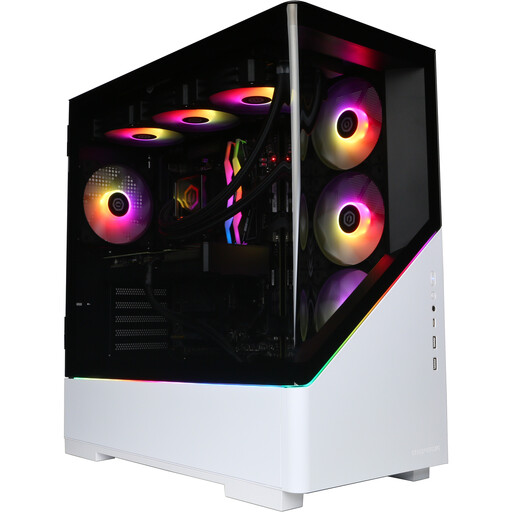 No image available
A Windows desktop to assess for PDF and 2D CAD review. Its listed configuration has an AMD Ryzen 7 9800X3D, 32GB DDR5 RAM, a 2TB NVMe SSD and Windows 11 Home.
Confirm that its monitor connections and the exact configuration’s acoustic results suit your study. For work-critical Revit use, check the graphics card and driver against Autodesk’s certification information.
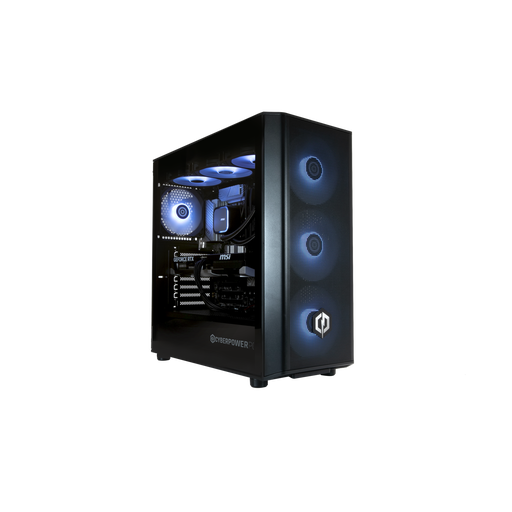 No image available
A Windows desktop to assess for PDF and 2D CAD review. Its listed configuration has an Intel Core Ultra 7 265KF, 32GB DDR5 RAM, a 1TB NVMe SSD and Windows 11 Home.
Match the monitor setup to the selected configuration and request acoustic results for that configuration. Check its graphics card and driver against Autodesk’s information if Revit is essential to your work.
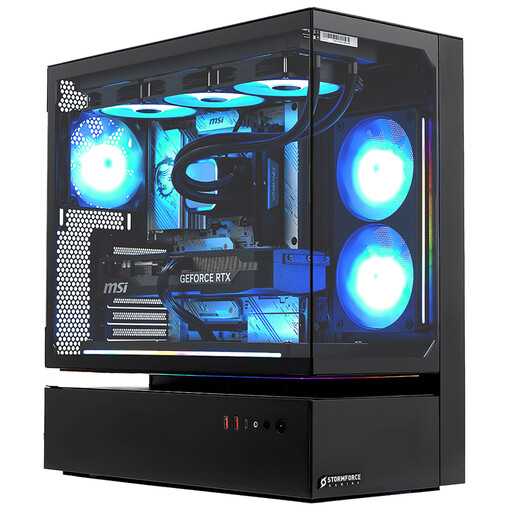 No image available
A Windows desktop to assess for PDF and 2D CAD review. The named variant has 32GB RAM, a 2TB SSD and Windows 11.
Confirm the exact video outputs before planning a multi-monitor desk, and request acoustic results for the selected configuration. For Revit, check the graphics card and driver against Autodesk’s certification information.
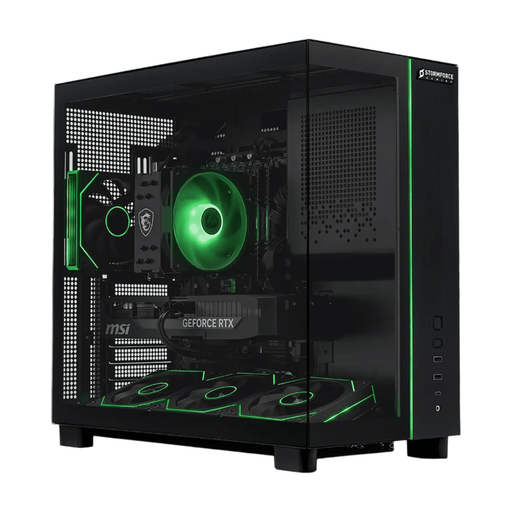 No image available
A Windows desktop to assess for PDF and 2D CAD review. The named variant has 32GB RAM, a 2TB SSD and Windows 11.
Check its available connections against your monitor arrangement and request acoustic results for the selected configuration. If Revit is central to your work, verify the graphics card and driver with Autodesk’s certification information.
Size memory to the models you open: Autodesk says 16 GB is usually sufficient for a typical Revit 2026 editing session with one model up to about 300 MB on disk, while its balanced configuration specifies 32 GB or more for one model up to about 600 MB. Linked models and individual project demands can change what you need.
A Mac can be an option for PDFs and a supported AutoCAD for Mac workflow, but check your exact software version and files before choosing it. Autodesk lists Windows operating-system requirements for Revit 2026, so a Mac should not be treated as a like-for-like native Revit desktop.
Autodesk does not describe certification as a universal requirement, but checking the exact card and driver is useful for work-critical Revit use. Autodesk says unlisted hardware may still work, though it has not received or verified test results for that combination.
Ask for acoustic readings in dBA for the exact configuration, together with the test conditions and workload. Compare readings for the type of work you expect to do rather than assuming that a compact chassis or a particular processor class will be quiet.
Multi-display support does not mean monitors are included: Lenovo explicitly says monitors for its ThinkStation P3 Tiny are sold separately. Check the contents of the configuration you order, its available ports and the cables needed for your screens.