Bus-sim cockpit builders
You use a PC with several monitors and want a wheel position and controls closer to heavy-vehicle driving than a conventional racing-car layout.


For bus simulation, prioritise a heavy-vehicle wheel position if a large rim, flatter mounting angle and accessible controls matter more to you than a racing-style setup. A truck-focused direct-drive bundle combines that approach with direct drive; a general-purpose direct-drive wheel makes more sense if you also play racing titles and accept a racing-oriented rim. Whichever route you take, check the exact game, platform variant and mounting space around your monitors before buying.
You use a PC with several monitors and want a wheel position and controls closer to heavy-vehicle driving than a conventional racing-car layout.
You need a wheel that can be mounted securely and removed when the desk is needed for something else. Monitor arms may compete for the same desk-edge space.
You drive buses and racing cars, so the choice involves balancing bus-style controls against the wheelbase and rim you want for other games.
Choose the steering position you want, then check whether the complete wheel-and-mount setup fits your desk or cockpit. Torque alone cannot tell you whether the controls will suit bus driving.
Choose it when: A flatter wheel position and a spinner knob matter most, without building a full cockpit. Thrustmaster describes these features for its SimTask steering kit.
Trade-off: A T128 SimTask setup follows a different feedback route from a direct-drive bundle; check the exact pack variant and desk-clamp fit.
Choose it when: You want a large truck-style rim and direct drive together. MOZA Racing lists a 400 mm wheel with its R5 Trucking and R5 Pro Truck bundles.
Trade-off: Allow room for the larger rim and a secure mount; confirm platform support for the exact bundle.
Choose it when: You also use racing simulators and prefer a racing-oriented wheel layout.
Trade-off: A racing rim and controls do not, by themselves, provide the bus-style steering position you may want.
| Concern | What to check | Who this matters to |
|---|---|---|
| Steering position and controls | Check rim diameter, wheel angle and whether a spinner knob or suitable mount is included. | If I want bus-like steering, a large round rim and reachable controls take priority over a compact racing layout. Around 42% of consumers put heavy-vehicle ergonomics first. |
| Feedback and mounting | Check the exact wheelbase specification and whether its clamp fits a stable, unobstructed desk edge. | When I want direct-drive feedback, I also need a mount that stays secure beside my monitor hardware. Roughly 33% of consumers make feedback and mounting stability their primary concern. |
| PC and game compatibility | Confirm the platform variant and current wheel guidance for your bus simulator; check monitor-arm and cable clearance. | If my game cannot use the wheel and controls as intended, the rest of the setup matters less. About 25% of consumers prioritise PC, game and multi-monitor integration. |
A direct-drive wheel can still have a compact racing rim and racing-oriented controls. For bus simulation, the steering position may matter more to you than the torque figure.
Compare the complete rim, mount and control layout. MOZA Racing specifies a 400 mm rim for its truck bundles, while Thrustmaster specifies a 30 cm rim for the T598.
Achieving a different driving position may mean adding a compatible rim, mount or separate vehicle controls.
A wheel mount and monitor-arm base may need the same section of desk edge. Desk thickness alone will not establish whether the setup fits.
Measure the usable edge, thickness and knee clearance, allowing for monitor arms, drawers and cable hardware. Check the clamp limits for the particular product rather than assuming clamps are interchangeable.
If the desk cannot hold the wheel securely, a compatible stand or cockpit may be needed.
Platform compatibility belongs to the exact model and version. MOZA Racing Support identifies the standard R5 bundle as PC-only; Logitech G lists different platform configurations for the G923.
Match the product variant to your PC and any console you intend to use before ordering.
Steam describes steering-wheel support for Bus Simulator 21 Next Stop, but the game's developer has also published a steering-wheel diagnostic tool. Individual models and control mappings still warrant a check.
Consult the current guidance for your game and wheel model, then test steering, pedals and essential bus controls promptly after setup.
MOZA Racing offers truck-focused direct-drive bundles alongside its standard R5 range.
Thrustmaster pairs racing-wheel products with SimTask mounting accessories aimed at heavy-vehicle simulations.
Logitech G offers racing-oriented wheels in several platform configurations, including direct-drive G PRO hardware.
These wheel-and-control sets offer different approaches to PC bus simulation: a SimTask desktop pack, a truck-focused control system and a racing-style wheel-and-pedal set. Check each one against your game, desk and preferred steering position.
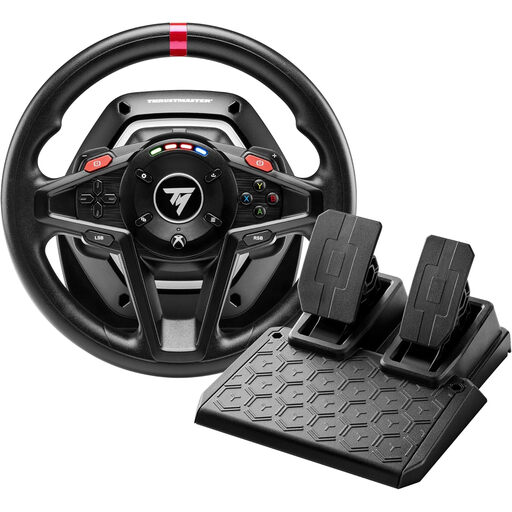 No image available
Consider this pack if a flatter, adjustable steering position at a desk is your priority. Check that the clamp fits your desk edge and leaves room for the monitor arms.
The named variant is for Xbox and PC. Confirm support for your exact bus simulator and its essential controls.
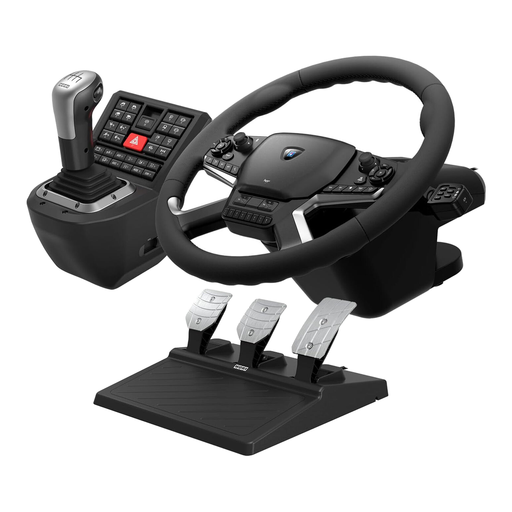 No image available
Consider this truck-oriented control system if you want a wheel, shifter and pedals for a Windows PC setup. Check its wheel position and mounting fit against your desk or rig.
The product name specifies Windows 11/10. Confirm that your bus simulator supports the exact wheel and controls.
 No image available
Consider this racing-style wheel-and-pedal set if you also play driving games beyond bus simulators. Decide whether its wheel position suits your intended bus-driving posture.
The named variant is for Xbox and PC. Check game support and leave enough desk-edge space for its mount alongside your monitors.
No: monitor count does not determine the torque you need. For a multi-monitor bus-sim desk, pay particular attention to PC compatibility, available connections, monitor-arm clearance and secure wheel mounting; choose feedback characteristics according to the wheel and setup you want.
Choose the larger truck-style rim if a heavy-vehicle steering interface is your priority, provided it fits your mounting space. MOZA Racing specifies 400 mm wheels for its truck bundles, while Thrustmaster specifies a 30 cm rim for the T598; the latter may suit a racing-oriented layout instead.
It can be desk-mounted if the particular wheel, clamp and desk meet the stated mounting requirements and the setup remains stable. MOZA Racing states a 3–70 mm desk-clamping range for its R5 Trucking Bundle and up to 50 mm for its separate table clamp; measure the usable edge around monitor arms and drawers.
Do not assume every PC wheel and control will work as intended. Steam describes support for popular steering wheels, while the game's developer has published a steering-wheel diagnostic tool; check current guidance for your exact model and game version.