Dedicated bus-cab builders
You want a driving position closer to a heavy-vehicle cab. Wheel angle, one-handed steering, mounting fit and access to other controls matter more to you than a circuit-racing layout.


For a room used mainly for simulated bus driving, consider a heavy-vehicle-oriented setup if a flatter wheel position and one-handed steering matter most; Thrustmaster's T128 SimTask Pack offers that layout for PC and Xbox. A conventional wheel may suit a room shared with racing games, while a direct-drive bundle is worth considering if steering feedback takes priority. Whichever layout you prefer, confirm support for your exact bus simulator and platform before buying.
You want a driving position closer to a heavy-vehicle cab. Wheel angle, one-handed steering, mounting fit and access to other controls matter more to you than a circuit-racing layout.
You plan to use the same room for bus, truck and racing titles. Choosing the right PC or console version is only part of the decision: the wheel must also work with each game you intend to play.
You have space for a more permanent installation and put steering feedback ahead of a bus-cab-style wheel position. Check your simulator's wheel and force-feedback support before committing to that layout.
Choose the wheel layout that suits how you want to drive, then check platform and game support before planning its position in the room.
Choose it when: A flatter wheel and spinner knob matter more than a conventional racing position. Thrustmaster positions its T128 SimTask Pack for heavy-vehicle simulations.
Bear in mind: The cited pack is for PC and Xbox, and Thrustmaster specifies a 15–50 mm desk-thickness range for the SimTask clamp.
Choose it when: You also play racing games and want a familiar wheel-and-pedal arrangement. Logitech G offers separate G29 PlayStation/PC and G920 Xbox/PC versions.
Bear in mind: Those console versions are not interchangeable, and Logitech G's cited wheel information does not establish a flat, bus-cab-style mounting position.
Choose it when: Steering feedback matters more to you than a heavy-vehicle wheel position. MOZA Racing describes its R3 as a direct-drive option and lists Euro Truck Simulator 2 and American Truck Simulator among its supported PC games.
Bear in mind: Support for those truck games does not establish support for your bus simulator; confirm the exact game and wheel combination.
| Concern | Buying checks | Who this matters to |
|---|---|---|
| Cab-style steering | Check the wheel position, spinner-knob arrangement and fit of the mount to your desk or rig. | If I mainly drive buses, I want a flatter wheel and room to use another control without taking both hands off the setup. Around 36% of consumers put cab-style control first. |
| Platform and game support | Match the wheel version to your PC or console, then check support for the exact simulator and its control configuration. | I do not want a wheel that connects to my platform but cannot be used as intended in my bus game. For around 29% of consumers, compatibility is the primary concern. |
| Steering feedback | Check the type of force feedback and whether your chosen game supports and lets you adjust it. | If steering forces are central to how I enjoy driving, I would accept a less cab-like layout to consider a different feedback system. Around 21% of consumers prioritise steering feel. |
| Additional controls | Check accessory compatibility, mounting space and whether the game can map the controls you want. | I want space to add controls to a permanent station, but only if they serve functions in the buses I drive. Expandability comes first for around 14% of consumers. |
Logitech G identifies the G29 as a PlayStation/PC wheel and the G920 as an Xbox/PC wheel. Their shared PC compatibility does not make the console versions interchangeable.
Decide which platform you will use before choosing a variant, and check the manufacturer's platform designation for that exact model.
A game's controller label may not identify which wheel models it accepts. For example, Valve's OMSI 2 store listing states that support for devices beyond its specified controllers is not known.
Check current guidance for the exact simulator, wheel and platform, including any driver or in-game configuration requirements.
Thrustmaster specifies a 15–50 mm desktop thickness for the SimTask Steering Kit clamp. Thickness alone does not tell you whether the clamp, pedals and cables will fit comfortably in your intended position.
Measure the mounting edge and underside clearance, then plan pedal placement and cable routing from your seated driving position.
These product lines offer different starting points for a bus-simulation room; a brand name alone does not establish support for a particular game.
Its T128 SimTask approach is aimed at a flatter, heavy-vehicle-style wheel position.
The G29 and G920 are conventional wheel-and-pedal options with distinct console versions.
The R3 is a direct-drive route for drivers weighing steering feedback against a cab-style layout.
These choices span a heavy-vehicle-oriented pack and other wheel systems for the room. Compare each one against your platform, bus game and intended mounting position rather than treating the different layouts as interchangeable.
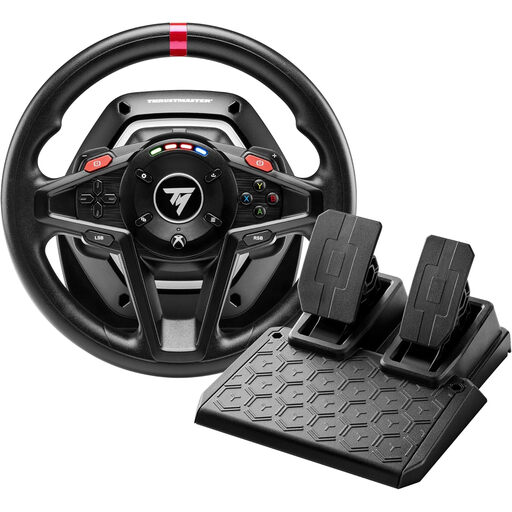 No image available
Consider this pack if a flatter wheel position and one-handed steering are central to your bus-simulation setup.
Thrustmaster describes the pack as including a wheel, pedals, flat-position Steering Kit and spinner knob. Its SimTask clamp is specified for desktops 15–50 mm thick; check underside clearance and support for your exact bus game.
 No image available
Consider this wheel-and-pedal system if you use Xbox or a Windows PC and want to assess a racing-style layout for your room.
Check its mounting arrangement and support in your exact bus simulator before choosing it for a permanent station.
 No image available
Consider this conventional wheel-and-pedal set if the room will be used for other driving games as well as buses.
Match the Xbox or PC version to your platform, and check game support and mounting fit rather than assuming it provides the SimTask pack's flatter position.
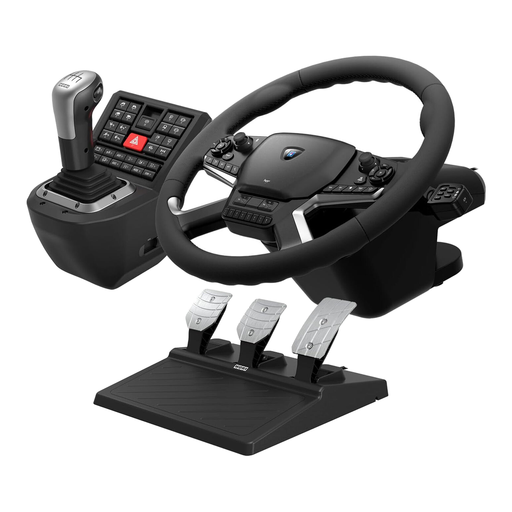 No image available
Consider this truck-oriented Windows control system if you want to investigate a heavy-vehicle setup for your PC room.
Check which controls your bus simulator can map and how the system will mount at your chosen driving position.
 No image available
Consider this T128 variant if you need a PlayStation or PC wheel-and-pedal set rather than the Xbox/PC SimTask Pack.
Thrustmaster gives the T128 a 270°–900° rotation range. Check your bus game's wheel support and whether your planned mounting position calls for separate compatible hardware.
No: platform compatibility does not establish support in a particular game. Check the exact simulator's current wheel guidance and any driver or configuration requirements. Valve's OMSI 2 listing, for instance, states controller support but does not confirm support for other devices.
No; a flat mount is a layout choice, not a requirement for every bus game. It is worth considering if you want a heavy-vehicle-style position or easier one-handed steering. Thrustmaster describes those uses for its SimTask Steering Kit and spinner knob.
Measure the desktop at the exact mounting point and check the space below it. Thrustmaster specifies a 15–50 mm desktop-thickness range for the SimTask clamp; you will also need to plan pedal placement and cable routing.
Yes, if you choose a compatible wheel and your game can make use of the extra input. Logitech G says its Driving Force Shifter is designed for the G923, G29 and G920; check how your bus simulator maps gears before buying one.