Compact-desk bus drivers
You need a secure mounting point in limited space and may prefer a flatter wheel position for heavy-vehicle driving. Thrustmaster specifies a 15–50 mm desk-clamp range for its SimTask mounting system.


Check your platform and bus game’s wheel support before choosing a setup, then make sure its mount fits your compact cockpit. A flatter, heavy-vehicle-style wheel position suits drivers who want bus-like steering; a wheel listed for their game offers a clearer starting point for compatibility, while a compact PC direct-drive bundle calls for a closer check of game configuration.
You need a secure mounting point in limited space and may prefer a flatter wheel position for heavy-vehicle driving. Thrustmaster specifies a 15–50 mm desk-clamp range for its SimTask mounting system.
You play on PC, Xbox or PlayStation and need the exact wheel variant to match both your platform and your bus game. Logitech G assigns the G29 and G920 to different console families.
You want to consider a compact direct-drive bundle for PC simulations and are prepared to check how your bus game detects and maps its controls. MOZA Racing includes a table clamp with its R3 PC bundle.
Start with platform and exact-game support, then check the mounting space. Steering feedback and extra controls matter only if the wheel will fit and its useful functions can be mapped in your game.
Choose when: Your PC or Xbox desk setup has a suitable edge and you want to angle the wheel towards a heavy-vehicle driving position.
Bear in mind: Thrustmaster’s T128 SimTask Pack is an Xbox/PC version; its heavy-vehicle design does not establish support for every bus game.
Choose when: Bus Simulator 21 is your main title and you want to start with a model on the publisher’s platform-specific support list.
Bear in mind: Logitech G specifies the G29 for PlayStation/PC and the G920 for Xbox/PC; check the game’s list for your particular platform.
Choose when: You use a PC and want to consider MOZA Racing’s desk-clamp-mounted R3 direct-drive bundle.
Bear in mind: Confirm detection, button mapping and force-feedback behaviour in your intended bus game before committing to this route.
| Concern | What to check | Who this matters to |
|---|---|---|
| Mounting fit and wheel position | Measure the usable desk edge and clearance beneath it. For the Thrustmaster SimTask mount, check that the edge is 15–50 mm thick. | I have little room and need the clamp to grip securely without an upright wheel position getting in the way. Around 34% of consumers put physical fit and steering position first. |
| Platform and game support | Match the exact wheel variant to your platform, then consult your bus game’s support information for that platform and version. | I want to avoid choosing a console variant or wheel that my main bus game cannot use as intended. Roughly 33% of consumers make compatibility their primary concern. |
| Steering feedback | Compare the stated drive systems and pedals only after checking fit and game support. MOZA Racing specifies 3.9 Nm for the R3 PC bundle; that rating alone does not establish how a bus game will feel. | If the wheel fits my setup and works with my game, steering feedback is what I most want to weigh. About 20% of consumers put feedback first. |
| Extra controls | Identify the actions you want on the wheel, check the game’s binding options and allow space for any additional controls. | I would rather reach for wheel-mounted controls during repeated bus-driving actions than rely on a keyboard or gamepad. Around 13% of consumers prioritise extra controls. |
Logitech G specifies the G29 for PlayStation/PC and the similar-looking G920 for Xbox/PC. The product-family name alone is not enough to identify the version you need.
Write down your platform and check the exact model designation before ordering.
The Bus Simulator 21 publisher lists certain wheels as preconfigured on PC. Other Windows-compatible wheels may need player configuration, and the publisher does not guarantee full functionality for manually configured wheels on console.
Check your exact title and platform’s wheel-support information, including whether the controls you need can be mapped.
A desk edge can be within a clamp’s thickness range while a drawer, apron or cable tray blocks the clamp underneath.
Measure the full clear clamping path. Thrustmaster specifies a 15–50 mm desk edge for the SimTask mounting system.
MOZA Racing specifies a direct-drive R3 PC bundle with a table clamp, but the drive-system specification does not tell you how your particular bus game will recognise it.
Check wheel detection, control bindings and force-feedback options for your intended title before choosing it for bus simulation.
Relevant to compact PC or Xbox setups where a flatter heavy-vehicle steering position is a priority.
Relevant when a player wants to consider G29 or G920 wheel-and-pedal systems alongside Bus Simulator 21’s support information.
Relevant to PC players considering a compact, desk-mounted direct-drive bundle.
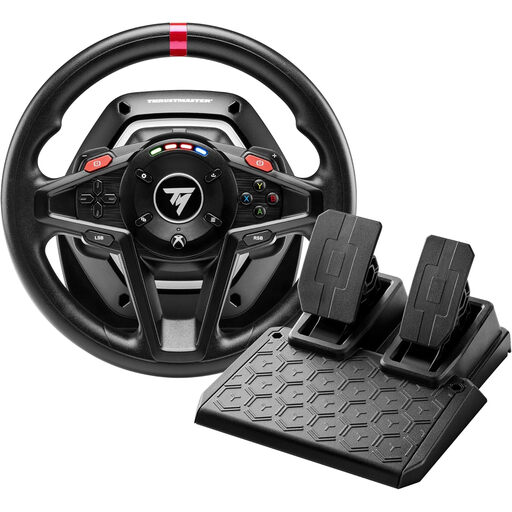
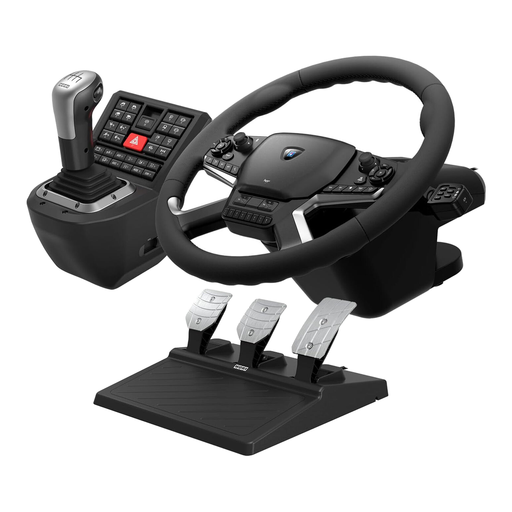
These products focus on heavy-vehicle-style wheel setups for a compact desk or cockpit. The Thrustmaster pack offers an adjustable wheel position for PC or Xbox; the HORI system is a Windows 10/11 option. Check mounting space and support for your particular bus game before choosing either.
 No image available
For a compact PC or Xbox setup where a flatter heavy-vehicle wheel position matters, this pack combines a T128 wheel, T2PM pedals, adjustable mount and spinner knob, according to Thrustmaster. Its SimTask clamp is specified for a 15–50 mm desk edge; check underside clearance and support for your bus game.
 No image available
For a Windows 11/10 bus-sim setup where a truck-oriented control system appeals, check the mounting space against your cockpit and confirm that your exact game detects and maps the controls you intend to use.
The Bus Simulator 21 publisher lists Logitech G29, G920 and G923 among its preconfigured PC wheels. Its support information varies by platform; check the list for your version and platform before choosing a wheel, particularly if you want to avoid manual configuration.
Thrustmaster specifies a 15–50 mm desk-edge range for the SimTask clamp. Measure the usable edge and check that drawers or bracing underneath leave enough room for the clamp to close.
The Xbox/PC T128 SimTask Pack is specified for PC, Xbox Series X|S and Xbox One, not PlayStation. For a PlayStation setup, choose a wheel version specified for that console and check your bus game’s support list.