Travellers checking live departures
If you move between waiting areas and bus stops, a tablet you can carry easily and connect without terminal Wi-Fi may matter more than a large screen.


For live bus timetables at a ferry terminal, prioritise a readable screen and a dependable way to get online. A compact cellular tablet suits checks while moving around; a weather-resistant model deserves consideration for frequent exposed use, while a larger Wi-Fi tablet makes more sense when you can rely on a known connection or phone hotspot. Check coverage at the terminal before choosing a mobile-data plan.
If you move between waiting areas and bus stops, a tablet you can carry easily and connect without terminal Wi-Fi may matter more than a large screen.
If rain, dirt or gloved use is a regular part of your journey, check the exact model’s protection claims and handling features rather than relying on its appearance.
If you also study route maps or detailed tables, extra screen area may be worth carrying, provided the display remains usable where you plan to check it.
Decide how you will get live updates, then balance daylight visibility, exposure to weather and the size you are willing to carry.
| Concern | What to check | Who this matters to |
|---|---|---|
| Outdoor readability | Compare the exact model’s screen size, stated brightness conditions and anti-reflective or outdoor-viewing features. | If I check a dense timetable in daylight, I need to make out departures without relying on a sheltered spot. Around 29% of consumers would put readability first. |
| Independent connection | Confirm whether the configuration has cellular data; use Ofcom’s coverage checker for the terminal postcode and your intended network. | When departures change while I am away from terminal Wi-Fi, I want a way to refresh the timetable. Around 29% of consumers would make connectivity their primary concern. |
| Weather and handling | Read the exact model’s ingress-protection conditions and exclusions; check glove operation if you need it. | For repeated checks in rain or while wearing gloves, I need protection and controls suited to those conditions. Around 24% of consumers would prioritise resilience. |
| Carrying size | Compare screen dimensions and stated weight, allowing for the case you intend to carry. | With luggage and tickets in hand, I would rather carry a smaller tablet even if it shows less of a route map at once. Around 18% of consumers would put portability first. |
A Wi-Fi-only configuration needs terminal Wi-Fi or a phone hotspot for live departures; a cellular version needs a suitable network connection.
Check the exact configuration and your intended network’s predicted coverage at the terminal using Ofcom’s checker.
A hotspot uses your phone’s data allowance, while a cellular tablet needs a compatible SIM or eSIM plan.
An ingress rating applies under stated test conditions, not every kind of rain, splash or prolonged exposure.
Check the manufacturer’s conditions for the exact model and plan how you will keep the tablet protected when exposure could exceed them.
Apple lists its iPad mini Wi-Fi + Cellular at 297 g and its 11-inch iPad Air Wi-Fi at 464 g. Those figures describe different configurations and exclude the case you might use.
If possible, handle a similarly sized tablet before deciding whether more screen area is worth carrying between terminal areas.
A case, strap or stand adds to what you carry.
The National Cyber Security Centre warns that public or insecure networks can expose data to interception or modification.
Keep the tablet supported and updated, and avoid entering sensitive information on an untrusted network when you can use a personal mobile connection instead.
The iPad mini and 11-inch iPad Air illustrate the choice between a compact cellular configuration and more screen area.
The Galaxy Tab S10 FE offers a larger-screen route, while the Galaxy Tab Active5 5G is a compact option with manufacturer-stated protection and cellular features.
The Lenovo Tab Plus is a larger Wi-Fi option to consider when a known connection or phone hotspot is part of your plan.
These tablets offer larger screens and stated SIM or cellular features relevant to checking live timetables. Before choosing one for an exposed terminal, confirm daylight visibility, weather protection and compatibility with your intended network.
 No image available
Consider its cellular configuration if you want to refresh timetables away from Wi-Fi. The product name specifies an 11-inch screen, dual 4G SIM capability and 256GB storage. Check network compatibility and whether the screen and protection suit exposed use.
 No image available
Its LTE configuration is relevant if you want live updates without depending on terminal Wi-Fi. Confirm compatibility with your intended network, and assess screen visibility and protection for the places you will use it.
 No image available
Consider the larger screen if you read route maps as well as departure times. The product name specifies a 12.7-inch 2K display, dual SIM 4G LTE and 256GB storage. Check how it carries, its network compatibility and its suitability for daylight or wet conditions.
 No image available
The large format may appeal if you spend time reading detailed timetables while seated. The product name specifies a 13.4-inch 120Hz display, dual SIM 4G LTE and 256GB storage. Consider the size you would carry between terminal areas, and check network compatibility, daylight visibility and weather protection.
 No image available
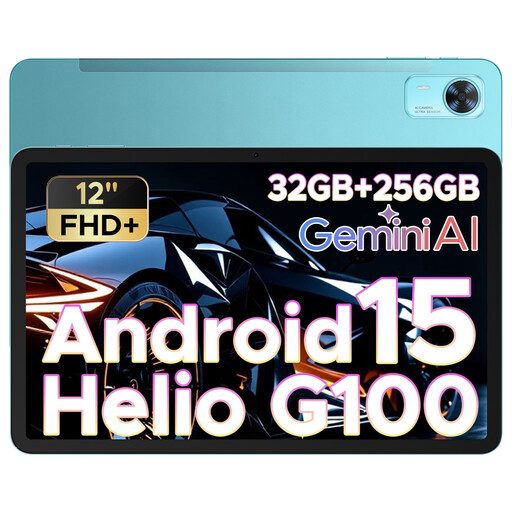
Its 12-inch screen may suit seated timetable and map reading. The product name specifies an FHD+ display and SIM-card support; if independent updates are essential, confirm the exact mobile-data capability and network compatibility. Also assess daylight visibility, carrying size and weather protection.
No: a Wi-Fi tablet can receive updates through terminal Wi-Fi or a phone hotspot. If you want the tablet’s own connection, check its cellular configuration and your chosen network’s predicted coverage at the terminal using Ofcom’s checker; actual reception can differ on site.
Yes, for ordinary timetable browsing, but do not assume a public connection is private. The National Cyber Security Centre warns that insecure networks can expose data to interception or modification, so keep your tablet updated and use a trusted connection for sensitive activity where possible.
No. IP68 is a rating under specified test conditions, not a promise of unrestricted waterside use. Read the exact manufacturer guidance and protect the tablet when rain or splashes could exceed those conditions.
A change-of-mind cancellation and a remedy for faulty or misdescribed goods are different matters. GOV.UK explains that online orders from traders can carry a time-limited cancellation right; check the applicable terms promptly, keep your order details and describe any fault separately when contacting the seller.