For a small organisation, an external drive can provide a separate local copy, cloud storage can serve staff working in different places, and a network-attached storage device (NAS) can centralise local backups across devices. For business-critical data, consider both a separate local copy and an online destination rather than relying on one device, location or account; whichever route you choose, check what can be restored and test the process.
Who needs a backup plan?
Start with the files and systems your organisation would need if its usual device or working copy became unavailable.
Sole traders and microbusinesses using one main computer
Invoices, contacts, documents and customer information need a recoverable copy beyond the working computer. A securely stored external drive can provide a local copy; protected online storage offers another destination. The National Cyber Security Centre (NCSC) advises small organisations to back up essential information and test that they can restore it.
Small teams sharing operational files
A cloud service or centrally administered NAS may help staff reach shared files, but access and recovery need named owners. Decide who manages permissions, protects accounts and can restore files when the usual administrator is unavailable.
Organisations handling personal information on portable devices
Consider how copies of customer or staff information are protected if a laptop or removable drive is lost. The Information Commissioner's Office (ICO) says security measures must reflect the risk; encryption is one measure to assess alongside access controls and the ability to restore data.
What should you check before choosing?
Choose the recovery route first, then check that its capacity, security and restore settings cover the data that keeps the organisation working.
Separate external drive
Consider it when: You need a straightforward local copy of a limited set of essential files, including where internet access is unreliable.
Trade-off: A connected drive can be affected by an incident on the computer, while one physical copy can be lost or damaged. Disconnect and store it securely after backup.
Local NAS
Consider it when: Several devices need centrally managed local backups and someone can administer the system.
Trade-off: A NAS needs setup, access control and ongoing management; keeping it at the same site does not provide a separate off-site copy.
Cloud service
Consider it when: Staff need access from different locations and the organisation can manage accounts and permissions.
Trade-off: Access depends on the connection and account setup. Check which files and earlier versions can actually be restored.
Local and online copies
Consider it when: Business-critical data needs recovery options if one device, location or account becomes unavailable.
Trade-off: Two destinations take more setup and administration. They still depend on protected credentials, retained copies and a tested restore process.
| Priority | What to check | Your needs |
|---|
| Recovery scope |
List essential files, email and device data. Check which sources the backup covers and whether files or whole devices can be restored. |
If the main computer fails, I need more than a spare copy of one folder: invoices, contacts and other essential work must be recoverable. |
| Separate copies |
Check where each copy is kept and when an external drive is disconnected. For online copies, check protection against deletion or overwriting; the NCSC highlights these risks for cloud backups. |
A problem with my working device or account should not make every recovery copy inaccessible. |
| Restore testing |
Restore representative files and, where relevant, a device or service. The NCSC advises regular backup tests; the ICO calls for measures that enable timely restoration of personal data. |
I want the person responsible for recovery to know how to use the backup before an incident interrupts work. |
| Data protection |
Assess permissions, physical security, encryption and management of recovery keys. The ICO says encryption is an example of an appropriate security measure, not a substitute for assessing the risk. |
Portable or shared copies of customer and staff information need protection against access by the wrong person. |
| Account access |
Check administrator permissions and recovery methods. Enable two-step verification for user accounts where available, as the NCSC advises. |
Staff may need remote access, but I also need control over who can change or delete backup copies. |
| Capacity and retention |
Allow for source data, growth and retained versions; check how long older copies remain restorable. For personal data, document a retention period appropriate to its purpose. |
I need enough space to recover an earlier usable copy, without keeping personal information indefinitely. |
What backup mistakes matter?
-
Choosing capacity before defining what to recover
A drive or service may have room for selected documents but not every essential file, device backup or retained version.
List critical data and its locations, allow for growth and versions, then check the proposed storage and restoration method against that list.
If retained copies exceed the planned capacity, the organisation may need additional storage or a different backup arrangement.
-
Treating one storage location as the whole plan
A sole backup on a drive, NAS or account can become unavailable along with the working data. The NCSC also warns that cloud backup data needs protection from malicious deletion or changes.
For business-critical data, consider destinations exposed to different failures. Check how copies are separated and whether earlier versions can be recovered.
-
Assuming encryption settles every security question
Encryption does not replace account permissions, recovery-key management, retention decisions or restore testing. The ICO advises security measures appropriate to the risks to personal data.
Assess who can access or delete copies, where keys and recovery codes are kept, and how authorised staff would restore the data.
-
Never trying a restore
A completed backup job does not show that the required information can be recovered in a usable form. The NCSC advises small organisations to test their backups regularly.
Schedule a documented test using representative critical files and, where necessary, a device or service. Include access to the required account, media, keys and instructions.
Which brands illustrate the routes?
These product lines illustrate different ways to manage backups; their features depend on the chosen service, hardware and configuration.
Synology
A NAS route for organisations considering centrally managed backups across supported devices.
- Synology describes Active Backup for Business as supporting backups of Windows and Mac computers, physical servers, file servers and specified virtual machines.
- Synology says the software requires a compatible x64 Synology NAS using Btrfs. Check the exact model, installed drives, software prerequisites and restore requirements rather than assuming every NAS supports the same setup.
QNAP
A NAS route for local storage and backups to supported external, remote or cloud destinations.
- QNAP describes Hybrid Backup Sync as providing backup, restore and synchronisation between a QNAP device and supported destinations.
- Check compatibility with the intended devices and destination, then plan NAS access control, backup separation and retention.
Microsoft
OneDrive for Business is a cloud-storage route for organisations using Microsoft 365 for file access and sharing.
- Microsoft describes file-sharing, administrator security controls and help with recovery after accidental deletion or malicious attacks.
- Check the selected plan's restore behaviour, retention, permissions and account protection before treating it as the organisation's complete backup arrangement.
Joybuy storage options
These options cover separate portable drives for local copies and NAS devices for central local storage. Choose a backup destination and restore process to go with the hardware; the products alone do not establish a complete recovery plan.
 No image available
Western Digital My Passport external hard drive, 2 TB, black
A portable option for a separate local copy of essential files. Check whether 2 TB accommodates the files and retained versions you need, and store the drive securely away from the working device after backup.
View on Joybuy
 No image available
Samsung T7 Shield portable SSD, 1 TB, USB 3.2 Gen.2, blue
A portable local-copy option for selected business files. Check that 1 TB accommodates the backup and retained versions you intend to keep, and decide how those copies will be created and restored.
View on Joybuy
 No image available
Synology DS225+ 2-bay diskless NAS
A local NAS option for a team planning centrally managed storage. The diskless configuration requires drives; check compatible models, usable capacity and backup-software requirements, and plan a separate destination for critical data.
View on Joybuy
 No image available
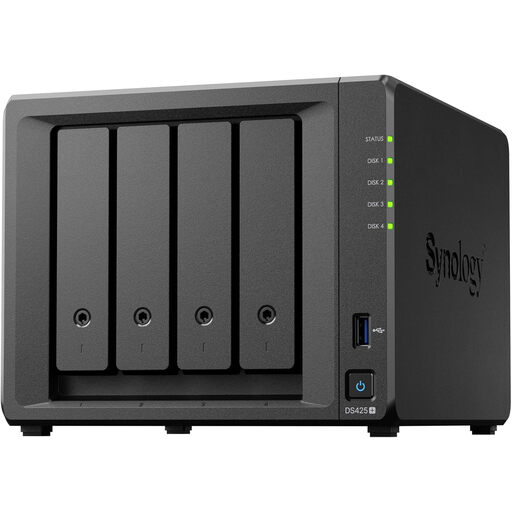
Synology DS425+ 4-bay NAS
A 4-bay local NAS option for central storage and backups. Check the bundle's drive contents, compatible drives and usable capacity; set retention and restore requirements, and keep a separate copy of critical data.
View on Joybuy
Backup questions
Is a cloud-sync folder enough to back up business files?
Not automatically. Check which files and earlier versions the service can restore, how deletions affect retained copies and whether the organisation needs another destination. The NCSC advises that cloud backup data should be protected against malicious editing, overwriting and deletion.
Must a UK organisation encrypt every backup?
The ICO says UK GDPR does not specifically require encryption of all personal information, but security measures must be appropriate to the risk. Assess encryption for the data and media involved alongside permissions, key management and restore access.
Should an external backup drive stay connected?
Disconnect it when it is not backing up and store it securely. The NCSC warns that a storage device connected to an infected computer can also be affected.
How often should we test restoration?
Test regularly, with a schedule suited to how important the data is and how often it changes. The NCSC advises small organisations to make regular copies of essential information and test that they can restore it; document what was restored and who can repeat the process.
Can personal data stay in backups indefinitely?
Do not retain it indefinitely without a purpose. GOV.UK's explanation of the UK GDPR storage-limitation principle says personal data should be kept no longer than necessary for the purpose for which it was processed. Set and document backup retention with the organisation's applicable purposes and obligations in mind.


