Choose the wheel edition that matches your PC or console, then check support for your exact bus simulator before comparing steering feedback and controls. Bus Simulator 21 published different wheel-support lists for PC, PS4 and Xbox One; those lists do not establish support in other games. Plan your headphone connection through the PC, console or compatible controller rather than assuming the wheel handles audio.
Who is this for?
Players choosing for a specific bus game
If you know your main simulator and platform, check both before choosing a wheel edition. Bus Simulator 21 published platform-specific support lists, while Logitech distinguishes its PlayStation/PC G29 from its Xbox/PC G920.
Drivers setting up at a desk
If the wheel must be fitted and put away between sessions, mounting and pedal placement matter alongside feedback. Thrustmaster lists a desk clamp and two-pedal set for the T128; the MOZA R3 bundle includes a table clamp and pedals.
Console players using headphones
If a wheel becomes your main driving control, keep a separate route for headset audio. Xbox Support describes compatible headset connections through the console or an Xbox Wireless Controller.
What matters when choosing?
For Bus Simulator 21, the platform-specific support lists give a starting point; for another title, check that game’s own wheel guidance.
Bus Simulator 21 on PC
Consider when: You want a model named as preconfigured in Bus Simulator’s September 2021 PC list, which included Logitech G29, G920 and G923.
Keep in mind: That listing does not cover other games or rule out PC input-configuration work.
Bus Simulator 21 on PS4
Consider when: You want a PlayStation wheel named on the game’s PS4 support list, such as Logitech G29 or Thrustmaster T150 or T300 RS.
Keep in mind: PS4 support for this title does not establish support for another game or its PS5 version.
Bus Simulator 21 on Xbox One
Consider when: You want an Xbox edition named on the game’s Xbox One support list, such as Logitech G920 or Thrustmaster TMX.
Keep in mind: Console licensing alone does not establish full support for a wheel outside that game-specific list.
| Concern | What to check | Who this matters to |
|---|
| Game and platform fit |
Match the wheel edition to your platform, then check the exact game’s support or configuration guidance. |
If my main bus game cannot use the wheel as expected, its other features matter less. Around 33% of consumers put game and platform fit first. |
| Desk and pedal setup |
Check the supplied mounting parts and pedals, plus clearance at your desk and a secure place for the pedals. |
I need to fit the controls for a driving session and put them away afterwards. Around 27% of consumers make practical setup their primary concern. |
| Steering feedback |
Compare the stated feedback system and controls after confirming game support; check what the game can configure. |
Once the wheel fits my game and space, I care most about its steering controls and feedback options. Around 20% of consumers prioritise those features. |
| Headphone connection |
Confirm how your headset connects to the PC, console or compatible controller independently of the wheel. |
I want to keep using headphones when the wheel takes over driving controls. For around 20% of consumers, that audio route is the main setup concern. |
Mistakes to avoid
-
Choosing the wrong console edition
Similar-looking wheels can belong to different platform families: Logitech lists G29 for PlayStation/PC and G920 for Xbox/PC, while Thrustmaster sells separate T128 editions.
Check the platform wording on the exact variant before comparing its other features.
-
Equating console support with game support
Bus Simulator 21’s support notice distinguishes listed wheels from models that may need manual configuration; full functionality is not guaranteed for every manually configured wheel.
Check your game and platform’s wheel guidance. On PC, be prepared to check bindings and input settings if the wheel is not recognised as expected.
-
Assuming the wheel provides a headphone socket
Xbox Support describes headset connections through the console or Xbox Wireless Controller, not as a racing-wheel feature.
Confirm your headset’s connection route before deciding where the wheel and controller will sit.
A wired headset may still need access to a compatible controller or adapter.
-
Overlooking mounting before choosing stronger feedback
A feedback specification does not establish whether a wheel will fit your desk or work with your bus game.
Check the mounting hardware, desk surface and pedal position before committing to a more involved setup.
An unsuitable desk may call for a different mounting arrangement.
Brands to consider for this setup
Logitech G
Logitech G separates G29 for PlayStation/PC from G920 for Xbox/PC. Bus Simulator named both in its September 2021 Bus Simulator 21 PC support list.
- The distinct G29 and G920 platform versions give console players a clear edition to check.
- Bus Simulator 21’s historical list does not establish support in every current bus game.
Thrustmaster
Thrustmaster offers separate PlayStation/PC and Xbox/PC T128 editions. Its T248 Xbox/PC model offers additional controls and feedback presets.
- Thrustmaster lists a clamp and magnetic two-pedal set with the T128.
- Match the edition to your platform and check support in your individual bus game.
MOZA Racing
MOZA Racing’s R3 Xbox/PC bundle combines a direct-drive base rated at 3.9 N·m with a wheel, pedals and table clamp.
- The stated bundle parts offer a defined starting point for a desk or rig setup.
- Confirm support for the exact bus simulator before relying on its Xbox/PC platform designation.
Joybuy wheel and pedal choices
These wheel-and-pedal choices span Xbox/Windows, PlayStation/PC and Windows-only setups. Select by your platform first, then check your bus game and the space available for mounting; the product list is not a game-compatibility ranking.
 No image available
Turtle Beach VelocityOne Race Wheel & Pedal System (Xbox, Windows 10/11)
Consider this wheel-and-pedal system for an Xbox or Windows 10/11 setup after checking your bus game’s support. Plan for secure mounting on a stable surface and connect headphones through your PC or console as appropriate.
View on Joybuy
 No image available
Thrustmaster T-248X Wheel and Pedals (Xbox, PC)
This Xbox/PC wheel-and-pedal set suits a buyer choosing that platform family. Confirm the included pedal and mounting arrangements, as well as support in your particular bus game.
View on Joybuy
 No image available
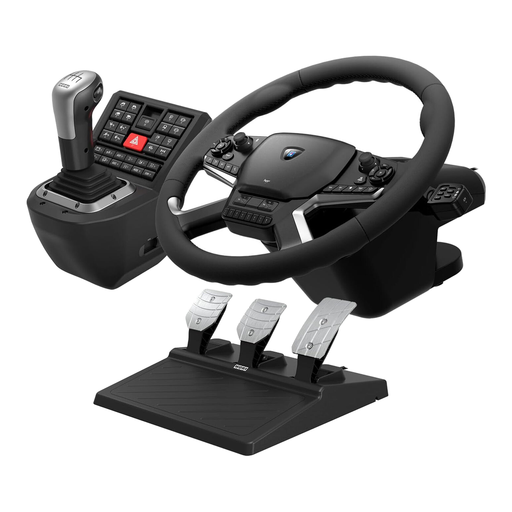
HORI Force Feedback Truck Control System (Windows 11/10)
This Windows 11/10 truck-control system is a PC option to investigate if you want steering and pedals for a driving setup. Check your bus simulator’s support before buying, and allow for driver installation and in-game calibration.
View on Joybuy
 No image available
Thrustmaster T248 Wheel & Magnetic Pedals (PS5, PS4, PC)
Consider this PlayStation/PC force-feedback set if that edition matches your platform. Check your bus game’s wheel guidance and how you would mount the set at your desk.
View on Joybuy
 No image available
Thrustmaster T128 Wheel & Pedals (PS5, PS4, PC)
This is the PlayStation/PC T128 edition, with force feedback and a two-pedal set. Thrustmaster describes a clamp for the T128, but check the exact bundle, desk fit and bus-game support before choosing it.
View on Joybuy
Common questions
Should I plug headphones into the racing wheel?
Plan a separate headset connection rather than assuming the wheel provides one. Xbox Support describes compatible wireless headsets connecting to the console and wired 3.5 mm headsets connecting through an Xbox Wireless Controller or suitable adapter; check your own headset’s connection method.
G29 or G920 for Bus Simulator 21?
Choose by platform: Logitech identifies G29 for PlayStation/PC and G920 for Xbox/PC. Bus Simulator’s September 2021 notice listed both as preconfigured on PC, G29 on PS4 and G920 on Xbox One. Check separately for another bus game or console version.
Can I use a wheel that is not on a bus game’s support list?
It may be possible to configure one, but do not assume full functionality. For Bus Simulator 21, the developer described manual configuration for some other wheels and later advised PC players troubleshooting input to check drivers, controller settings, bindings and Steam Input.
Are the two Thrustmaster T128 console editions interchangeable?
No: Thrustmaster sells a PlayStation/PC T128 and a separate Xbox/PC T128. Choose the version matching your console, then check the particular bus game; PC appears in both editions’ stated platform lists.


