Choose a basic button phone when calls, texts and physical controls matter more than apps; choose a simplified Android smartphone when WhatsApp, video calls or other apps are essential. Match the controls to the person who will use them, then check the exact handset’s calling compatibility with the intended UK provider. Ofcom says UK 3G networks are switched off and 2G networks are being retired gradually, so avoid relying on a 2G/3G-only phone.
Who needs which kind of phone?
The starting point is how the person makes calls and messages: by pressing keys, using a simplified touchscreen or relying on spoken feedback.
Call-and-text users who struggle with touchscreens
If a standard smartphone is difficult to navigate and apps are not needed, look at a button phone with keys the user can distinguish and press comfortably. Speed dial may reduce the steps needed to call familiar contacts. Check the exact model and its compatibility with the intended network.
WhatsApp users who need a simpler layout
A simplified smartphone is the more relevant route when WhatsApp or other Android apps are essential, but crowded menus are a problem. Doro says its Aurora smartphones run full Android with a simpler presentation; confirm the required apps and current software support for the exact model.
People who rely on touch and speech
When a visual touchscreen cannot be used reliably, larger icons alone may not solve the problem. A tactile keypad and spoken feedback are worth assessing. BlindShell’s Classic 3 manual describes keypad, touchscreen and voice operation, with synthetic-voice feedback.
What should you check before choosing?
Decide whether apps are necessary before comparing controls and display features. Then check that the chosen handset can make calls on the provider’s current network.
Basic button phone
Choose it when: Calls and SMS are the main tasks, and physical keys make navigation easier.
Trade-off: Do not assume a basic phone runs WhatsApp or other Android apps.
Simplified Android smartphone
Choose it when: Essential apps make a basic calls-and-texts phone unsuitable.
Trade-off: The user still needs to operate a touchscreen and manage apps, accounts and updates.
Voice-led, tactile phone
Consider it when: Spoken feedback and tactile navigation matter more than a mainly visual interface.
Trade-off: Check how each essential third-party app works with the exact phone’s controls.
| Priority | What to check | Your needs |
|---|
| Controls |
Try the key size and feel, speed-dial setup and number of menu steps. If visual navigation is difficult, assess spoken feedback and voice operation on the exact model. |
I want to find contacts, dial and write texts without losing my place in the menus. |
| Display and sound |
Check text size, contrast, alert volume and call audio in use. If a hearing aid is involved, check the exact handset’s stated compatibility rating separately from its other accessibility features. |
Messages need to be readable, and I need to notice calls and hear the person speaking. A hearing-aid rating alone would not tell me whether every control suits me. |
| Essential apps |
Confirm WhatsApp and any other required app on the exact model and supported software version. Check whether the user can manage its touchscreen and account setup. |
WhatsApp is how I keep in touch, but I would prefer a less crowded screen than a standard smartphone offers. |
| UK calling |
Confirm the handset’s network version and ask the intended provider about 4G Calling, also called VoLTE. Ofcom’s postcode checker shows predicted mobile coverage by provider; actual service indoors can differ. |
I need calls and texts to work where I use the phone, not just a handset labelled 4G. Ofcom says UK 3G is off and 2G is being retired gradually. |
What can go wrong when buying?
-
Choosing a familiar 2G/3G-only handset
A familiar keypad does not compensate for a phone that cannot use the intended calling service. Ofcom says UK 3G is switched off and 2G is being retired gradually.
Check the exact network version and ask the intended provider whether that handset supports calls on its current service, including 4G Calling where required.
-
Assuming every button phone runs WhatsApp
App access differs between basic phones and simplified smartphones. A phone chosen for simple calling may not provide an essential way of messaging someone.
Check WhatsApp and any other required app on the exact model and software version before choosing a button phone over a simplified Android smartphone.
-
Treating a hearing-aid rating as the whole accessibility answer
A stated hearing-aid compatibility rating does not describe the phone’s display, keys, menus or suitability for every individual hearing-aid setup.
Check the exact rating and, where possible, try calls with the user’s hearing aid. Assess readability, volume and controls separately.
-
Overlooking charging equipment and setup
Even straightforward daily controls are of limited use if the phone is not charged or familiar contacts and calling settings have not been set up.
Check the exact box contents and arrange contacts, speed dial and any needed accessibility or 4G Calling settings before relying on the phone.
For example, emporia says its JOY model does not include a power supply; check that a compatible one is available.
Which brands offer relevant options?
These brand ranges illustrate different ways to simplify phone use; compare the exact model rather than assuming every handset in a range has the same features.
Doro
Doro describes simple mobile phones alongside Aurora Android smartphones with a simplified presentation.
- Its range description includes larger buttons or icons, clearer displays and hearing-aid compatibility.
- Check the exact model for required apps, software support, hearing-aid compatibility and calling on the chosen network.
emporia
emporia offers button phones and smartphones; its JOY page describes speed-dial keys and distinct 2G and 4G/LTE versions.
- The JOY’s stated three speed-dial keys are worth considering if frequent contacts need to be easy to reach.
- Confirm the exact network version, provider calling compatibility and charging equipment. emporia says a power supply is not included with JOY.
BlindShell
BlindShell focuses on tactile and spoken phone operation for people who cannot rely on a conventional visual interface.
- BlindShell describes Classic 3 as voice controlled; its manual also documents physical-keypad operation and spoken feedback.
- Check the accessibility and compatibility of each essential third-party app on the exact model.
Joybuy button-phone options
These Nokia handsets are options to consider if physical controls appeal and calls and texts are the main tasks. They do not stand in for a simplified Android smartphone when apps are essential; check each handset’s network and calling compatibility before choosing.
 No image available
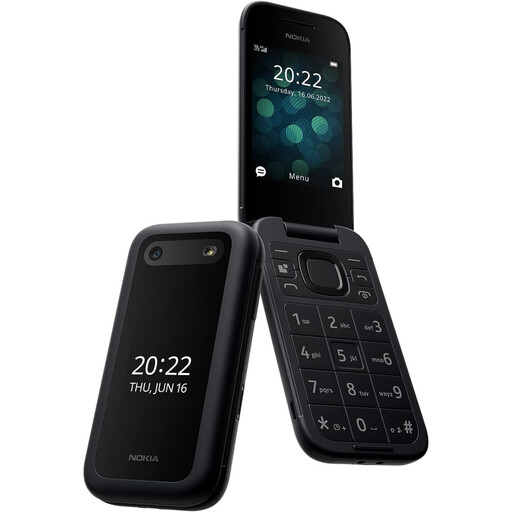
Nokia 2660 TA-1469
Consider this model for calls and texts if physical controls are easier for the user to manage. Check the keys and screen in use, confirm 4G Calling with the intended provider, and verify any essential app requirements.
View on Joybuy
 No image available
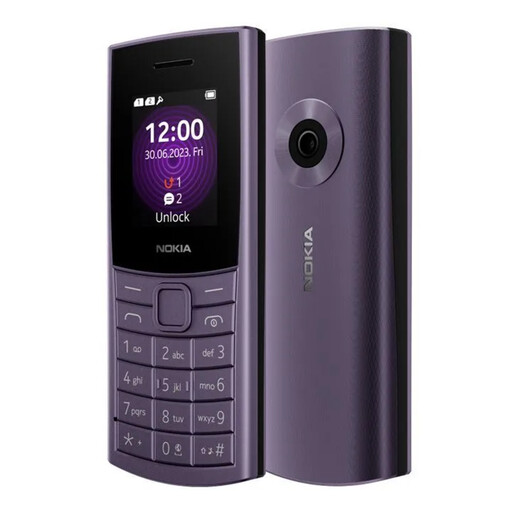
Nokia 110 4G TA-1543 DS Purple
This 4G model is a calls-and-texts option for someone who prefers physical controls. The 4G name alone does not establish 4G Calling compatibility with the intended UK provider; confirm it before buying, and check app requirements separately.
View on Joybuy
 No image available
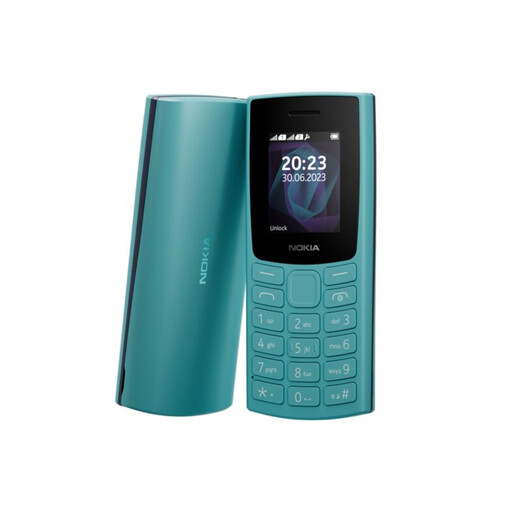
Nokia 105 TA-1557 DS Cyan
Consider this model if straightforward calls and texts with physical keys are the priority. Confirm the exact handset version, its network capabilities and calling compatibility with the intended UK provider before relying on it.
View on Joybuy
Common questions
Can a basic button phone still make sense in the UK?
Yes, when calls and SMS are the main tasks and physical controls help the user. Ofcom says UK 3G is switched off and 2G is being retired gradually, so confirm the exact handset’s network capabilities and calling compatibility with the intended provider rather than relying on a 2G/3G-only model.
Do all simple phones support WhatsApp?
No; app support depends on the exact phone and its software. Doro says its Aurora simplified smartphones run Android and can use WhatsApp, but that does not establish support on every simple phone. Check the required app on the model being considered.
How can I check mobile coverage at home?
Enter the relevant postcode in Ofcom’s mobile coverage checker and compare the intended providers. Ofcom cautions that coverage predictions may differ from the signal experienced at home, so the checker is a starting point rather than a guarantee.
What does an M4/T4 hearing-aid rating tell me?
It is a stated handset compatibility rating for hearing-aid use, not a guarantee of an individual’s call experience. emporia describes separate M and T rating scales; check the exact phone and, where possible, try it with the hearing aid that will be used.


