
24/7 Customer Support

Free returns

Same-day & Next-day Delivery

Quality Guaranteed

Unlock Your Welcome Offers: FREE Delivery | Up to 80% OFF | Free 30-day JoyPlus trial
Download the APP
Choosing a new gaming PC can feel like navigating a minefield of technical jargon. With acronyms like CPU, GPU and RAM being thrown around, it’s easy to feel overwhelmed and unsure if you’re making the right choice for your budget and gaming ambitions. Are you looking for a machine to play esports titles, a powerhouse for the latest AAA releases, or something in between?
This guide is designed to cut through the jargon. As a Joybuy Product Recommendation Officer, my role is to provide clear, practical advice to help you find the right gaming desktop. We will break down the essential components to consider and then present a few of our top recommendations for different needs and budgets in 2026, helping you make an informed decision.
Before diving into specific models, let's clarify what key specifications mean for your gaming experience. Understanding these will help you select the perfect prebuilt gaming PC.
The GPU is the single most important component for gaming performance. It renders the images you see on screen, and its power dictates the resolution and graphical settings you can play at smoothly.
The CPU is the brain of your computer, handling game logic, physics and background tasks. RAM is its short-term memory. For a modern gaming desktop, an Intel Core i5 or AMD Ryzen 5 processor is a solid baseline. Paired with 16GB of RAM, this combination ensures smooth gameplay and allows for multitasking, like running Discord or streaming music while you play. For intensive tasks like video editing or streaming your gameplay, a higher-end CPU (Core Ultra 7/Ryzen 7) and 32GB of RAM are advisable.
A Solid State Drive (SSD) is essential in 2026. Specifically, an NVMe SSD provides incredibly fast loading times for your operating system and games, getting you into the action quicker. While 500GB is a decent starting point, 1TB or more is recommended if you plan to install several large modern games. Also, consider the PC's chassis. A case with tool-free access makes it much easier to add more storage or upgrade components in the future.
Here are a few standout options that cater to different types of players, from those just starting out to seasoned veterans seeking a high end gaming PC.
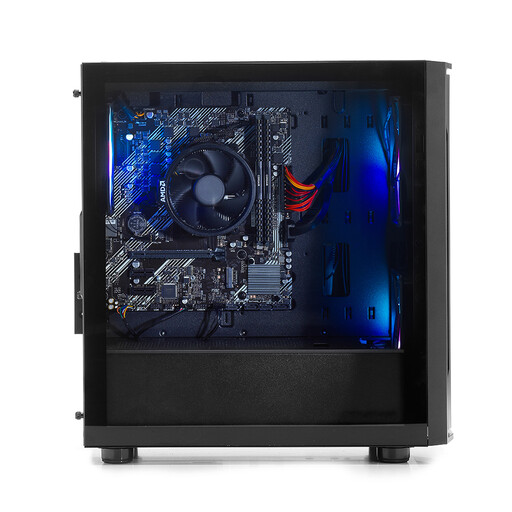
Why It Stands Out: The Stormforce Rogue is an excellent and affordable entry point into PC gaming. It uses the AMD Ryzen 5 5500GT processor, which features capable integrated Radeon Vega 7 graphics. This means you can start playing popular esports and indie games straight out of the box without the immediate expense of a dedicated graphics card, making it a great cheap gaming PC.
View the Stormforce Entry Gaming PC
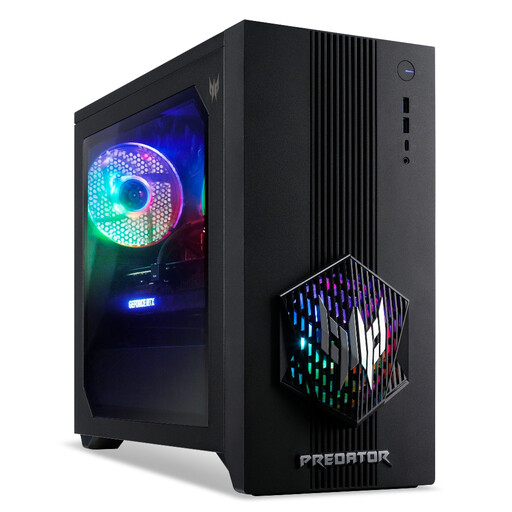
Why It Stands Out: The Predator Orion 3000 strikes a fantastic balance between price and performance. It pairs a 14th generation Intel Core i5-14400F processor with the new NVIDIA GeForce RTX 5060 graphics card. This combination is purpose-built for delivering high frame rates in demanding AAA titles at 1080p and 1440p. The advanced FrostBlade 2.0 cooling system ensures the components maintain peak performance during long gaming sessions.
View the Acer Predator Orion 3000
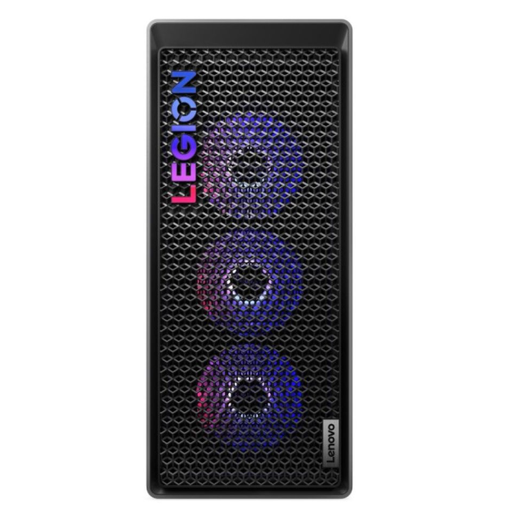
Why It Stands Out: The Lenovo Legion T7 is a high-performance machine for those who refuse to compromise. It features the powerful Intel Core Ultra 7 265K processor and the formidable NVIDIA GeForce RTX 5070 Ti with 16GB of VRAM. This setup is engineered for elite-level gaming at 1440p and a solid 4K experience, as well as demanding creative workloads like video editing and 3D rendering. With 32GB of DDR5 RAM and a 1TB PCIe 4.0 SSD, it’s exceptionally responsive.
View the Lenovo Legion T7 Gaming Tower
If these specific configurations don't quite match what you're looking for, don't worry. There is a wide range of systems available with different component combinations to suit every need and budget. Explore our full collection to find the perfect machine for your setup.
While building a PC can be a rewarding hobby, it is not always the cheaper option in 2026. Manufacturers of prebuilt gaming PCs often get components at a lower cost and pass those savings on. When you factor in the convenience, professional assembly, software installation and a single point of contact for warranty and support, a prebuilt gaming desktop often provides better overall value, especially for those new to PC gaming.
A good budget depends entirely on your goals. For a budget gaming PC capable of running popular esports titles at 1080p, you can find great options starting around ?500-?700. For a solid mid-range system that can handle most new AAA games at 1080p or 1440p, expect to budget between ?1,000 and ?1,600. For a high end gaming PC designed for 4K gaming, streaming and creative work, prices typically start from ?1,800 and go up from there.
A well-chosen gaming PC should provide a great gaming experience for around 4 to 6 years. After this time, you may find you need to lower graphical settings in the newest games. However, one of the main advantages of a desktop PC is its upgradability. You can extend its life significantly by upgrading individual components like the graphics card or adding more RAM, allowing you to keep pace with technology without replacing the entire system.