
24/7 Customer Support

Free returns

Same-day & Next-day Delivery

Quality Guaranteed

Unlock Your Welcome Offers: FREE Delivery | Up to 80% OFF | Free 30-day JoyPlus trial
Download the APP
Navigating the market to buy laptops online can feel overwhelming. With endless specifications and persuasive marketing, it's easy to make a choice you later regret. As a Joybuy Product Recommendation Officer, my role is to help you see past the hype and focus on what truly matters for your needs. This guide will highlight common pitfalls UK buyers face and break down the essential features to check before you purchase.
Many of us have been there: you buy a new device, and within months, you realise it’s not quite right. It might be sluggish, the screen might be dull, or it’s too heavy to carry around. Here are three frequent traps and how to sidestep them.
To make an informed decision, focus on these core parameters. They are the foundation of a device that will serve you well for years to come.
Think of the CPU as the laptop's brain and RAM as its short-term memory. For everyday tasks like browsing, streaming and office work, an Intel Core Ultra 5 or an Apple A18 Pro chip provides more than enough power. For more demanding use, such as a business laptop for data analysis or a creator laptop for editing, an Intel Core Ultra 7 or a gaming laptop with a high-performance chip is more suitable.
As for RAM, 16GB has become the new standard for smooth multitasking. While 8GB can suffice for very light use, 16GB ensures you can run multiple applications without your system slowing to a crawl. For serious gaming or professional creative work, 32GB is advisable.
Your screen is your window to everything you do. Here’s what to look for:
A Solid State Drive (SSD) is non-negotiable for any modern laptop. It makes your device boot up in seconds and launch applications almost instantly. A capacity of 512GB is a comfortable starting point for most users, providing enough space for the operating system, applications and personal files. If you plan to store large game libraries or video files, a 1TB SSD is a worthwhile upgrade.
To help match a device to your lifestyle, here are a few recommendations from the current market.
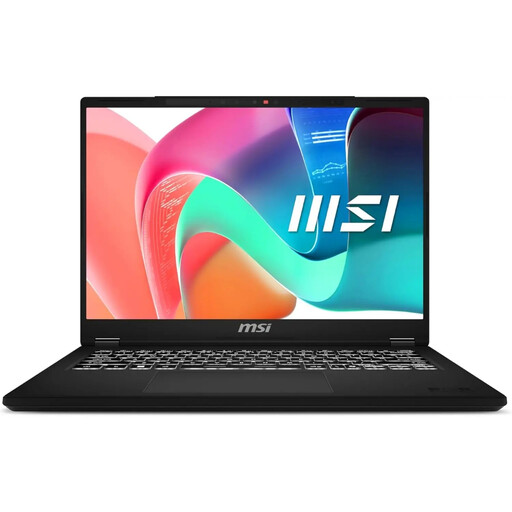
Why This Fits Their Persona: This MSI laptop is a practical choice for a student laptop or for general home use. It's lightweight enough for carrying to lectures or coffee shops, and its specifications are perfectly balanced for productivity tasks, research and streaming.
It avoids the "future-proofing" trap by providing efficient, modern performance without the high cost of unnecessary top-tier components. The 16:10 display also sidesteps the poor screen trap, offering more vertical space for productivity.
Features 16GB of RAM for smooth multitasking and a productive 16:10 aspect ratio display, all in a lightweight and portable design.
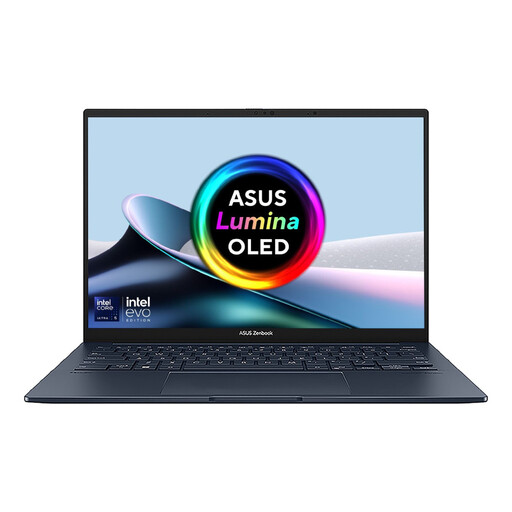
Why This Fits Their Persona: This ASUS Zenbook is ideal for a creator laptop user or a professional who values a premium display and portability. Its lightweight chassis (1.25 kg) and vibrant OLED screen make it perfect for working on the go, client presentations and photo or video reviews.
It directly counters the poor display trap with a stunning 3K 120Hz OLED panel. It is also ultra-portable, avoiding the trap of a bulky device that is difficult to travel with, while the Intel Evo platform ensures responsive performance and good battery life.
A class-leading 3K OLED touchscreen with a 120Hz refresh rate for fluid visuals. It is also extremely light and features comprehensive connectivity, including Thunderbolt 4.
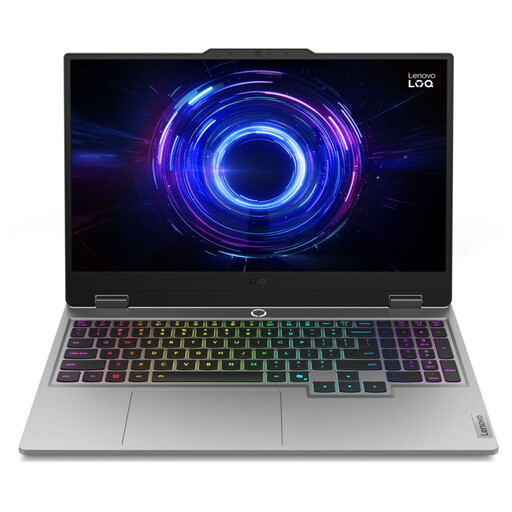
Why This Fits Their Persona: This Lenovo laptop is a purpose-built gaming laptop. For this user, high-end specifications are not a luxury but a necessity for playing modern games at high frame rates. The powerful processor, dedicated graphics and massive 24GB of RAM are built for performance.
For a gamer, this machine avoids the "overpaying" trap because the specs will be fully utilised. It also features a 144Hz high-refresh-rate display, ensuring a smooth visual experience that is critical for gaming and avoiding the poor-screen trap.
Features a powerful NVIDIA GeForce RTX 5060 GPU for next-generation gaming performance and a 144Hz display for fluid motion. The 24GB of RAM provides ample headroom for gaming and streaming simultaneously.
Choosing the right laptop means matching the device's capabilities to your actual, day-to-day needs. Whether you are a student looking for a reliable workhorse like an MSI laptop, a creative professional drawn to the screen of an ASUS Zenbook or a user preferring the ecosystem of an Apple MacBook, focusing on these core principles will help you find a machine that offers genuine value.
We have compiled a complete, real-time list of products that fully satisfy these strict selection criteria and UK safety regulations.
For light use such as web browsing and document editing, 8GB of RAM is the minimum. However, for a smooth, responsive experience with multiple applications open, 16GB is the recommended standard. If you are a gamer, video editor or use other demanding software, 32GB or more will provide a noticeable performance benefit.
This depends on your usage. If you are a creative professional who works with photos or videos, or you consume a lot of media, the superior colour accuracy, contrast and deep blacks of an OLED laptop screen are a significant advantage. For general office work and browsing, a high-quality IPS display is often more than sufficient and can be a more affordable option.
A new laptop purchased today should typically last between 3 to 5 years. The lifespan depends on the initial build quality, how it is used and how demanding software becomes over time. A well-cared-for business laptop used for light tasks may last longer, while a heavily used gaming laptop might feel dated sooner as game requirements increase.