What matters when choosing?
Decide whether students will watch through a live computer connection or a recording you edit later. Then establish the lens position and writing-area coverage before choosing recording features.
| Concern |
What to check |
Who this matters to |
| Overhead detail |
Check the writing area against the exact lens and mounting height. If you will crop recordings, check the camera’s recording resolution. |
If I edit close views of pen strokes, I need enough room to reframe without losing the full page. Roughly 40% of consumers put overhead detail first. |
| Live-call connection |
Confirm the camera’s USB or HDMI-capture route and the computer connection it requires. Sony says ZV-E10 II USB streaming outputs 720p over USB 2.0. |
When I teach live, I need students to see the writing area throughout the call, not just in a recording afterwards. Around 30% of consumers prioritise a dependable live connection. |
| Manageable setup |
Check the supplied lens, overhead support and supported external-power method for the exact model. |
If I am setting up a home studio for the first time, I want a workable desk arrangement without equipment I will not use. Roughly 30% of consumers make setup simplicity their primary concern. |
Joybuy product choices
These cameras and the USB webcam offer different starting points for a recorded demonstration or computer-connected lesson. Check each choice against your overhead framing, connection and power needs.
 No image available
Sony Alpha ZV-E10 II K with 16-50 mm f/3.5-5.6 Power Zoom kit lens
Consider this model if you need both recorded footage and a documented USB route for live lessons. Sony UK confirms ZV-E10 II USB web-conferencing use and says USB 2.0 limits its streaming output to 720p.
The named kit includes a 16-50 mm f/3.5-5.6 lens; check whether it covers your writing area from the intended mount and confirm a suitable power setup.
Joybuy
 No image available
Sony ZV-E10K with 16–50mm Power Zoom Lens
For a recorded desk demonstration, check whether the included 16–50mm lens frames the whole writing area from your mounting position.
If you also plan live calls or extended lessons, confirm this exact model’s computer connection and supported external-power accessories.
Joybuy
 No image available
Sony ZV-1F Compact Vlog Camera, 1-Inch Sensor, Ultra-Wide Lens
For a recorded lesson with a fixed-lens camera, check the view from your planned overhead position before relying on the ultra-wide lens to cover the page.
If you need computer-connected teaching or a long session, confirm the exact webcam and external-power arrangements first.
Joybuy
 No image available
j5create JVCU435 USB™ 4K Webcam, 5x Digital Zoom Remote Control, Black and Silver
A USB webcam is worth considering if the lesson will run through a computer rather than rely on in-camera recording. This model’s name specifies 4K and 5x digital zoom.
Check that you can mount and aim it securely above the page; confirm a separate recording workflow if you need one.
Joybuy
 No image available
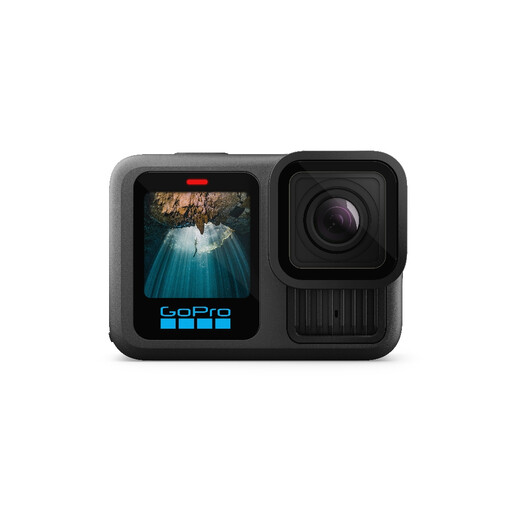
GoPro HERO13 Black
If you are considering the HERO13 Black for a recorded desk view, establish a stable overhead mounting arrangement and check that the full writing area fits in frame.
For a live lesson, confirm the required computer connection, output mode and conferencing-platform compatibility.
Joybuy
Common questions
Do I need 4K to teach calligraphy online?
Not necessarily: for a live call, check the image delivered through the camera connection and whether students can see the writing clearly. Higher-resolution recording is more relevant if you plan to crop footage later; Sony says the ZV-E10 II outputs 720p when USB streaming over USB 2.0.
Can a mirrorless camera work as a webcam for a live lesson?
Yes, when the exact camera and computer setup support it. Sony documents USB web-conferencing for the ZV-E10 II, while Canon describes an HDMI-to-USB capture workflow for compatible cameras; check the body, cable, port, capture hardware where needed and call platform.
Can I record in-camera while sending video over HDMI?
That depends on the exact camera and output mode. Panasonic says its G100 cannot record video while HDMI output is in use; check another model’s manual before relying on a simultaneous backup recording.
What power setup should I use for a long lesson?
Use an external-power method supported by your exact camera if you need it to run beyond a battery-powered session. Canon’s HDMI-streaming guidance describes a DC coupler and AC adapter and notes compatible USB PD power for some models; confirm the accessory and whether it is included.
Do UKCA or CE markings matter for a charger bought for Great Britain?
Check that the charger meets the applicable requirements for supply in Great Britain, rather than judging it by a marking alone. GOV.UK guidance says Great Britain recognises CE marking alongside or instead of UKCA where the relevant requirements are met; the guidance covers England, Scotland and Wales, while Northern Ireland has different arrangements.


