Detail-focused lettering instructors
If viewers need to see nib angle, pressure changes and fine ink lines, check whether the intended lens can frame the paper at your available camera height and hold focus where the brush moves.


Choose the lens and camera position that show the whole sheet and fine brush movements, then check that you can monitor framing and capture speech clearly in the workshop. An interchangeable-lens camera offers a choice of lenses for different working distances, while a compact camera may suit a simpler fixed setup; neither removes the need to test focus, microphone placement and a secure overhead support.
If viewers need to see nib angle, pressure changes and fine ink lines, check whether the intended lens can frame the paper at your available camera height and hold focus where the brush moves.
Nearby conversation or equipment can compete with spoken instructions. A compatible external microphone and a test recording in the working workshop matter alongside the picture.
When you also operate the camera, a screen visible from the teaching position and a clear way to check recording and focus can make a fixed lesson setup easier to manage.
Plan the view from the paper upwards: establish the mounting height and lens framing, test speech in the occupied workshop, then check recording controls and support for a full lesson.
| Concern | What to check | Who this matters to |
|---|---|---|
| Visible brushwork | Test whether the intended lens frames the full sheet from the planned height and focuses where the brush moves. | I need viewers to see fine lines without losing the rest of the writing area. Around 34% of consumers would put visible lettering first. |
| Clear speech | Check microphone compatibility and, if you need it, headphone monitoring; make a test recording while the workshop is active. | With other people working nearby, I need spoken steps to remain intelligible. For around 33% of consumers, clear instruction is the primary concern. |
| Repeatable recording | Check the intended recording mode, card and power requirements, and whether the support can hold the camera securely. | I want to keep a fixed view through demonstrations and retakes rather than rebuild the setup each time. A dependable session setup comes first for around 20% of consumers. |
| Solo operation | Check that you can see recording status and set focus from your teaching position. | When I teach and film alone, I need to spot a framing or recording mistake before finishing a take. Around 13% of consumers would prioritise straightforward solo operation. |
Fine lettering may be visible even when workshop noise makes spoken steps hard to follow. Sony advises considering an external microphone when sound is especially critical.
Check the camera's microphone options and record a short lesson segment while the workshop is operating.
A compatible external microphone may need to be obtained separately.
The paper size, camera height and lens focusing distance all affect what fits in the shot. An interchangeable mount gives you lens choices, not a guarantee that the supplied lens suits your desk.
Measure the intended camera-to-paper distance and test the lens with the whole sheet in frame before the lesson.
A different lens or a dedicated overhead support may be needed.
A body-only option still needs a suitable lens and other equipment for the planned recording. Canon UK Store states that a USB-C charger is not included with its EOS R50 V body listing.
Check the contents of the exact variant you intend to buy, including the lens, microphone, recording media, power arrangements and support.
Stabilisation does not secure a camera above the work surface. In a shared working area, the support and cable positions also affect people moving nearby.
Use a support suited to the camera and position, secure it and keep cables out of access routes. The Health and Safety Executive identifies risk assessment as fundamental to managing safety in film work.
The EOS R50 V is an APS-C interchangeable-lens option for instructors who want to choose a lens for their camera position.
The ZV-E10 II is an APS-C E-mount option when interchangeable lenses and recording and audio connections matter to the lesson plan.
The LUMIX G100D is a Micro Four Thirds option for a mostly fixed lesson setup where its published 4K modes meet the intended delivery needs.
These choices include interchangeable-lens kits for adjusting the desk view and compact gimbal cameras for a smaller filming setup. Whichever format you consider, test paper framing and speech capture from the position you will use in the workshop.
 No image available
Consider this interchangeable-lens kit if you want to choose framing for the desk and check audio while filming; Sony UK specifies microphone and headphone terminals for the ZV-E10 II.
The product title specifies an APS-C camera, 4K/60p video and 10-bit 4:2:2 recording. Test whether the supplied lens focuses and frames the whole sheet at your planned mounting height.
 No image available
This compact gimbal-camera bundle is worth considering if you want a microphone included with a solo filming setup; test how it captures speech amid workshop noise.
The product title specifies a 1-inch CMOS sensor, 4K/120 fps video and 3-axis stabilisation. Check close-up paper framing and use a securely suited support rather than assuming a small tripod can hold an overhead view.
 No image available
Consider this interchangeable-lens kit if adjusting the view of the writing desk is a priority. Test the supplied lens at your planned camera height before relying on it for fine brushwork.
The product title identifies the 16–50 mm Power Zoom lens. If you need to monitor workshop audio during recording, check the exact microphone and headphone connections for this model rather than assuming they match the ZV-E10 II.
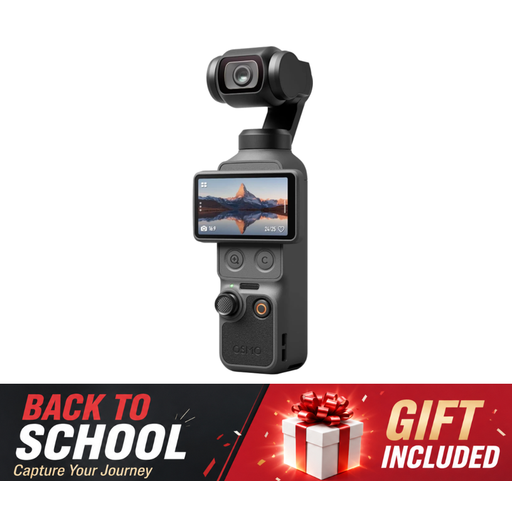 No image available
This pocket gimbal camera is an option to examine if you want to check composition from the teaching position; its product title describes a 2-inch rotatable screen.
Before choosing it for spoken instruction, confirm microphone compatibility and audio-monitoring options. Also test close focus, full-sheet framing and a secure mounting arrangement for your planned view.
No: a mostly fixed demonstration can use 4K/25p or 4K/30p if the paper is framed and focused well and the speech is clear. Consider 50p or 60p if smoother hand-motion footage or slow-motion inserts are part of your plan. Panasonic UK & Ireland lists 4K/25p and 4K/30p for the G100D; Canon UK and Sony UK publish modes reaching approximately 60p for the EOS R50 V and ZV-E10 II respectively.
Do not rely on it without testing in the occupied workshop. Sony advises using an external microphone when sound is especially critical, and Canon describes external microphone options for the EOS R50 V; position a compatible microphone for the instructor's voice and listen to a test recording before the lesson.
Clarify who is organising the filming, why identifiable people may be recorded and how the footage will be used before filming or publishing. The Information Commissioner's Office says organisations using surveillance systems that process identifiable people's data must comply with the UK GDPR and Data Protection Act 2018 and identify and document an Article 6 lawful basis. Whether that guidance applies to your particular setup depends on the activity; agree filming arrangements with the workshop operator and seek appropriate data-protection advice where needed.
Check that the support is suited to the camera and mounting position, secure the equipment and keep legs and cables out of access routes. For work activities, the Health and Safety Executive says risk assessment is fundamental: consider who could be exposed to a hazard and revisit the setup if the workshop layout changes.