For mostly fixed tabletop shots, choose an interchangeable-lens mirrorless camera if changing the lens and refining close-up framing matter more than a quick setup. A fixed-lens compact reduces equipment decisions, while a pocket gimbal makes more sense for moving shots and a small workspace; neither removes the need to check framing distance and indoor lighting.
Who each camera route suits
Tabletop detail-focused makers
If your shots concentrate on hands, wax texture, labels or small decorations, an interchangeable-lens camera gives you more ways to adjust composition. Check the chosen lens at the distance your table and spare room allow.
Solo creators with very limited room
If you need to set up beside a small table and occasionally move around a finished display, a pocket gimbal offers a compact way to film moving shots. Its fixed lens still has to frame your close details from a workable position.
Occasional social-video makers
If you make short decoration clips and would rather not choose separate lenses, a fixed-lens compact is a simpler route. Check that its focal range covers both your wider table view and the details you want to show.
What matters when choosing
Interchangeable-lens mirrorless
Choose it when: Your camera will usually stay beside or above the table, and changing lenses could help you frame different decoration details.
Trade-off: A body-only camera needs a compatible lens, and the lens-based setup takes more planning and space.
Pocket gimbal
Choose it when: You film alone and regularly move around the table for handheld views of the finished display.
Trade-off: Its fixed lens may not give you a tight composition from the position available in your room.
Fixed-lens compact
Choose it when: You want an integrated camera for occasional clips without building a lens kit.
Trade-off: The built-in lens keeps the setup simple but cannot be changed if your framing needs do.
| Concern |
What to check |
Who this matters to |
| Close-up framing |
Check the supplied lens or fixed focal range, minimum focus distance and the space between camera and table. |
I want the wax texture and small decorations to fill the frame without shifting the whole setup. Around 33% of consumers put detail framing first. |
| Indoor light and colour |
Check lens aperture and exposure and white-balance controls; plan how you will light the table away from the flame. |
When the flame is bright but the room is dim, I need control over how both appear in the shot. For around 25% of consumers, managing indoor light is the primary concern. |
| Solo setup |
Check screen movement, focusing options and whether your intended tabletop support fits the camera. |
I need to see the framing while my hands are arranging the decoration, without repeatedly moving around the camera. Easy solo setup comes first for around 25% of consumers. |
| Moving and slow-motion shots |
Check stabilisation and the resolution and recording mode of any high-frame-rate setting. |
I plan to move around the finished display or slow down a decorating sequence, rather than film only from a fixed position. Around 17% of consumers prioritise those moving shots. |
Mistakes to avoid
-
Assuming a mirrorless body includes a lens
Canon lists the cited EOS R50 as body-only, while Sony offers both body-only and lens-kit versions of the ZV-E10 II. The bundle changes what you can use straight away.
Check the exact bundle and whether its lens can frame your table and small details from the distance available.
-
Choosing the highest frame rate for every clip
DJI lists the Osmo Pocket 3's 4K/120 fps setting as slow-motion recording; Canon lists 4K 30p and Full HD 120p for the EOS R50. Those modes serve different edits.
Decide whether you need slow motion before choosing a recording mode, and check its card and lighting requirements.
-
Confusing close focus with tight framing
DJI specifies that the Osmo Pocket 3 focuses from 0.2 m, but its fixed 20 mm-equivalent lens may still give a wider view than you want.
Mark out your intended camera position and subject size before relying on a fixed wide lens for detail shots.
-
Adjusting equipment while a candle burns unattended
London Fire Brigade advises keeping candles on a stable surface in heat-resistant holders and away from materials that can catch fire, including decorations.
Position and focus the camera before lighting the candle where possible. Never leave a lit candle unattended, and extinguish it before leaving the room.
Relevant brands to consider
Sony
Sony offers two distinct routes here: the interchangeable-lens ZV-E10 II and the integrated-lens ZV-1 II.
- Sony lists an APS-C sensor and interchangeable lenses for the ZV-E10 II, allowing lens choice to change with a tabletop setup.
- Check whether the ZV-E10 II bundle includes a lens. The ZV-1 II instead has a fixed 18–50 mm-equivalent lens.
Canon
The EOS R50 is an APS-C mirrorless option for creators who want a vari-angle display alongside stills and video recording.
- Canon lists a 24.2 MP sensor, Dual Pixel CMOS AF II, a vari-angle touchscreen and 4K 30p recording for the EOS R50.
- The cited EOS R50 version is body-only; confirm a suitable RF or RF-S lens separately.
DJI
The Osmo Pocket 3 is a pocket-gimbal route for solo filming and moving views around a table.
- DJI specifies a rotatable display, three-axis mechanical stabilisation and focus from 0.2 m for the Osmo Pocket 3.
- Its fixed 20 mm-equivalent lens restricts framing choices, and the camera has no built-in storage.
Panasonic
The LUMIX G100D kit is a compact Micro Four Thirds route with an included 12–32 mm lens.
- Panasonic lists 4K 30p recording, 5-Axis HYBRID I.S. and USB-C charging for this kit.
- Confirm the kit's current availability and whether its lens frames your intended close details.
Joybuy camera choices
These cameras cover two approaches to the spare-room setup: a lens-kit mirrorless camera for mainly fixed tabletop filming, and pocket gimbals for compact setups and moving shots. Check close-up framing at your actual shooting distance before choosing either approach.
 No image available
Sony Alpha ZV-E10 II K with 16–50 mm Power Zoom lens
Consider this lens kit if you mainly film from a fixed tabletop position but want the option to change lenses as your framing needs develop.
The listing specifies an APS-C camera, a 16–50 mm f/3.5–5.6 kit lens and 4K recording up to 60p. Check whether that lens can focus closely enough for your smallest decorations at the distance available.
Joybuy
 No image available
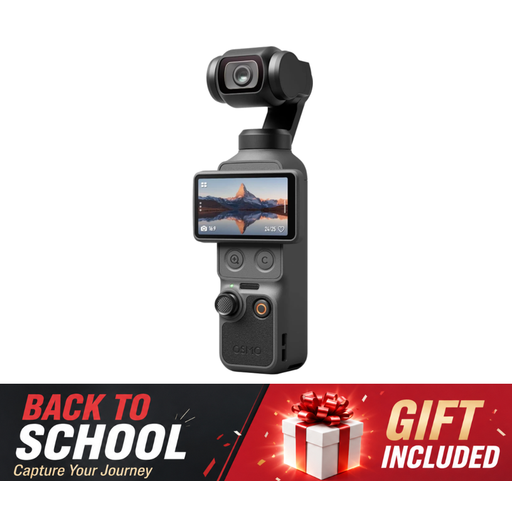
DJI Osmo Pocket 3 Creator Combo
Consider this compact gimbal if you film alone and want to move around the table for views of the finished decoration.
DJI specifies a fixed 20 mm-equivalent f/2.0 lens, focus from 0.2 m and three-axis mechanical stabilisation for the Osmo Pocket 3. Its 4K/120 fps setting is a slow-motion mode; check that the fixed lens gives you the close-up composition you need.
Joybuy
 No image available
DJI Osmo Pocket 4 Standard Combo
Consider this listed pocket-gimbal option if keeping the filming setup compact is a priority.
The listing describes three-axis stabilisation and 2× zoom. Confirm the zoom and recording modes, lens aperture and minimum focus distance against your intended tabletop composition before buying.
Joybuy
Common questions
Will a high ISO range solve dim spare-room lighting?
No: ISO range alone will not solve a dim tabletop setup. DJI's indoor-filming guidance also points to available light, lens aperture, shutter speed and subject movement, so plan lighting and exposure alongside the camera choice.
Can a pocket gimbal film small candle decorations?
Yes, if its fixed lens frames the detail you want from a workable position. DJI specifies a 20 mm-equivalent lens and focus from 0.2 m for the Osmo Pocket 3; that focus distance does not by itself guarantee a tight shot.
What should I do before filming a lit candle?
Set up the camera and clear nearby flammable materials before lighting it. London Fire Brigade advises using a stable, heat-resistant holder, never leaving a lit candle unattended and keeping it away from decorations and other materials that can catch fire.
Should I worry about what appears through a window?
Keep identifiable neighbours and shared areas out of the shot where practical. GOV.UK's guidance on domestic video surveillance addresses systems that capture areas beyond a private property; it is not a direct rule for every candle-filming setup.


