Tutors prioritising spoken instruction
If activity and other voices in the workshop could obscure your explanation, plan the microphone position and check the camera’s audio connections and monitoring options before prioritising a higher frame rate.


Choose an interchangeable-lens camera if the lesson will mostly use a fixed tripod or overhead view and you need flexibility to frame hands and the work surface. A pocket gimbal camera suits quicker setup and occasional moving shots, but its fixed lens makes camera position more important for close detail. In a shared workshop, plan for intelligible speech, secure mounting, dust-aware handling and the recording of other people as well as image quality.
If activity and other voices in the workshop could obscure your explanation, plan the microphone position and check the camera’s audio connections and monitoring options before prioritising a higher frame rate.
A repeatable view of hands, tools and clay calls for careful framing and a secure tripod or overhead support. Handheld stabilisation alone does not hold a long demonstration in place.
A compact camera can make occasional moving angles easier to capture. Check whether its fixed lens can also frame the main lesson from the position available in your workspace.
Decide where the main camera can stand and how you will record the demonstrator’s voice before comparing recording modes. For a fixed teaching view, an interchangeable-lens setup offers framing choices but needs a suitable lens and support; a pocket gimbal is easier to reposition, though its fixed lens places more weight on camera placement.
| Concern | What to check when buying | Who this matters to |
|---|---|---|
| Clear spoken instruction | Check the exact camera’s microphone connection and monitoring options. If two people will speak, check the selected microphone package. | When other workshop activity competes with my explanation, I need a way to capture my voice clearly. Around 33% of consumers put spoken instruction first. |
| Steady close framing | Check the view at your bench-to-camera distance and whether a tripod, clamp or overhead support can hold that position securely. | I want learners to follow my hands and the clay throughout a fixed demonstration, rather than lose the detail as I work; for around 27% of consumers, steady close framing is the primary concern. |
| Quick repositioning | Check camera size, screen orientation, stabilisation and the mounting accessories needed for both moving and stationary shots. | If I film alone at different benches, I need to move the camera without a lengthy reset. Quick repositioning comes first for around 20% of consumers. |
| Editing flexibility | Confirm the recording modes you would use, suitable memory cards and whether your editing setup can handle the files. | I plan to adjust colour or make slow-motion process inserts, so the recording format matters to my workflow; around 20% of consumers chiefly prioritise editing flexibility. |
Sharp footage is less useful as a lesson if shared-workshop noise obscures the explanation.
Check the camera’s microphone and monitoring options, then plan where the microphone will sit relative to the speaker.
An external microphone system adds equipment and setup work, particularly if more than one person speaks.
Stabilisation helps with movement, but it does not keep hands and clay consistently framed through a long stationary demonstration.
Check the field of view at the intended bench distance and choose a secure support for the main lesson angle.
A tripod, clamp or overhead support may still be needed.
Sony warns that dust, dirt or moisture can enter an interchangeable-lens camera during handling.
Fit the lens you expect to use before working near clay, and move to a cleaner area if you need to change it.
Footage of identifiable people can raise responsibilities beyond camera settings. The Information Commissioner’s Office says organisations processing personal data through video must identify and document a lawful basis under Article 6 of the UK GDPR.
Agree the filming purpose, framing, participant information, access and retention arrangements with the workshop operator before recording or publishing footage.
The EOS R50 V is relevant to a fixed lesson setup built around an interchangeable lens, suitable support and separate audio planning.
The ZV-E10 II is relevant when you want an APS-C interchangeable-lens camera and a choice of recording formats for a planned teaching angle.
The Osmo Pocket 3 is relevant to a solo operator who wants a compact camera for quick setup or supplementary moving angles.
These choices cover interchangeable-lens cameras for a planned lesson angle, pocket gimbal cameras for a more mobile setup, and an action camera to consider for supplementary views. Check framing, audio and mounting for the role each camera would play in your workshop.
 No image available
Consider this kit for a fixed view where you want to adjust framing at the bench. Its title lists APS-C, 26 megapixels, 4K60p and 4:2:2 10-bit recording; Sony United Kingdom specifies separate 3.5 mm microphone and headphone terminals for the ZV-E10 II. Test the supplied lens at your working distance and avoid unnecessary lens changes near clay dust.
 No image available
The included zoom lens gives you framing options for a planned view of the work surface. Test it at the intended bench distance, and confirm the exact microphone connection and monitoring arrangement you need for spoken tuition.
 No image available
Consider this compact gimbal camera for a solo setup that includes occasional moving shots. DJI specifies a fixed 20 mm-equivalent lens and three-axis mechanical stabilisation for Pocket 3. Check whether the camera can sit close enough for hand detail and whether the bundle’s mounting accessories suit your fixed lesson angle.
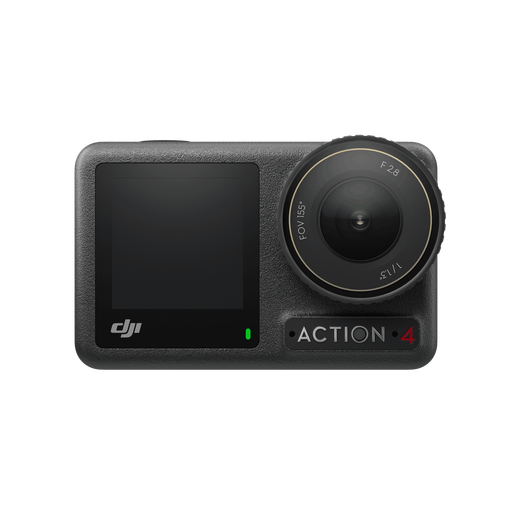 No image available
This action-camera format is an option for supplementary angles rather than a substitute for planning the main close teaching view. The title lists a 155° field of view, 4K/120fps recording and three extra batteries. Test how much of the frame your hands occupy at the intended distance, and confirm a secure fixed mount and audio arrangement.
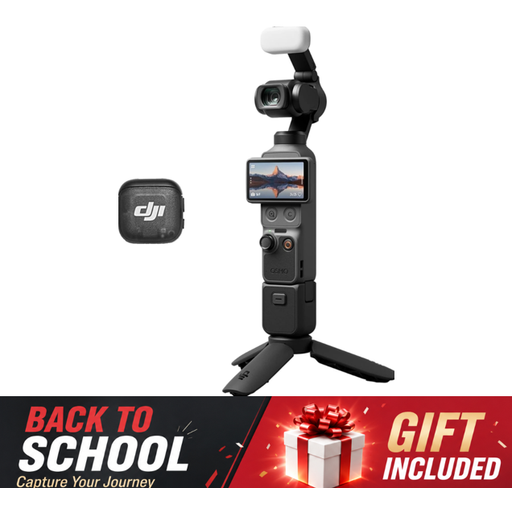 No image available
Consider this pocket gimbal model if you need a camera that can be repositioned between shots. Its listed handle has a 1/4-inch thread for a compatible support. Before relying on it for a fixed clay demonstration, check the view at your bench distance and confirm the microphone connection and monitoring setup you intend to use.
If other voices or workshop activity could obscure the explanation, plan an external microphone and check that the chosen camera can connect to it. Sony United Kingdom lists separate microphone and headphone terminals for the ZV-E10 II, while DJI says Pocket 3 can connect directly to two DJI Mic 2 transmitters. Microphone placement still depends on who is speaking and where they stand.
Yes, if you can mount it securely and its view captures enough hand and clay detail from that position. DJI lists a fixed 20 mm-equivalent lens for Osmo Pocket 3, so check the frame at the planned bench distance rather than relying on its handheld stabilisation to solve a stationary setup.
Avoid unnecessary lens changes beside the work area and move to a cleaner location when a change is needed. Sony warns that dust, dirt or moisture can enter interchangeable-lens cameras; choosing the intended lens before filming reduces the need to expose the camera during the lesson.
Do not assume that buying a camera settles whether identifiable participants can be recorded or their footage published. For organisations processing personal data through video, the Information Commissioner’s Office says a lawful basis under Article 6 of the UK GDPR must be identified and documented. Agree the filming and publication plan with the workshop operator and check current guidance for the circumstances; the ICO notes that its video-surveillance guidance is under review.